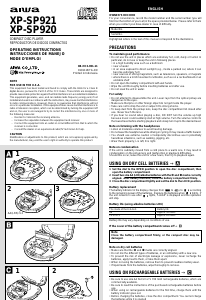
Manual de uso Aiwa XP-SP921 Discman

¿Necesita un manual para su Aiwa XP-SP921 Discman? A continuación puedes ver y descargar el manual en PDF gratis en español. Este producto actualmente tiene 1 pregunta frecuente, 0 comentarios y tiene 0 votos. Si este no es el manual que desea, , contáctenos.

¿Su producto tiene algún defecto y el manual no ofrece ninguna solución? Vaya a Repair Café para solicitar un servicio de reparación gratuito.

Manual de uso

Loading…
g,
commercially available.
Be sure to read the instructions of the purchased rechargeable batteries before
use.
When using on rechargeable batteries for the first time, charge them until the
battery indicator goes out.
Before charging the batteries, close the disc compartment. You cannot charge
the batteries while it is opened.
1 Insert the rechargeable batteries with the 0 and 9 marks correctly aligned.
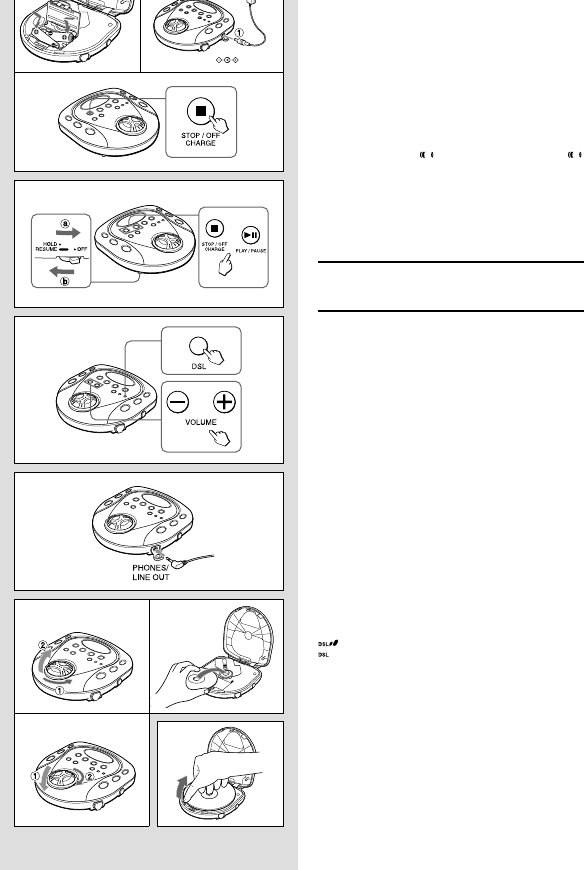
2 Connect the AC adaptor.
Pull out the rubber cap before connecting the adaptor.
1 to DC 5 ~ 6 V jack
2 to wall outlet
3 Keep sSTOP/OFF/CHARGE pressed for about 1 second to start charging.
“Con” is displayed and the battery indicator blinks.
After charging, disconnect the AC adaptor.
Time to recharge the batteries
Recharge the batteries when
lights. If the unit remains in use after
lights, “LobAtt” is displayed and the current operation will stop.
To stop charging
Press sSTOP/OFF/CHARGE during charging.
Force charging
When the recharging stops after only few minutes or the batteries cannot be fully
recharged, press sSTOP/OFF/CHARGE while pressing PLAY MODE to start force
charging.
USING ON AC HOUSE CURRENT
Connect the supplied AC adaptor in the same way as when recharging the batteries.
During operation on AC house current, all of the battery indicators disappear.
BEFORE PLAYBACK
HOLD switch D
Release the HOLD switch before playback. a
When not using the unit, set the HOLD switch to the HOLD position. Accidentally
pressed button will not function. b
If buttons are pressed when the HOLD switch is set to the HOLD position, “HOLd”
flashes in the display.
Turning on and off D
Turning the power on
Press ePLAY/PAUSE. Power is turned on and playback starts.
Note
“Err” appears on the display in the following cases:
When you try to play the unit without a disc in the disc compartment.
When you play a disc placed upside-down or a defective disc.
Turning the power off
If no new operations are done within 30 seconds from the end of last operation,
the power is turned off automatically. (Auto power off function)
• You can turn off the power before it is automatically turned off by pressing
sSTOP/OFF/CHARGE.
Standby mode D
When an operation finishes, the unit goes into standby mode until the auto power
off function automatically turns off the power.
To enter standby mode, press ePLAY/PAUSE to start playback, then press
sSTOP/OFF/CHARGE.
Adjusting the sound E
Volume
Press + to increase the volume.
Press - to decrease the volume.
DSL
Press DSL for more powerful sound and deeper bass.
: Deep bass is emphasized.
: Normal sound
Connecting the headphones F
Pull out the rubber cap and connect the supplied headphones to the
PHONES/LINE OUT jack.
Inserting a disc G
1 Set the dial to the OPEN position to open the disc compartment.
2 Place a disc in the center with the label side facing up.
3 Close the disc compartment tightly and set the dial to the LOCK position.
To remove the disc H
Pick up the disc, holding its edge, while pressing the pivot gently.
Note
The unit may not play a CD-R/RW disc that is recorded on personal computers
or some kinds of CD-R/RW recorders because of differences in recording
platforms.
Do not attach any seal or label to either side (the recordable side or the labeled
side) of a CD-R/RW disc. It may cause malfunction.
D
E
3
F
G
3
H
DC 5~6V
12
Descargue el manual en Español (PDF, 0.53 MB)
(Piense en el medioambiente y solo imprima este manual si es de verdad necesario)

Loading…

Puntuación

Dé su opinión de la Aiwa XP-SP921 Discman calificando el producto. ¿Quiere compartir su experiencia con este producto o hacer una pregunta? Deje un comentario en la parte inferior de la página.
¿Estás satisfecho con elAiwa XP-SP921 Discman?
No
Sea el primero en calificar este producto
0 votos

Únase a la conversación sobre este producto

Aquí puedes compartir lo que piensas sobre Aiwa XP-SP921 Discman. Si tiene alguna pregunta, primero lea atentamente el manual. Puede solicitar un manual utilizando nuestro formulario de contacto.

Más sobre este manual

Entendemos que es bueno tener un manual en papel para tus Aiwa XP-SP921 Discman. Siempre puedes descargar el manual desde nuestro sitio web e imprimirlo tú mismo. Si deseas tener un manual original te recomendamos contactar con Aiwa. Es posible que puedan proporcionar un manual original. ¿Estás buscando el manual de tu Aiwa XP-SP921 Discman en otro idioma? Elija su idioma preferido en nuestra página de inicio y busque el número de modelo para ver si lo tenemos disponible.

Especificaciones

Marca Aiwa
Modelo XP-SP921
Categoría Discman
Tipo de archivo PDF
Tamaño del archivo 0.53 MB

Todos los manuales para Aiwa Discman
Más manuales de Discman

Preguntas frecuentes sobre Aiwa XP-SP921 Discman

Nuestro equipo de atención al cliente busca información útil sobre los productos y responde a las preguntas frecuentes. Si encuentra inexactitudes en las preguntas frecuentes, indíquenoslo usando nuestro formulario de contacto.

¿Puedo reparar yo mismo los arañazos en un CD? Verificado

Los rayones impiden que el láser lea el disco correctamente. Cuando los rayones son solo superficiales, es posible repararlos usted mismo puliendo el disco con un compuesto ligeramente abrasivo. Lo ideal es utilizar un compuesto abrasivo profesional, pero también es posible utilizar pasta de dientes normal. Después de pulir el disco, es necesario lavarlo y dejarlo secar. Hay empresas especializadas que pueden hacer esto.

Ha sido de gran ayuda (38) Leer más
Manual de uso Aiwa XP-SP921 Discman

Productos relacionados

Categorias relacionadas

×
Download