Manual de uso Black and Decker KR70LSR Taladradora de percusión

¿Necesita un manual para su Black and Decker KR70LSR Taladradora de percusión? A continuación puedes ver y descargar el manual en PDF gratis en español. Este producto actualmente tiene 3 preguntas frecuentes, 0 comentarios y tiene 0 votos. Si este no es el manual que desea, , contáctenos.

¿Su producto tiene algún defecto y el manual no ofrece ninguna solución? Vaya a Repair Café para solicitar un servicio de reparación gratuito.

Manual de uso

Loading…
4
ENGLISH
Electrical safety
This tool is double insulated; therefore no earth wire
is required. Always check that the power supply
corresponds to the voltage on the rating plate.
Features
This tool includes some or all of the following features.
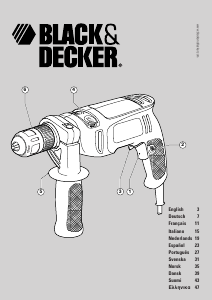
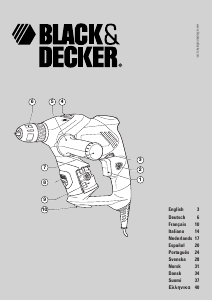
1. Variable speed switch
2. Lock-on button
3. Forward/reverse slider
4. Drilling mode selector
5. Side handle
6. Chuck
7. Bit storage
8. Latch
9. Laser unit
10. Wall mount
Assembly
Warning! Make sure that the tool is switched off and
unplugged.
Fitting the side handle (fig. A)
Screw the side handle (5) into the one of the holes (11) on
either side of the tool.
Fitting a drill bit or screwdriver bit (fig. B)
Open the chuck by turning the front part (13) with one
hand while holding the rear part (12) with the other.
Insert the bit shaft (14) into the chuck and firmly tighten
the chuck.
Removing and refitting the chuck (fig. C)
Open the chuck as far as possible.
Remove the chuck retaining screw, located in the front part
of the chuck, by turning it clockwise using a screwdriver.
Tighten an Allen key (15) into the chuck and strike it with
a hammer as shown.
Remove the Allen key.
Remove the chuck by turning it counterclockwise.
To refit the chuck, screw it onto the spindle and secure it
with the chuck retaining screw.
Removing and replacing the laser unit
The tool provides a mounting location where the laser unit (9)
is stored when not in use.
To remove the unit, release the latch (8) by pressing it
downward and slide the unit out of the mounting location.
To replace the unit, release the latch (8) and slide the unit
into the mounting location.
Removing and replacing the wall mount
To remove the wall mount (10), rotate the collar counter-
clockwise until the wall mount comes off the tool.
To replace the wall mount (10), place the wall mount with
the legs closed in the hole in the bottom of the tool and
rotate the collar clockwise until the wall mount engages.
Use
Warning! Before drilling into walls, floors or ceilings,
check for the location of wiring and pipes.
Selecting the direction of rotation
For drilling and for tightening screws, use forward (clockwise)
rotation. For loosening screws or removing a jammed drill bit,
use reverse (counterclockwise) rotation.
To select forward rotation, push the forward/reverse
slider (3) to the left.
To select reverse rotation, push the forward/reverse slider
to the right.
Warning! Never change the direction of rotation while the
motor is running.
Selecting the drilling mode
For drilling in masonry, set the drilling mode selector (4) to
the
position.
For drilling in other materials and for screwdriving, set the
drilling mode selector (4) to the
position.
Switching on and off
To switch the tool on, press the variable speed switch (1).
The tool speed depends on how far you press the switch.
As a general rule, use low speeds for large diameter drill
bits and high speeds for smaller diameter drill bits.
For continuous operation, press the lock-on button (2) and
release the variable speed switch. This option is available
only at full speed.
To switch the tool off, release the variable speed switch.
To switch the tool off when in continuous operation,
press the variable speed switch once more and release it.
Using the laser unit
The laser unit (9) is used for the alignment of several drill holes.
Remove the unit from the tool.
Refer to the manual of the laser unit for further instructions.
Accessories
The performance of your tool depends on the accessory used.
Black & Decker and Piranha accessories are engineered to
high quality standards and designed to enhance the
performance of your tool. By using these accessories you will
get the very best from your tool.
Descargue el manual en Español (PDF, 0.75 MB)
(Piense en el medioambiente y solo imprima este manual si es de verdad necesario)

Loading…

Puntuación

Dé su opinión de la Black and Decker KR70LSR Taladradora de percusión calificando el producto. ¿Quiere compartir su experiencia con este producto o hacer una pregunta? Deje un comentario en la parte inferior de la página.
¿Estás satisfecho con elBlack and Decker KR70LSR Taladradora de percusión?
No
Sea el primero en calificar este producto
0 votos

Únase a la conversación sobre este producto

Aquí puedes compartir lo que piensas sobre Black and Decker KR70LSR Taladradora de percusión. Si tiene alguna pregunta, primero lea atentamente el manual. Puede solicitar un manual utilizando nuestro formulario de contacto.

Más sobre este manual

Entendemos que es bueno tener un manual en papel para tus Black and Decker KR70LSR Taladradora de percusión. Siempre puedes descargar el manual desde nuestro sitio web e imprimirlo tú mismo. Si deseas tener un manual original te recomendamos contactar con Black and Decker. Es posible que puedan proporcionar un manual original. ¿Estás buscando el manual de tu Black and Decker KR70LSR Taladradora de percusión en otro idioma? Elija su idioma preferido en nuestra página de inicio y busque el número de modelo para ver si lo tenemos disponible.

Especificaciones

Marca Black and Decker
Modelo KR70LSR
Categoría Taladradoras de percusión
Tipo de archivo PDF
Tamaño del archivo 0.75 MB

Todos los manuales para Black and Decker Taladradoras de percusión
Más manuales de Taladradoras de percusión

Preguntas frecuentes sobre Black and Decker KR70LSR Taladradora de percusión

Nuestro equipo de atención al cliente busca información útil sobre los productos y responde a las preguntas frecuentes. Si encuentra inexactitudes en las preguntas frecuentes, indíquenoslo usando nuestro formulario de contacto.

¿Cuál es la diferencia entre un taladro de impacto y un martillo perforador? Verificado

Los taladros de impacto se pueden utilizar para hacer agujeros en paredes de ladrillos y mortero. Para perforar agujeros en paredes de hormigón se necesita un martillo perforador.

Ha sido de gran ayuda (133) Leer más

¿Necesito usar protección auditiva cuando utilizo un taladro? Verificado

Si deberías. Aunque la cantidad de ruido producido por un taladro puede variar entre marcas y modelos, la exposición prolongada a ruidos fuertes puede causar daños auditivos permanentes. Por eso es una buena idea usar protección auditiva.

Ha sido de gran ayuda (23) Leer más

¿Puedo guardar herramientas eléctricas en un cobertizo o garaje? Verificado

En general, las herramientas eléctricas se pueden guardar en un cobertizo o en un garaje, aunque a veces haga frío allí. Sin embargo, para prolongar la vida útil de la herramienta eléctrica, es mejor guardarla en un lugar seco y sin grandes fluctuaciones de temperatura. En un cobertizo o garaje, las diferencias de temperatura pueden provocar la formación de condensación, lo que puede provocar oxidación. Además, las herramientas que funcionan con baterías duran menos y no se cargan tan bien a temperaturas muy bajas. Para estar seguro de cómo debe almacenarse su herramienta eléctrica, lea siempre detenidamente el manual del usuario.

Ha sido de gran ayuda (8) Leer más
Manual de uso Black and Decker KR70LSR Taladradora de percusión

Productos relacionados

Categorias relacionadas

×
Download