Manual de uso Corsair K68 Teclado

¿Necesita un manual para su Corsair K68 Teclado? A continuación puedes ver y descargar el manual en PDF gratis en español. Este producto actualmente tiene 2 preguntas frecuentes, 0 comentarios y tiene 2 votos con una calificación promedio de producto de 50/100. Si este no es el manual que desea, , contáctenos.

¿Su producto tiene algún defecto y el manual no ofrece ninguna solución? Vaya a Repair Café para solicitar un servicio de reparación gratuito.

Manual de uso

Loading…
1 2!
BA D
C E
F G H
I
J
The CORSAIR K68 mechanical keyboard features
100% CHERRY MX keyswitches with dynamic
backlighting and dust and spill resistance
(up to IP32) to enable a high performance
gaming experience. The dedicated volume and
multimedia controls allow you to adjust your
audio without interrupting
your game. 100% anti-ghosting with full
key rollover ensures your commands and
simultaneous keystrokes always register the way
you intended. CORSAIR Utility Engine (CUE)
unlocks sophisticated macro programming and
dynamic lighting effects. Windows Key Lock
mode ensures interruption-free gaming.
CONGRATULATIONS!
SETTING UP YOUR KEYBOARD
> Turn on your computer
> Connect the keyboard to a USB 2.0 or
USB 3.0 port
> Download the CORSAIR Utility Engine (CUE)
software from www.corsair.com/downloads
> Run the installer program
> Follow the instruction for installation
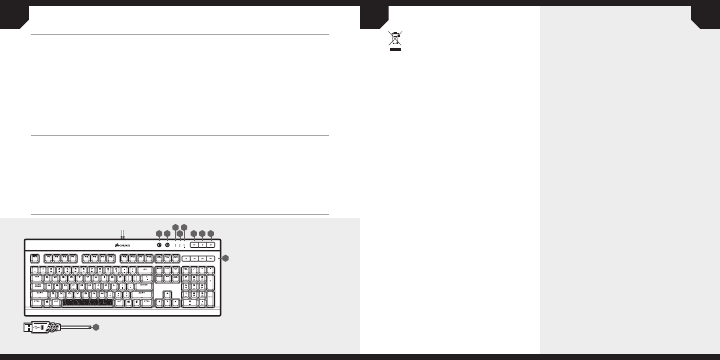
A – BACKLIGHT BRIGHTNESS KEY
B – WINDOWS KEY DISABLE
C – NUM LOCK LED INDICATOR
D – CAPS LOCK LED INDICATOR
E – SCROLL LOCK LED INDICATOR
F – MUTE KEY
G – VOLUME DOWN KEY
H – VOLUME UP KEY
I – DEDICATED MULTIMEDIA KEYS
J – USB CONNECTION CABLE
NOTE ON ENVIRONMENTAL PROTECTION
After the implementation of the European
Directive 2002/96/EU in the national legal system,
the following applies:
—Electrical and electronic devices may not be
disposed of with domestic waste.
—Consumers are obligated by law to return
electrical and electronic devices at the end of
their service lives to the public collecting points
set up for this purpose of point of sale. Details
to this are defined by the national law of the
respective country. This symbol on the product,
the instruction manual or the package indicates
that a product is subject to these regulations. By
recycling, reusing the materials or other forms of
utilizing old devices, you are making an important
contribution to protecting our environment.
CAUTION!
The manufacturer is not responsible for any
radio or TV interference caused by unauthorized
modifications to this equipment. Such modifications
could void the user authority to operate
the equipment.
FCC STATEMENT
This equipment has been tested and found to
comply with the limits for a Class B digital device,
pursuant to part 15 of the FCC Rules. These limits
are designed to provide reasonable protection
against harmful interference in a residential
installation. This equipment generates, uses
and can radiate radio frequency energy and, if
not installed and used in accordance with the
instructions, may cause harmful interference
to radio communications. However, there is no
guarantee that interference will not occur in a
particular installation. If this equipment does cause
harmful interference to radio or television reception,
which can be determined by turning the equipment
o and on, the user is encouraged to try to correct
the interference by one or more of the following
measures:
> Reorient or relocate the receiving antenna.
> Increase the separation between the
equipment and receiver.
> Connect the equipment into an outlet on
a circuit dierent fromthat to which the
receiver is connected.
> Consult the dealer or an experienced radio/TV
technician for help.
This device must not be co-located or operating in
conjunction with any other antenna or transmitter.
Operation is subject to the following two
conditions:
(1) this device may not cause harmful interference,
and (2) this device must accept any interference
received, including interference that may cause
undesired operation.
GETTING TO KNOW YOUR KEYBOARD
Descargue el manual en Español (PDF, 9.21 MB)
(Piense en el medioambiente y solo imprima este manual si es de verdad necesario)

Loading…

Puntuación

Dé su opinión de la Corsair K68 Teclado calificando el producto. ¿Quiere compartir su experiencia con este producto o hacer una pregunta? Deje un comentario en la parte inferior de la página.
¿Estás satisfecho con elCorsair K68 Teclado?
No
50%
50%
2 votos

Únase a la conversación sobre este producto

Aquí puedes compartir lo que piensas sobre Corsair K68 Teclado. Si tiene alguna pregunta, primero lea atentamente el manual. Puede solicitar un manual utilizando nuestro formulario de contacto.

Más sobre este manual

Entendemos que es bueno tener un manual en papel para tus Corsair K68 Teclado. Siempre puedes descargar el manual desde nuestro sitio web e imprimirlo tú mismo. Si deseas tener un manual original te recomendamos contactar con Corsair. Es posible que puedan proporcionar un manual original. ¿Estás buscando el manual de tu Corsair K68 Teclado en otro idioma? Elija su idioma preferido en nuestra página de inicio y busque el número de modelo para ver si lo tenemos disponible.

Especificaciones

Marca Corsair
Modelo K68
Categoría Teclados
Tipo de archivo PDF
Tamaño del archivo 9.21 MB

Todos los manuales para Corsair Teclados
Más manuales de Teclados

Preguntas frecuentes sobre Corsair K68 Teclado

Nuestro equipo de atención al cliente busca información útil sobre los productos y responde a las preguntas frecuentes. Si encuentra inexactitudes en las preguntas frecuentes, indíquenoslo usando nuestro formulario de contacto.

Las letras del teclado no están en las posiciones a las que estoy acostumbrado. ¿Por qué? Verificado

La mayoría de los teclados son de configuración QWERTY, que indica las seis primeras letras del teclado. Sin embargo, hay diferentes diseños de teclado que se ajustan a las necesidades específicas de un determinado idioma. También es posible que las teclas se hayan intercambiado. Sobre todo con los teclados antiguos esto es fácil de hacer.

Ha sido de gran ayuda (1356) Leer más

¿Cuál es la mejor forma de limpiar mi teclado? Verificado

Nunca inserte objetos entre los bordes de las teclas, ya que esto empujará principalmente suciedad y dañará el teclado. Es mejor limpiar el teclado con aire comprimido manteniendo el teclado boca abajo. La parte superior de las teclas se puede limpiar con un paño ligeramente húmedo.

Ha sido de gran ayuda (200) Leer más
Manual de uso Corsair K68 Teclado

Productos relacionados

Categorias relacionadas

×
Download