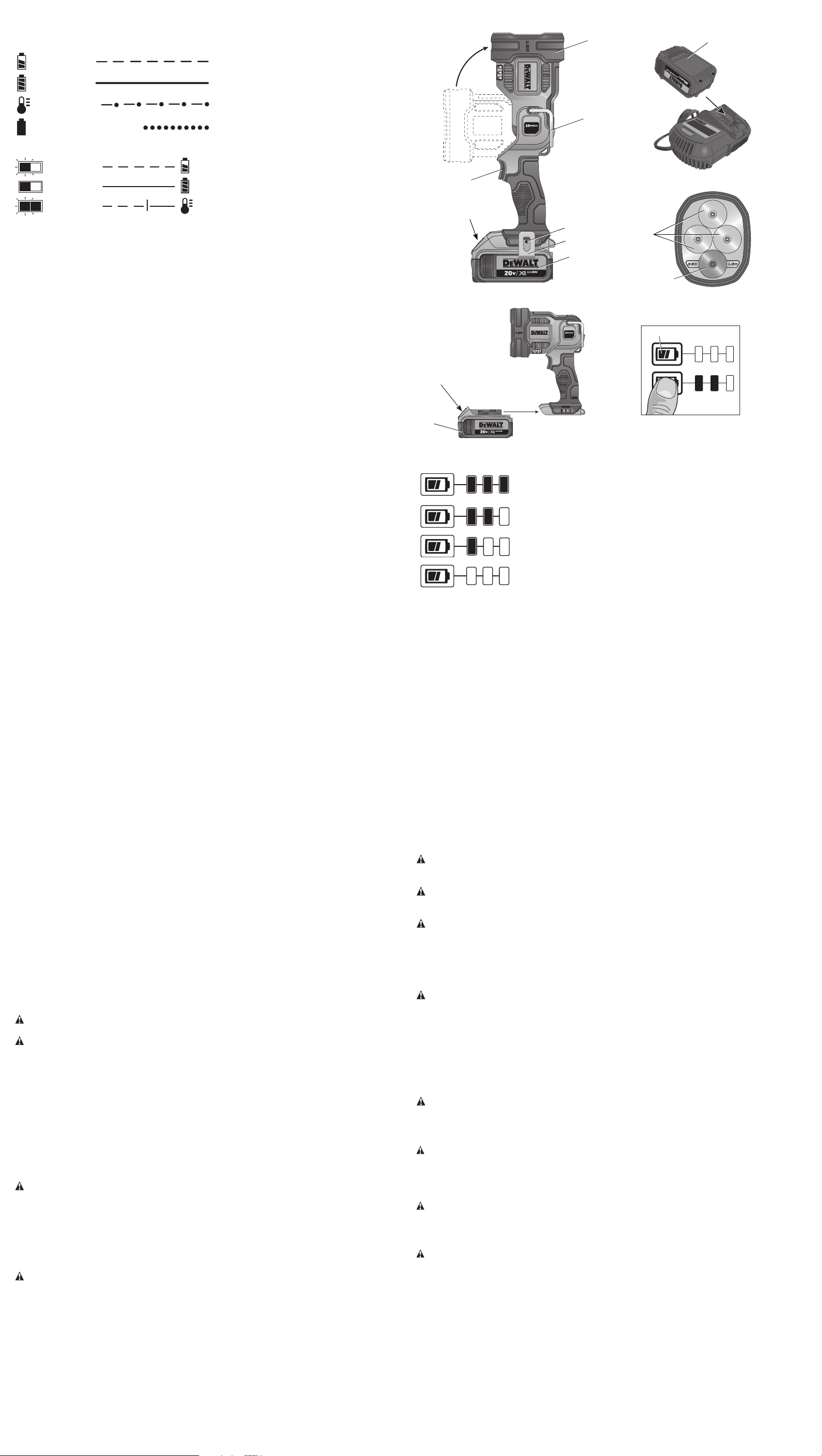
Indicator Light Operation
DCB101, DCB102, DCB103
PACK CHARGING
PACK CHARGED
x
HOT/COLD DELAY
PROBLEM PACK OR CHARGER
DCB107, DCB112, DCB113, DCB115
PACK CHARGING
PACK CHARGED
HOT/COLD DELAY
Charge Indicators
This charger is designed to detect certain problems that can arise. Problems are indicated by
the red light flashing at a fast rate. If this occurs, re-insert the battery pack into the charger. If the
problem persists, try a different battery pack to determine if the charger is working properly. If
the new pack charges correctly, then the original pack is defective and should be returned to a
service center or other collection site for recycling. If the new battery pack elicits the same trouble
indication as the original, have the charger and the battery pack tested at an authorized service
center.
HOT/COLD DELAY
DCB101, DCB102, DCB103
These chargers have a hot/cold delay feature. When the charger detects a battery that is too hot
or too cold, it automatically starts a delay, suspending charging. The red light flashes long, then
short while in the hot/cold delay mode.
Once the battery has reached an optimum temperature, the charger will automatically resume the
charging procedure. This feature ensures maximum battery life.
DCB107, DCB112, DCB113, DCB115
These chargers have a hot/cold delay feature. When the charger detects a battery that is too hot
or too cold, it automatically starts a delay, suspending charging. The red light will continue to blink,
but a yellow indicator light will be illuminated during this suspension.
Once the battery has reached an optimum temperature, the yellow light will turn off and the
charger will automatically resume the charging procedure. This feature ensures maximum battery
life.
LEAVING THE BATTERY PACK IN THE CHARGER
The charger and battery pack can be left connected with the charge indicator showing Pack
Charged.
WEAK BATTERY PACKS: Weak batteries will continue to function but should not be expected
to perform as much work.
FAULTY BATTERY PACKS
DCB101, DCB102, DCB103
These chargers will not charge a faulty battery pack. The charger will indicate faulty battery pack
by refusing to light or by displaying problem pack or charger.
NOTE: This could also mean a problem with a charger.
DCB107, DCB112, DCB113, DCB115
These chargers will not charge a faulty battery pack. The charger will indicate faulty battery pack
by refusing to light.
NOTE: This could also mean a problem with a charger.
Wall Mounting
DCB107, DCB112, DCB113, DCB115
These chargers are designed to be wall mountable or to sit upright on a table or work surface.
If wall mounting, locate the charger within reach of an electrical outlet. Mount the charger securely
using drywall screws at least 1" (25.4 mm) long, screwed into wood to an optimal depth leaving
approximately 7/32" (5.5 mm) of the screw exposed.
Important Charging Notes
1. Longest life and best performance can be obtained if the battery pack is charged when the
air temperature is between 65°F and 75°F (18° – 24°C). DO NOT charge the battery pack in
an air temperature below +40°F (+4.5°C), or above +104°F (+40 °C). This is important and
will prevent serious damage to the battery pack.
2. The charger and battery pack may become warm to the touch while charging. This is a
normal condition, and does not indicate a problem. To facilitate the cooling of the battery pack
after use, avoid placing the charger or battery pack in a warm environment such as in a metal
shed or an uninsulated trailer.
3. A cold battery pack will charge at about half the rate of a warm battery pack. The battery
pack will charge at that slower rate throughout the entire charging cycle and will not return to
maximum charge rate even if the battery pack warms.
4. If the battery pack does not charge properly:
a. Check operation of receptacle by plugging in a lamp or other appliance;
b. Check to see if receptacle is connected to a light switch which turns power off when you
turn out the lights;
c. Move the charger and battery pack to a location where the surrounding air temperature is
approximately 65°F – 75°F (18° – 24°C);
d. If charging problems persist, take the tool, battery pack and charger to your local service
center.
5. The battery pack should be recharged when it fails to produce sufficient power on jobs which
were easily done previously. DO NOT CONTINUE to use under these conditions. Follow the
charging procedure. You may also charge a partially used pack whenever you desire with no
adverse effect on the battery pack.
6. Foreign materials of a conductive nature such as, but not limited to, grinding dust, metal
chips, steel wool, aluminum foil, or any buildup of metallic particles should be kept away from
charger cavities. Always unplug the charger from the power supply when there is no battery
pack in the cavity. Unplug the charger before attempting to clean.
7. Do not freeze or immerse the charger in water or any other liquid.
WARNING: Shock hazard. Don’t allow any liquid to get inside the charger. Electric shock may
result.
WARNING: Burn hazard. Do not submerge the battery pack in any liquid or allow any liquid
to enter the battery pack. Never attempt to open the battery pack for any reason. If the plastic
housing of the battery pack breaks or cracks, return to a service center for recycling.
Storage Recommendations
1. The best storage place is one that is cool and dry, away from direct sunlight and excess heat
or cold.
2. For long storage, it is recommended to store a fully charged battery pack in a cool dry place
out of the charger for optimal results.
NOTE: Battery packs should not be stored completely depleted of charge. The battery pack will
need to be recharged before use.
SAVE THESE INSTRUCTIONS FOR FUTURE USE
COMPONENTS (Fig. 1, 5)
WARNING: Never modify the spotlight or any part of it. Damage or personal injury could result.
A. Switch E. Battery release button
B. Loop hook F. Belt hook screw
C. Pivoting head G. Belt hook
D. Battery pack H. Fuel gauge button (Fig. 5)
OPERATION
Installing and Removing the Battery Pack (Fig. 4)
WARNING: To reduce the risk of injury, never depress the battery release button without
removing the battery pack. Depressing the battery release button without removing the battery
pack can result in the battery pack falling out unexpectedly.
NOTE: For best results, make sure your battery pack is fully charged.
To install the battery pack (D) into the tool handle, align the battery pack with the rails inside the
tool’s handle and slide it into the handle until the battery pack is firmly seated in the tool and
ensure that it does not disengage.
To remove the battery pack from the tool, press the release button (E) and firmly pull the battery
pack out of the tool handle. Insert it into the charger as described in the charger section of this
manual.
Consult the chart at the end of this manual for compatibility of chargers and battery packs.
FUEL GAUGE BATTERY PACKS (FIG. 5)
Some DeWALT battery packs include a fuel gauge which consists of three green LED lights that
indicate the level of charge remaining in the battery pack.
The fuel gauge is an indication of approximate levels of charge remaining in the battery pack
according to the following indicators:
75–100% charged
51–74% charged
< 50% charged
Pack needs to be charged
To actuate the fuel gauge, press and hold the fuel gauge button (H). A combination of the three
green LED lights will illuminate designating the level of charge left. When the level of charge in the
battery is below the usable limit, the fuel gauge will not illuminate and the battery will need to be
recharged.
NOTE: The fuel gauge is only an indication of the charge left on the battery pack. It does not
indicate tool functionality and is subject to variation based on product components, temperature
and end-user application.
For more information regarding fuel gauge battery packs, please contact call 1-800-4-DeWALT
(1-800-433-9258) or visit our website www.dewalt.com.
Switch (Fig. 1, 3)
The spotlight has a high beam (I) and red beam (J) setting. Press the switch (A) once for high beam.
Press the switch again for the red beam. Press the switch again to turn the spotlight off.
Low Battery Indicator
NOTE: The light will run up to 3.5 hours when using the high beam and 13 hours when using the
red beam on a single battery charge using the DCB201 20V Max* battery. Using batteries with
higher capacity will produce more run time.
As the battery nears a fully discharged state, the spotlight will blink twice and then dim, dropping
the brightness of the spotlight below the normal level. The light will continue to blink twice every
45 seconds until the battery is fully discharged at which time the light will turn off. Indication time
will vary based on battery pack capacity and the light setting.
Pivoting Head (Fig. 1)
The pivoting head rotates in six positions ranging from 0°–90°.
Carrying and Suspending the Spotlight (Fig. 1)
CAUTION: When the spotlight hangs by the belt hook or loop hook, do not shake the spotlight
or the object from which it hangs. Do not hang the spotlight from any electrical wires or anything
that is not secure. Personal injury or property damage may occur.
CAUTION: Only use the belt hook or loop hook for hanging the LED spotlight. The belt hook
and loop hook are not intended to support additional weight. Do not attach or hang anything
additional to the spotlight or risk of breakage may occur.
CAUTION: Do not use the belt hook or loop hook to reach with or to support your weight
in any situation.
LOOP HOOK (FIG. 1)
The light may be carried or hung by the loop hook (B). When not in use, the loop may be locked
down.
BELT HOOK (FIG. 1)
WARNING: To reduce the risk of serious personal injury, ensure the screw holding the
belt hook is secure.
IMPORTANT: When attaching or replacing the belt hook (G), use only the screw (F) that is
provided. Be sure to securely tighten screw.
The belt hook (G) can be attached to either side of the spotlight using only the screw (F) provided,
to accommodate left- or right-handed users.
To move the belt hook, remove the screw (F) that holds the belt hook in place, then reassemble
on the opposite side. Be sure to securely tighten screw.
MAINTENANCE
WARNING: Do not attempt to repair the spotlight. To assure product safety and reliability,
repairs, maintenance, and adjustments should be performed by authorized DeWALT service
centers.
Cleaning
WARNING: Never use solvents or other harsh chemicals for cleaning the non-metallic parts
of the tool. These chemicals may weaken the plastic materials used in these parts. Use a cloth
dampened only with water and mild soap. Never let any liquid get inside the tool; never immerse
any part of the tool into a liquid.
CHARGER CLEANING INSTRUCTIONS
WARNING: Shock hazard. Disconnect the charger from the AC outlet before cleaning. Dirt and
grease may be removed from the exterior of the charger using a cloth or soft non-metallic brush.
Do not use water or any cleaning solutions.
Accessories
WARNING: Since accessories, other than those offered by DeWALT, have not been tested
with this product, use of such accessories with this tool could be hazardous. To reduce the risk
of injury, only DeWALT recommended accessories should be used with this product.
Recommended accessories for use with your tool are available at extra cost from your local dealer
or authorized service center. If you need assistance in locating any accessory, please contact
DeWALT Industrial Tool Co., 701 East Joppa Road, Towson, MD 21286, call 1-800-4-DeWALT
(1-800-433-9258) or visit our website: www.dewalt.com.
Repairs
The charger and battery pack are not serviceable.
To assure product SAFETY and RELIABILITY, repairs, maintenance and adjustment (including
brush inspection and replacement) should be performed by a DeWALT factory service center,
a DeWALT authorized service center or other qualified service personnel. Always use identical
replacement parts.
FIG. 2
D
H
FIG. 4
E
D
FIG. 1
B
C
A
FIG. 3
J
I
FIG. 5
D
E
F
G


Únase a la conversación sobre este producto
Aquí puedes compartir lo que piensas sobre DeWalt DCL043 Lámpara. Si tiene alguna pregunta, primero lea atentamente el manual. Puede solicitar un manual utilizando nuestro formulario de contacto.