Manual de uso Hama 00184023 Calypso Auriculares

¿Necesita un manual para su Hama 00184023 Calypso Auriculares? A continuación puedes ver y descargar el manual en PDF gratis en español. Este producto actualmente tiene 6 preguntas frecuentes, 0 comentarios y tiene 3 votos con una calificación promedio de producto de 33/100. Si este no es el manual que desea, , contáctenos.

¿Su producto tiene algún defecto y el manual no ofrece ninguna solución? Vaya a Repair Café para solicitar un servicio de reparación gratuito.

Manual de uso

Loading…

3
5. Operation
Switching the headset off/on
•Press and hold the MFB button (4) for about 3seconds until a
voice says ‘Power ON’ and the blue LED (5) ashes.
•Toswitch the device off,press and hold the MFB button (4) for
about 5seconds until avoice says ‘Power OFF’ and the red
LED (5) ashes and goes out.
Note
The functions described in this section areonly available for
Bluetooth
®
-capable terminal devices.
5.1. Bluetooth
®
pairing
Note –Pairing
•Make surethat your Bluetooth
®
-capable terminal device is on
and Bluetooth
®
is activated.
•Make surethat your Bluetooth
®
-capable terminal device is
visible for other Bluetooth
®
devices.
•For moreinformation, please refer to the operating
instructions of your terminal device.
•The headset and the terminal device should not be any further
than 1metreaway from each other.The smaller the distance,
the better.
•Switch the headset on using the MFB button (4).
•Press and hold the MFB button (4) for about 5seconds
until avoice says ‘PAIRING’ and the blue and redLEDs
ash alternatingly.The headset is searching for aBluetooth
®
connection.
•Open the Bluetooth
®
settings on your terminal device and wait
until
Hama BTH CALYPSO
appears in the list of Bluetooth
®
devices found.
•Select
Hama BTH CALYPSO
and wait until the headset is listed
as connected in the Bluetooth
®
settings on your terminal device.
Note –Bluetooth
®
password
Some terminal devices requireapasswordinorder to connect to
another Bluetooth
®
device.
•Ifyour terminal device requests apasswordfor connection
with the headset, enter 0000.
Note
•Once the connection has been established, avoice says,
„Your device is connected“.
•Ifthe connection attempt takes longer than 180 seconds to
complete, it is cancelled and the LEDs go out. In this case,
repeat the steps listed previously under 5.1 Bluetooth
®
pairing.
5.2. Automatic Bluetooth
®
connection (after successful
pairing)
Note –Pairing
•Make surethat your Bluetooth
®
-capable terminal device is on
and Bluetooth
®
is activated.
•Make surethat your Bluetooth
®
-capable terminal device is
visible for other Bluetooth
®
devices.
•For moreinformation, please refer to the operating
instructions of your terminal device.
•Switch the headset on using the MFB button (4). The blue LED
begins to ash and the headset automatically connects with the
last terminal device used.
Note
•Once the connection has been established, avoice says,
„Your device is connected“.
•Ifthe connection attempt takes longer than 180 seconds to
complete, it is cancelled and the LEDs go out. In this case,
repeat the steps listed previously under 5.1.
•Itmay be necessary to make settings on your terminal device
to enable automatic connection with the paired headset.
Note –Connection impaired
After the headset and terminal device have been paired, a
connection is established automatically.Ifthe Bluetooth
®
connection is not established automatically,check the following:
•Check the Bluetooth
®
settings of your terminal device to see
whether Hama
BTH CALYPSO
is connected. If not, repeat the
steps listed under 5.1. Bluetooth
®
pairing.
•Check whether obstacles areimpairing the range. If so, move
the devices closer together.
•The performance can also be affected by aweak battery.
5.3. Bluetooth
®
multipoint connection
This headset can be connected with two Bluetooth
®
-enabled
terminal devices simultaneously.
•First connect the headset withthe rst terminal device as described in 5.1.
•Then disable Bluetooth
®
on that terminal device.
•Next, connect the headset with the second terminal device as
described in 5.1.
•Activate Bluetooth
®
on the rst terminal device once more. The
headset now connects to that terminal device automatically.
Descargue el manual en Español (PDF, 0.65 MB)
(Piense en el medioambiente y solo imprima este manual si es de verdad necesario)

Loading…

Puntuación

Dé su opinión de la Hama 00184023 Calypso Auriculares calificando el producto. ¿Quiere compartir su experiencia con este producto o hacer una pregunta? Deje un comentario en la parte inferior de la página.
¿Estás satisfecho con elHama 00184023 Calypso Auriculares?
No
33%
67%
3 votos

Únase a la conversación sobre este producto

Aquí puedes compartir lo que piensas sobre Hama 00184023 Calypso Auriculares. Si tiene alguna pregunta, primero lea atentamente el manual. Puede solicitar un manual utilizando nuestro formulario de contacto.

Más sobre este manual

Entendemos que es bueno tener un manual en papel para tus Hama 00184023 Calypso Auriculares. Siempre puedes descargar el manual desde nuestro sitio web e imprimirlo tú mismo. Si deseas tener un manual original te recomendamos contactar con Hama. Es posible que puedan proporcionar un manual original. ¿Estás buscando el manual de tu Hama 00184023 Calypso Auriculares en otro idioma? Elija su idioma preferido en nuestra página de inicio y busque el número de modelo para ver si lo tenemos disponible.

Especificaciones

Marca Hama
Modelo 00184023 Calypso
Categoría Auriculares
Tipo de archivo PDF
Tamaño del archivo 0.65 MB

Todos los manuales para Hama Auriculares
Más manuales de Auriculares

Preguntas frecuentes sobre Hama 00184023 Calypso Auriculares

Nuestro equipo de atención al cliente busca información útil sobre los productos y responde a las preguntas frecuentes. Si encuentra inexactitudes en las preguntas frecuentes, indíquenoslo usando nuestro formulario de contacto.

Cuando conecto un auricular a mi dispositivo, no funciona correctamente, ¿qué puedo hacer? Verificado

Es posible que se haya acumulado suciedad en la abertura donde está conectado el auricular, impidiendo que haga un contacto adecuado. La mejor forma de limpiarlo es con aire comprimido. En caso de duda, haga que lo haga un profesional.

Ha sido de gran ayuda (1167) Leer más

¿Cuándo está la música demasiado alta? Verificado

El sonido por encima de los 80 decibelios (dB) puede causar daños en la audición. Los sonidos por encima de 120 dB dañan la audición de forma inmediata. La gravedad de los daños depende de la frecuencia y la duración del sonido.

Ha sido de gran ayuda (1053) Leer más

¿Qué es la cancelación de ruido? Verificado

La cancelación de ruido es una técnica que se utiliza principalmente en auriculares. El control de ruido activo se utiliza para reducir o eliminar la influencia del ruido ambiental.

Ha sido de gran ayuda (646) Leer más

¿El bluetooth funciona a través de paredes y techos? Verificado

Una señal bluetooth funcionará a través de paredes y techo, a menos que estén hechos de metal. Dependiendo del grosor y del material de la pared, la señal puede perder fuerza.

Ha sido de gran ayuda (254) Leer más

¿Hasta qué nivel es seguro el ruido para los niños? Verificado

Los niños se dañan los oídos antes que los adultos. Por lo tanto, nunca exponga a los niños a un ruido superior a 85 dB. En el caso de los auriculares hay modelos especiales para niños. Con altavoces u en otras situaciones hay que estar atento para que el ruido no supere ese nivel.

Ha sido de gran ayuda (182) Leer más

¿Puedo enrollar el cable alrededor del dispositivo después de su uso? Verificado

Es mejor no hacer esto, porque puede dañar el cable. Lo mejor que puede hacer es enrollar el cable tal como estaba cuando se empacó el producto.

Ha sido de gran ayuda (182) Leer más
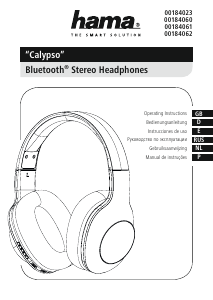
Manual de uso Hama 00184023 Calypso Auriculares

Productos relacionados

Categorias relacionadas

×
Download