Manual de uso Honeywell HZ-341 Calefactor

¿Necesita un manual para su Honeywell HZ-341 Calefactor? A continuación puedes ver y descargar el manual en PDF gratis en español. Este producto actualmente tiene 2 preguntas frecuentes, 0 comentarios y tiene 0 votos. Si este no es el manual que desea, , contáctenos.

¿Su producto tiene algún defecto y el manual no ofrece ninguna solución? Vaya a Repair Café para solicitar un servicio de reparación gratuito.

Manual de uso

Loading…
This heater is equipped with SureSet
Digital Controls that provide the ability to set the temperature to the
exact degree desired. To operate, simply follow these instructions.
STEP 1: POWER
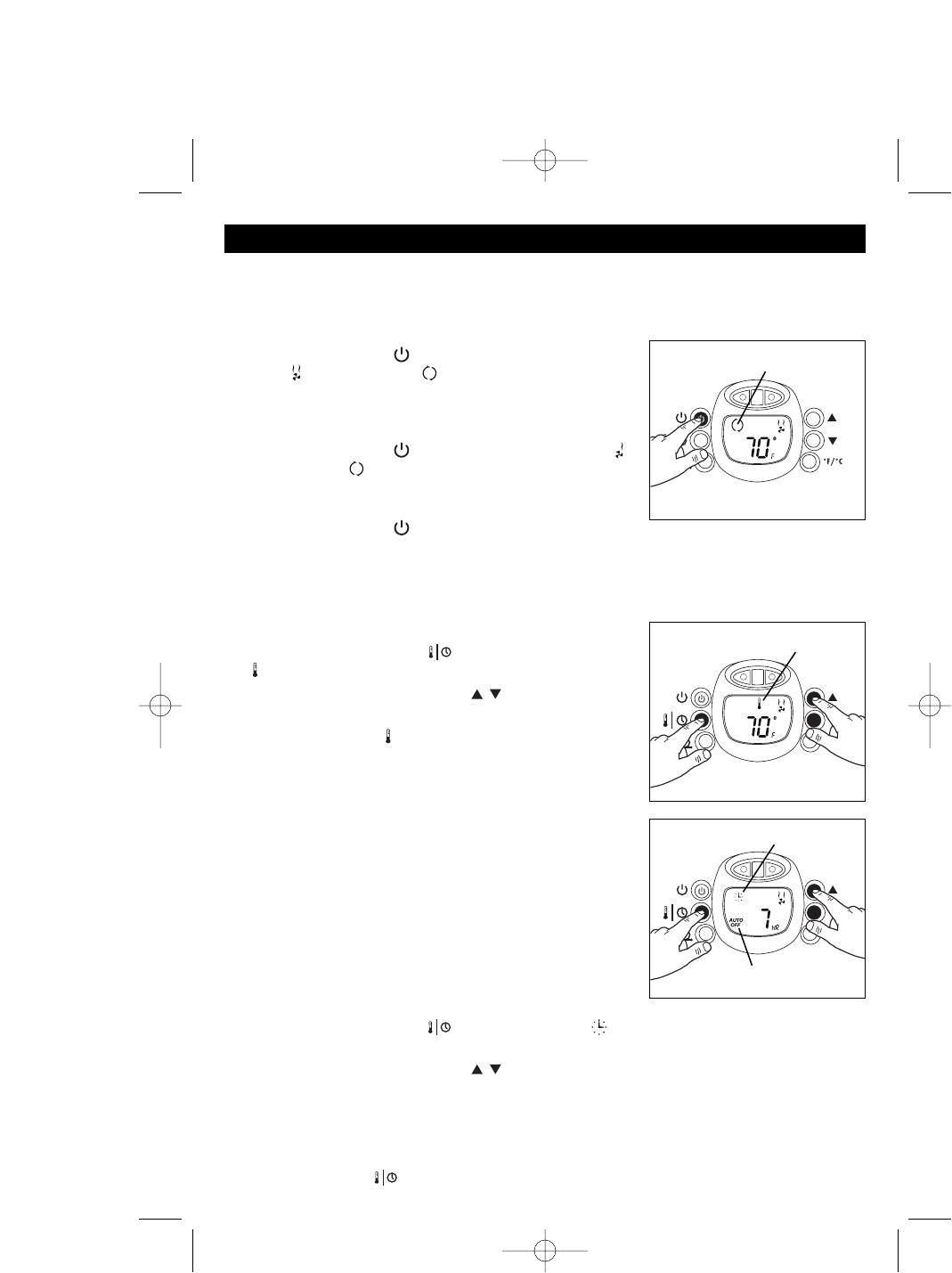
• Press the Power button ( ) once to start the heater on High
Power ( ), Continuous Run ( ) (Fig. 1). If left at this setting,
the unit will run continuously on High Power (1500 watts, 12.5
amps) and will not shut off until the unit is manually turned
off.
• Press the Power button ( ) again to change to Low Power ( ),
Continuous Run ( ). If left at this setting, the unit will run
continuously on Low Power (900 watts, 7.5 amps) and will not
shut off until the unit is manually turned off.
• Press the Power button ( ) a third time to turn the heater OFF.
NOTE: If operated at the Low setting, the heater will not provide as much heat output as in the High
setting, however, the Low setting will not require as much electrical current to operate. To avoid
overloading a circuit, do not plug the heater into a circuit that already has other appliances working.
STEP 2: SET TEMPERATURE
Press the Temp/Timer button ( ) until the Temperature Icon
( ) blinks. The current room temperature will appear (Fig. 2).
• Use the Up and Down arrow buttons ( ) to set the Desired
Temperature (Fig. 2).
• The Temperature Icon ( ) will stop blinking and the current room
temperature will reappear after the Desired Temperature is set.
• The heater will turn off shortly after the Desired Temperature is
reached and the Temperature Display will blink.
• The heater will turn back on when the room temperature drops
below the Desired Temperature. The Temperature Display will
then stop blinking and will display the current room temperature.
STEP 3: SET TIMER
NOTE: This function should only be set if you desire that the heater
be automatically shut off after a certain period of time (1 to 10 hours
from the time the function is set). Always set the Desired
Temperature prior to setting the Timer (see Step 2) so that the heater
will shut off at the Desired Temperature setting and not run
continuously.
• Press the Temp/Timer button ( ) until the Timer Icon ( ) blinks. The Hour Display will appear.
The Auto Off icon will also appear (Fig. 3).
• Use the Up and Down arrow buttons ( ) to set the heater operation time between 1 and 10 hours
(Fig. 3). Once the timer function is set the hour set will remain displayed until the time set runs out.
• The heater will automatically turn off when time runs out.
NOTE: If the Desired Temperature was set prior to setting the Timer function, the heater will cycle on and
off as per the selected Desired Temperature setting. To return to the Continuous Run Mode (Fig. 1), press
the Temp/Timer button ( ) a third time.
OPERATION
Fig. 3
Fig. 2
Fig. 1
Continuous Run Icon
Temperature Icon
Timer Icon
Auto Off Icon
HZ-339_341_OM_Rev2.qxd 6/22/05 5:15 PM Page 2
Descargue el manual en Español (PDF, 2.39 MB)
(Piense en el medioambiente y solo imprima este manual si es de verdad necesario)

Loading…

Puntuación

Dé su opinión de la Honeywell HZ-341 Calefactor calificando el producto. ¿Quiere compartir su experiencia con este producto o hacer una pregunta? Deje un comentario en la parte inferior de la página.
¿Estás satisfecho con elHoneywell HZ-341 Calefactor?
No
Sea el primero en calificar este producto
0 votos

Únase a la conversación sobre este producto

Aquí puedes compartir lo que piensas sobre Honeywell HZ-341 Calefactor. Si tiene alguna pregunta, primero lea atentamente el manual. Puede solicitar un manual utilizando nuestro formulario de contacto.

Más sobre este manual

Entendemos que es bueno tener un manual en papel para tus Honeywell HZ-341 Calefactor. Siempre puedes descargar el manual desde nuestro sitio web e imprimirlo tú mismo. Si deseas tener un manual original te recomendamos contactar con Honeywell. Es posible que puedan proporcionar un manual original. ¿Estás buscando el manual de tu Honeywell HZ-341 Calefactor en otro idioma? Elija su idioma preferido en nuestra página de inicio y busque el número de modelo para ver si lo tenemos disponible.

Especificaciones

Marca Honeywell
Modelo HZ-341
Categoría Calefactores
Tipo de archivo PDF
Tamaño del archivo 2.39 MB

Todos los manuales para Honeywell Calefactores
Más manuales de Calefactores

Preguntas frecuentes sobre Honeywell HZ-341 Calefactor

Nuestro equipo de atención al cliente busca información útil sobre los productos y responde a las preguntas frecuentes. Si encuentra inexactitudes en las preguntas frecuentes, indíquenoslo usando nuestro formulario de contacto.

¿Cómo afecta el polvo la eficiencia de un calentador? Verificado

El polvo se puede acumular en los elementos calefactores y en los filtros de aire de un calefactor, lo que reduce su eficiencia. Esto puede hacer que el calentador trabaje más para producir la misma cantidad de calor, lo que genera un mayor consumo de energía y facturas de servicios públicos más altas. Para mantener la eficiencia de su calentador, asegúrese de limpiarlo regularmente y reemplace el filtro de aire según sea necesario.

Ha sido de gran ayuda (207) Leer más

¿Cómo determino el tamaño del calentador que necesito para una habitación? Verificado

El tamaño del calentador que necesita para una habitación depende del tamaño de la habitación y del aislamiento del espacio. Una regla general es utilizar 60 vatios por metro cuadrado de espacio. Por ejemplo, si una habitación tiene 14 metros cuadrados, sería apropiado un calentador de 840 vatios.

Ha sido de gran ayuda (172) Leer más
Manual de uso Honeywell HZ-341 Calefactor

Productos relacionados

Categorias relacionadas

×
Download