EN 3
ABOVE ALL
● NEVER let anyone especially children push anything into holes,
slots or any other opening in the case ^ this could result in a
fatal electrical shock;
● NEVER guess or take chances with electrical equipment of any
kind ^ it is better to be safe than sorry!
Safety Precautions for the Burner
Be sure to observe the following precautions. Failing to do so may
result in electric shock, fire, injury, or malfunction.
● Do not disassemble, dismantle, or modify the equipment.
Requests for repair and inspection should be made to the dealer.
● Do not insert metal or combustible objects or pour water or other
liquids inside the burner.
● Turn off the power when connecting equipment.
● Remove the plug when the burner will not be used for a
prolonged time or prior to cleaning (electricity flows through the
equipment even when the power is off).
● Do not block the ventilation holes of the burner.
● Do not use where there is condensation. Suddenly carrying the
burner from a cold location to a hot location may result in the
formation of drops, which may cause a malfunction or failure.
● Do not cause the burner to vibrate when discs are in.
Safety Precautions for Accessories
● When using the AC adapter, the power cord, and the USB cable,
be sure to observe the following precautions. Failing to do so may
result in electric shock, fire, injury, or malfunction.
• Do not insert or remove the plug when your hands are wet.
• Fully insert the plug into the outlet.
• Keep dust and metal objects away from the plug.
• Do not damage the cord.
• Place the cord where it will not trip someone up.
• Do not use when thunder can be heard.
• Do not dismantle.
• Do not use for any product other than this one.
● Do not play the provided CD-ROM with an audio player. Doing so
may damage the circuits or speakers.
Safety Precautions for Discs
Do not use the following discs.
● Cracked discs
● Deeply scratched discs
Installation
Do not install in any of the following locations.
● Humid location
● Location of 60 °C or above
● Location subject to direct sunlight
● Location where overheating is likely
● Dusty or smoky locations
● Locations subject to oily smoke or steam such as a kitchen
counter or beside a humidifier
● Unstable location
● Bathroom
● Dusty places
● Slanted location
Cleaning Procedure
IMPORTANT:
● Be sure to unplug the burner before beginning cleaning.
● Do not use liquid or aerosol cleaners.
● Ensure that no moisture or liquid comes into contact with the
drive during cleaning.
Exterior of the Burner:
Wipe dirt off with a dry cloth.
Disc Tray:
Wipe off dirt with a soft dry cloth.
Disc:
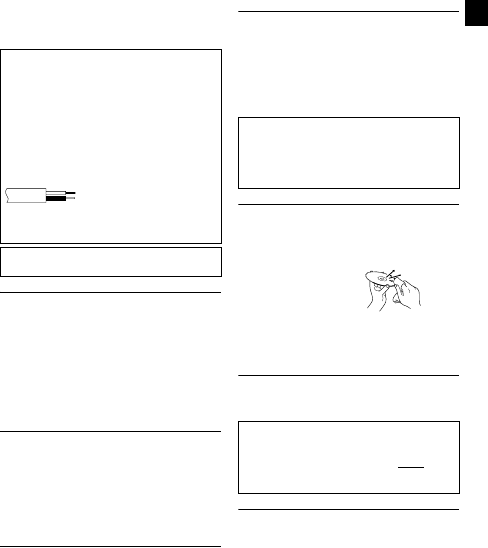
Gently wipe from the inner edge to
the outer edge with a soft cloth.
Storage:
Make sure that discs are kept in their cases. If discs are piled on
top of one another without their protective cases, they can be
damaged. Do not put discs in a location where they may be
exposed to direct sunlight, or in a place where the humidity or
temperature is high. Avoid leaving discs in your car!
Region Codes
Region codes are numbers for restricting DVD video playback. The
world is separated into six regions and each region is identified by
a number. If the number for a disc does not match the number for
the player, the disc cannot be played on the player. (The initial
region code is indicated on the label on the bottom of the burner.)
Disclaimer
JVC accepts no liability whatsoever for loss of data resulting from
inappropriate connections or handling.
IMPORTANT (for owners in the U.K.)
Connection to the mains supply in the United Kingdom.
DO NOT cut off the mains plug from this equipment.
If the plug fitted is not suitable for the power points in your home or the
cable is too short to reach a power point, then obtain an appropriate
safety approved extension lead or consult your dealer.
In the unlikely event of the plug fuse failing be sure to replace the
fuse only with an identical approved type, as originally fitted, and
to replace the fuse cover. If the fuse fails again consult your
nearest JVC dealer.
If nonetheless the mains plug is cut off be sure to remove the fuse and
dispose of the plug immediately, to avoid possible shock hazard by
inadvertent connection to the mains supply.
If this product is not supplied fitted with a mains plug then follow the
instructions given below:
DO NOT make any connection to the Larger Terminal coded E or
Green.
The wires in the mains lead are coloured in accordance with the
following code:
If these colours do not correspond with the terminal identifications of
your plug, connect as follows:
Blue wire to terminal coded N (Neutral) or coloured black.
Brown wire to terminal coded L (Live) or coloured Red.
If in doubt — consult a competent electrician.
The C/B button does not completely shut off mains power from the unit,
but switches operating current on and off. ABB shows electrical power
standby and ACB shows ON.
Blue to N (Neutral) or Black
Brown to L (Live) or Red
ATTENTION:
On placing the unit:
Some TVs or other appliances generate strong magnetic fields. Do not
place such appliances on top of the unit as it may cause picture
disturbance.
When moving the product:
Press C/B to turn off the power, and wait at least 30 seconds before
unplugging the power cord. Then, wait at least 2 minutes before
moving the product.
Changing the region codes
You can change the region code to play a DVD that has a different
code. (The code cannot be changed for some playback software.)
When you insert the disc, the Caution screen appears. Follow the
on-screen instructions to change the code.
The region code for the burner can be changed 4 times only. The
code set the fourth time becomes the final code, so be sure to set
a frequently used code. Take sufficient care when changing the
code.
CU-VD20.book Page 3 Thursday, March 1, 2007 5:55 PM


Únase a la conversación sobre este producto
Aquí puedes compartir lo que piensas sobre JVC CU-VD20 Reproductor DVD. Si tiene alguna pregunta, primero lea atentamente el manual. Puede solicitar un manual utilizando nuestro formulario de contacto.