Bedienungsanleitung Wecker Riqueza | KA6124
BEDIENUNGSANLEITUNG
Vielen Dank für den Kauf dieses LED Kuckuck Weckers. Bitte
lesen Sie die folgenden Anweisungen und Warnhinweise sorgfältig
durch, um eine sichere und korrekte Verwendung dieses Produkts
zu gewährleisten.
GEBRAUCHSANLEITUNG
FUNKTIONEN
Zeit und Kalender (Jahr, Monat und Datum)
Kuckuck Wecker mit Schlummerfunktion
Temperatur (einstellbar in °C oder °F)
Stundensignal mit Kuckuck Ton
DIE UHR ANSCHLIESSEN
Schließen Sie das Kabel an ein 5V Netzteil (nicht enthalten) und an
den Type C DC 5V Anschluss an. Die Zeit startet bei 12:00.
ZEIT UND KALENDER EINSTELLEN
Drücken Sie im normalen Zeitmodus die SET Taste. Die Stunde-
nanzeige blinkt. Stellen Sie die Stunden mit der UP oder DOWN
Taste ein. Achten Sie darauf, dass AM oder PM korrekt eingestellt
ist. Im 12 Stunden Format leuchtet eine PM Anzeige auf.
Drücken Sie erneut SET. Die Minuten blinken. Stellen Sie diese mit
UP oder DOWN ein. Fahren Sie anschließend in dieser Reihenfolge
fort: Stunde, Minute, Jahr, Monat, Datum. Drücken Sie danach
SET oder MODE, um zur Zeitanzeige zurückzukehren.
ALARM EINSTELLEN
Halten Sie die SET Taste 3 Sekunden gedrückt. Die Stunde-
nanzeige blinkt. Stellen Sie die Stunde mit UP oder DOWN ein,
einschließlich AM oder PM.
Drücken Sie SET. Die Minuten blinken. Stellen Sie diese mit UP
oder DOWN ein.
Drücken Sie erneut SET. “AL --” blinkt. Wählen Sie mit UP oder
DOWN zwischen “AL on” und “AL --”. “AL on” aktiviert den Alarm,
“AL --” deaktiviert ihn.
Drücken Sie SET oder MODE, um zu speichern und zur Zeitan-
zeige zurückzukehren.
SCHLUMMERFUNKTION EIN ODER AUSSCHALTEN
Halten Sie die SET Taste (1) 3 Sekunden gedrückt und drücken
Sie anschließend noch zweimal, bis “AL --” blinkt. Wählen Sie mit
UP (6) oder DOWN (7) “AL on”. Drücken Sie SET (1) oder MODE
(2), um zur Zeitanzeige zurückzukehren. Ein Alarm LED Symbol
(über dem Doppelpunkt) leuchtet, um anzuzeigen, dass der Alarm
aktiv ist. Wenn der Alarm ertönt, wird der Kuckuck Ton über den
Lautsprecher (8) wiedergegeben und der Vogel leuchtet auf.
Drücken Sie eine beliebige Taste auf der Rückseite der Uhr,
außer TEST, um den Alarm vorübergehend zu stoppen. Der Alarm
ertönt erneut nach der eingestellten Schlummerzeit. Nach vier
Schlummerzyklen stoppt die Schlummerfunktion automatisch.
Die Standard Schlummerzeit beträgt 5 Minuten. Wenn keine Taste
gedrückt wird, ertönt der Alarm einmal für 14 Sekunden.
OPERATING INSTRUCTIONS
Instrucons for use
1. Funcons
1) Time and Calendar (Year, Month, and Date)
2) Snooze Cuckoo Alarm
3) Temperature (in selectable C/F format)
4) Hourly Cuckoo Chime
2. Connect the cable to a 5V adapter (not included) and the ‘Type C’ DC-5V (5) jack. Time starts from “12:00” o’clock.
3. Set the me and calendar
1) In the normal display, press SET (1) buon, hour digits ash. Press UP (6) or DOWN (7) buon to set the
hour. Take care to set AM or PMcorrectly. When the PM me
is set under 12-hour format, a ‘PM’ LED
icon (on the top le corner of
2) Press SET (1) buon, minute digits ash. Press UP (6) or DOWN (7) buon to set the minute. Connue to set in
the sequence as: hour -> minute -> year -> month -> date. At last, press SET (1) or MODE (2)
ill return to the me display.
4. Set the alarm
1) Press and hold SET (1)UP (6) or DOWN (7)
2) Press SET (1)UP (6) or DOWN (7)
3) Press SET (1)UP (6) or DOWN (7)
4) Press SET (1) or MODE (2)
5. Turn the Snooze Alarm ON/OFF
Press and hold SET (1)UP (6) or
DOWN (7) SET (1) or MODE (2)
SPEAKER (8)
Thank you for your purchase of this LED Cuckoo Alarm Clock. Please read the folloing instrucons and arnings
carefully before use to ensure safe and sasfactory operaon of this product.
3) Press and hold SET (1)UP (6) or
DOWN (7), then press SET (1) or MODE (2)
6. Hourly Cuckoo Chime
UP (6)
at 7:00 am). Press UP (6) or DOWN (7)
MODE (2)
UP (6)SET (1)
UP (6) or DOWN (7) to select “HC --”. “HC on” means Hourly Chime sound is on, “HC --”
Press SET (1) or MODE (2)
7. Temerature Display
The display alternates beteen me and temperature.ress DOWN (7) buon to select
Celsius or Fahrenheit.
UP (6)
MODE (2)
MODE (2)
MODE (2)UP (6) or DOWN
(7)MODE (2)
12. Back-up Cell
CR2032 buon c
ell (not included) is a backeep me ongoing in the eent of blackout or other poer
failure.CELL
compartment (9)
13. TEST (4)
14. RESET hole (3)
If the clock is dead (the display does not moe) during seng or orking, please use a slim but blunt object (like ball
pen pointer, toothpick etc.) to press this hole, the clock ill return to the inialdisplay.
Warnings:
1. Keep this product aay from any liquids.
2. Please use a so cloth or a paper toel to clean the clock.
3. Do n
ot use any corrosie cleanser or chemical soluons on the clock.
4. Please keep the instrucons paper ell for future use.
5. This product is not a toy. Keep aay from children and animals.
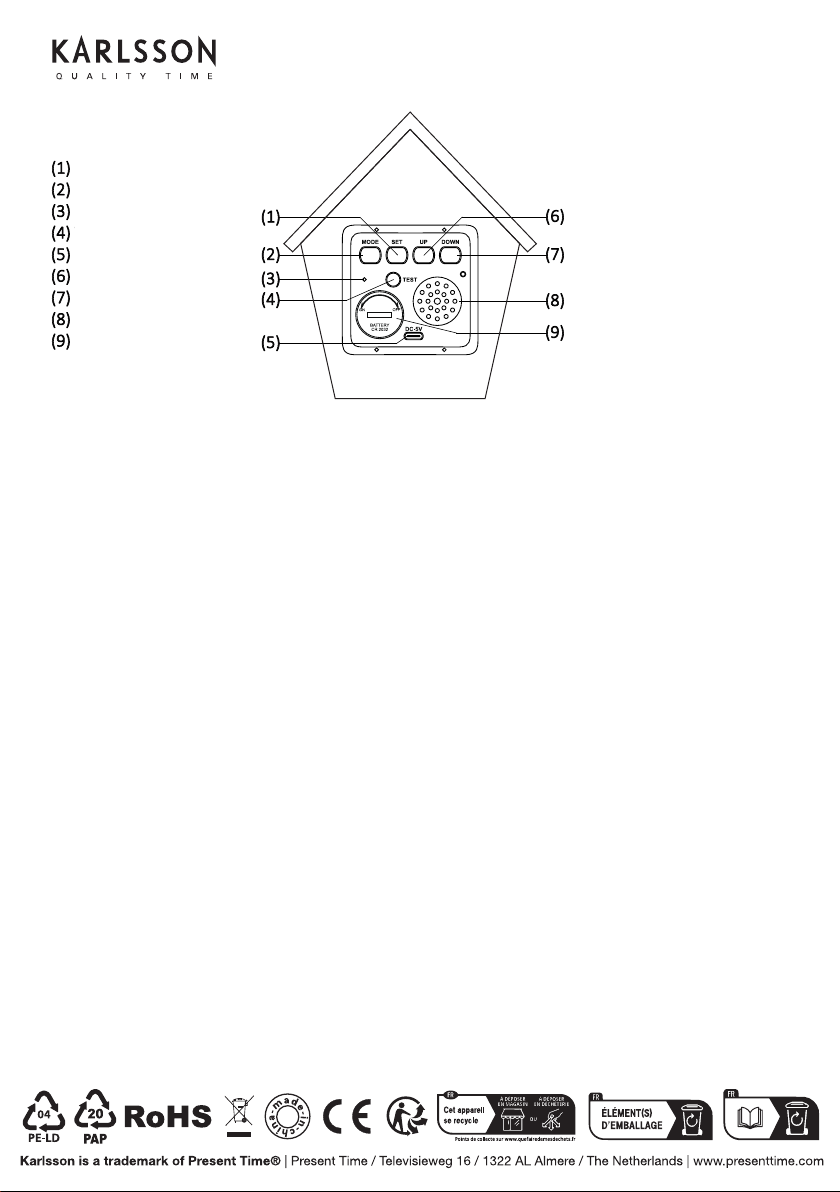
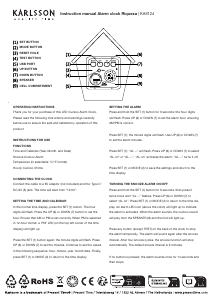
SET TASTE
MODE TASTE
RESET ÖFFNUNG
TEST TASTE
USB ANSCHLUSS
UP TASTE
DOWN TASTE
LAUTSPRECHER
BATTERIEFACH


Únase a la conversación sobre este producto
Aquí puedes compartir lo que piensas sobre Karlsson KA6124GR Reloj. Si tiene alguna pregunta, primero lea atentamente el manual. Puede solicitar un manual utilizando nuestro formulario de contacto.