Manuale d’uso sveglia Riqueza | KA6124
MANUALE D’USO
Grazie per aver acquistato questa sveglia LED a cucù. Si prega
di leggere attentamente le seguenti istruzioni e avvertenze per
garantire un uso sicuro e corretto del prodotto.
ISTRUZIONI D’USO
FUNZIONI
Ora e calendario (anno, mese e data)
Sveglia cucù con funzione snooze
Temperatura (impostabile in °C o °F)
Segnale orario con suono cucù
COLLEGAMENTO DELLA SVEGLIA
Collegare il cavo a un adattatore 5V (non incluso) e alla porta Type
C DC 5V. L’ora parte da 12:00.
IMPOSTAZIONE DELL’ORA E DEL CALENDARIO
In modalità visualizzazione dell’ora, premere il tasto SET. Le ore
iniziano a lampeggiare. Regolare le ore con i tasti UP o DOWN.
Vericare che AM o PM sia impostato correttamente. In formato 12
ore, l’indicazione PM si accende.
Premere nuovamente SET. I minuti lampeggiano. Regolarli con
UP o DOWN. Proseguire nell’ordine seguente: ora, minuto, anno,
mese, data. Premere quindi SET o MODE per tornare alla visualiz-
zazione dell’ora.
IMPOSTAZIONE DELLA SVEGLIA
Tenere premuto il tasto SET per 3 secondi. Le ore lampeggiano.
Regolare l’ora con UP o DOWN, inclusi AM o PM.
Premere SET. I minuti lampeggiano. Regolarli con UP o DOWN.
Premere nuovamente SET. “AL --” lampeggia. Selezionare con UP
o DOWN tra “AL on” e “AL --”. “AL on” attiva la sveglia, “AL --” la
disattiva.
Premere SET o MODE per salvare e tornare alla visualizzazione
dell’ora.
ATTIVAZIONE O DISATTIVAZIONE DELLA FUNZIONE SNOOZE
Tenere premuto il tasto SET (1) per 3 secondi, quindi premere altre
due volte no a quando “AL --” lampeggia. Selezionare “AL on”
con UP (6) o DOWN (7). Premere SET (1) o MODE (2) per tornare
alla visualizzazione dell’ora. Un’icona LED della sveglia (sopra i
due punti) si accende per indicare che la sveglia è attiva. Quando
la sveglia suona, il suono del cucù viene riprodotto tramite l’alto-
parlante (8) e l’uccello si illumina.
Premere qualsiasi tasto sul retro della sveglia, tranne TEST, per
interrompere temporaneamente la sveglia. La sveglia si riattiva
dopo il tempo snooze. Dopo quattro cicli snooze, la funzione si
interrompe automaticamente. Il tempo snooze predenito è di 5
minuti. Se non viene premuto alcun tasto, la sveglia suona una
volta per 14 secondi.
OPERATING INSTRUCTIONS
Instrucons for use
1. Funcons
1) Time and Calendar (Year, Month, and Date)
2) Snooze Cuckoo Alarm
3) Temperature (in selectable C/F format)
4) Hourly Cuckoo Chime
2. Connect the cable to a 5V adapter (not included) and the ‘Type C’ DC-5V (5) jack. Time starts from “12:00” o’clock.
3. Set the me and calendar
1) In the normal display, press SET (1) buon, hour digits ash. Press UP (6) or DOWN (7) buon to set the
hour. Take care to set AM or PMcorrectly. When the PM me
is set under 12-hour format, a ‘PM’ LED
icon (on the top le corner of
2) Press SET (1) buon, minute digits ash. Press UP (6) or DOWN (7) buon to set the minute. Connue to set in
the sequence as: hour -> minute -> year -> month -> date. At last, press SET (1) or MODE (2)
ill return to the me display.
4. Set the alarm
1) Press and hold SET (1)UP (6) or DOWN (7)
2) Press SET (1)UP (6) or DOWN (7)
3) Press SET (1)UP (6) or DOWN (7)
4) Press SET (1) or MODE (2)
5. Turn the Snooze Alarm ON/OFF
Press and hold SET (1)UP (6) or
DOWN (7) SET (1) or MODE (2)
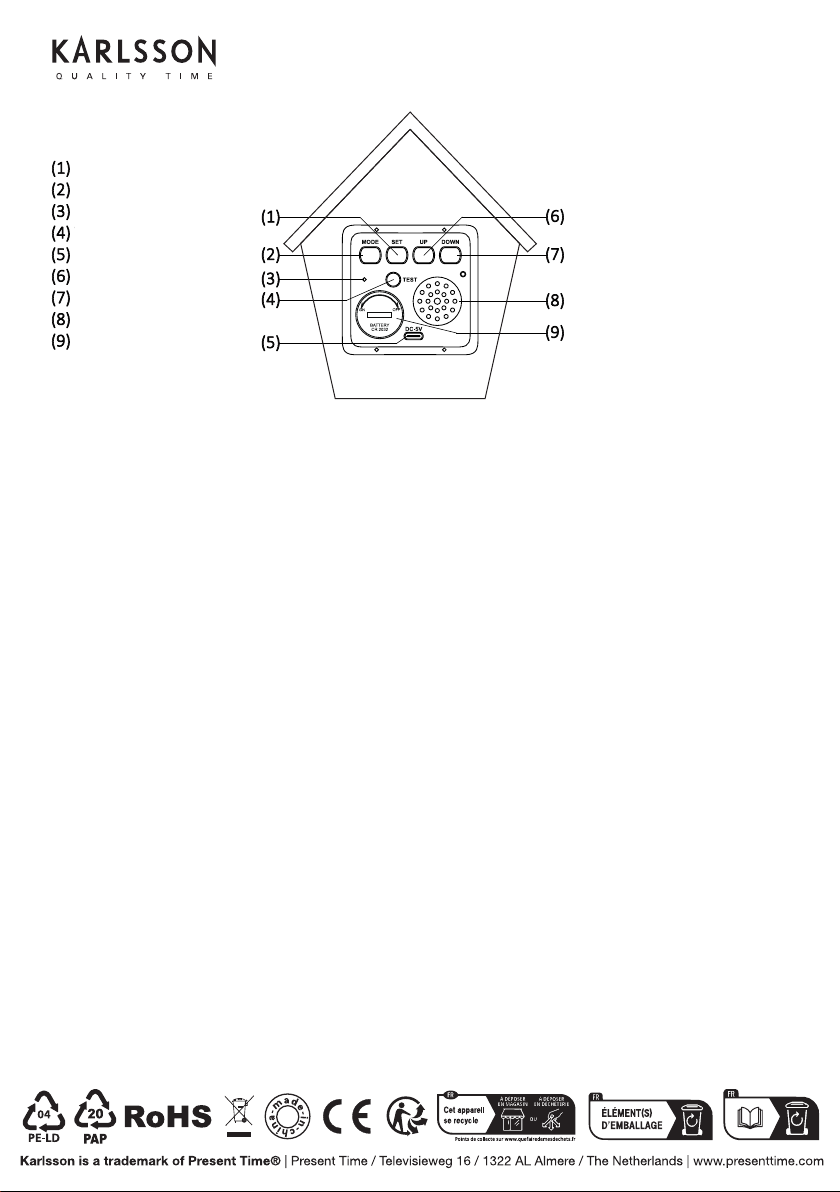
SPEAKER (8)
Thank you for your purchase of this LED Cuckoo Alarm Clock. Please read the folloing instrucons and arnings
carefully before use to ensure safe and sasfactory operaon of this product.
3) Press and hold SET (1)UP (6) or
DOWN (7), then press SET (1) or MODE (2)
6. Hourly Cuckoo Chime
UP (6)
at 7:00 am). Press UP (6) or DOWN (7)
MODE (2)
UP (6)SET (1)
UP (6) or DOWN (7) to select “HC --”. “HC on” means Hourly Chime sound is on, “HC --”
Press SET (1) or MODE (2)
7. Temerature Display
The display alternates beteen me and temperature.ress DOWN (7) buon to select
Celsius or Fahrenheit.
UP (6)
MODE (2)
MODE (2)
MODE (2)UP (6) or DOWN
(7)MODE (2)
12. Back-up Cell
CR2032 buon c
ell (not included) is a backeep me ongoing in the eent of blackout or other poer
failure.CELL
compartment (9)
13. TEST (4)
14. RESET hole (3)
If the clock is dead (the display does not moe) during seng or orking, please use a slim but blunt object (like ball
pen pointer, toothpick etc.) to press this hole, the clock ill return to the inialdisplay.
Warnings:
1. Keep this product aay from any liquids.
2. Please use a so cloth or a paper toel to clean the clock.
3. Do n
ot use any corrosie cleanser or chemical soluons on the clock.
4. Please keep the instrucons paper ell for future use.
5. This product is not a toy. Keep aay from children and animals.
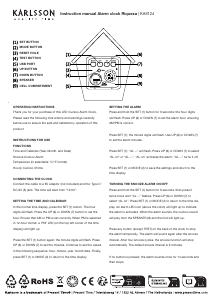
TASTO SET
TASTO MODE
APERTURA RESET
TASTO TEST
PORTA USB
TASTO UP
TASTO DOWN
ALTOPARLANTE
VANO BATTERIE


Únase a la conversación sobre este producto
Aquí puedes compartir lo que piensas sobre Karlsson KA6124GR Reloj. Si tiene alguna pregunta, primero lea atentamente el manual. Puede solicitar un manual utilizando nuestro formulario de contacto.