Manual de uso Klip Xtreme KBS-800 Vibe360 Altavoz

¿Necesita un manual para su Klip Xtreme KBS-800 Vibe360 Altavoz? A continuación puedes ver y descargar el manual en PDF gratis en español. Este producto actualmente tiene 5 preguntas frecuentes, 0 comentarios y tiene 0 votos. Si este no es el manual que desea, , contáctenos.

¿Su producto tiene algún defecto y el manual no ofrece ninguna solución? Vaya a Repair Café para solicitar un servicio de reparación gratuito.

Manual de uso

Loading…

• Press the Power button to start and stop audio playback.
• Press the Power button three times to disconnect the TWS capability, and then
press this button twice to disconnect the Bluetooth
®
device.
• Press and hold the button to play the next track.
• Press and hold the button to play the previous track.
• In order to adjust the volume level, briefly press the or button.
Note: As these are two individual speakers, the secondary speaker will automatically pair to
the primary speaker (the LED of the secondary speaker will be solid blue, as it is paired to
the primary speaker).
2. Set your Bluetooth
®
phone to “discover” the wireless speaker.
3. Place both devices not more than one meter away from each other.
4. The Power button LED for the primary unit will start blinking to indicate that the
device has entered into the pairing mode and is ready to be detectable for the first time.
5. On your mobile phone, tap the newly discovered audio device (KBS-800) displayed in
the Bluetooth
®
list.
6. If you have a lower Bluetooth
®
version, you may be prompted to enter the passkey 0000
(4 zeros).
7. If pairing is successful, a tone will be heard and the LED light will turn solid blue. If after 60
seconds the pairing process fails, please repeat steps 1 through 6 described above.
8. We recommend turning off the device when not in use. The speaker will shut off
automatically after a period of inactivity, as long as it is not in the Bluetooth
®
mode.
B. Pairing the speaker units with your mobile device individually
1. First, press and hold the Power button on the secondary speaker (will be labeled on
speaker) to turn it ON.
2. Set your Bluetooth
®
phone to “discover” the wireless speaker.
3. The Power button LED will start blinking to indicate that the device has entered into
the pairing mode and is ready to be detectable for the first time.
4. On your mobile phone, tap the newly discovered audio device (KBS-800) displayed in
the Bluetooth
®
list.
VI. Using the speaker to answer or end a call
• When there is an incoming call, the speaker will generate a tone to alert you of
this event.
• Briefly press the Power button to pick it up. You may also press the answer
button on your phone to take the call using the speaker. Talk normally close to the
speaker as the built-in microphone will allow clear voice reproduction.
• To end a call, press the Power button once again. Likewise, you may also end the call
directly using the command on your cell phone.
• When listening to music using your mobile phone, playback will resume
automatically once the call has ended.
• Press the Power button twice to reject an incoming call (on supported devices).
VIII. LED STATUS
Power indicator:
• The blue LED blinks quickly when the speaker is turned on.
• If both speakers are turned on, the LED only blinks in one of them.
• When the speaker is in TWS mode, both LEDs blink but the LED in the secondary
unit becomes solid as it pairs to the primary speaker. The primary unit keeps
blinking until it pairs with the mobile device.
Bluetooth
®
indicator:
• The blue LED blinks quickly when the two units are pairing.
• Once the pairing is successful both blue LED indicators will become solid. They will
only blink slowly when music is being played.
• The device will power off automatically if the speaker has been inactive for more
than 10 minutes, as long as the speaker is not connected to Bluetooth
®
.
Charging indicator:
• After the speaker is fully charged the LED will turn off.
• The red LED will blink if the battery level is low.
VII. Music playback
Note: Music playback will work individually or in TWS mode.
Note: Before installing this product, please make sure your device has the built-in
Bluetooth
®
feature available
A. Pairing the speaker with your mobile device in TWS mode
1. Press and hold the Power button on both speakers to turn them on simultaneously.
5. If you have a lower Bluetooth
®
version, you may be prompted to enter the passkey 0000
(4 zeros).
6. If pairing is successful, a tone will be heard, and the LED light will turn solid blue. If after 60
seconds the pairing process fails, please repeat steps 1 through 6 described above.
7. We recommend turning off the device when not in use. The speaker will shut off
automatically after a period of inactivity, as long as it is not in the Bluetooth
®
mode.
8. Repeat steps 1through 7 again to pair the primary device separately.
Note: If you are using both speakers, you have to press the power button on the
master speaker, which will be the one with the blue LED that is blinking.
Descargue el manual en Español (PDF, 0.74 MB)
(Piense en el medioambiente y solo imprima este manual si es de verdad necesario)

Loading…

Puntuación

Dé su opinión de la Klip Xtreme KBS-800 Vibe360 Altavoz calificando el producto. ¿Quiere compartir su experiencia con este producto o hacer una pregunta? Deje un comentario en la parte inferior de la página.
¿Estás satisfecho con elKlip Xtreme KBS-800 Vibe360 Altavoz?
No
Sea el primero en calificar este producto
0 votos

Únase a la conversación sobre este producto

Aquí puedes compartir lo que piensas sobre Klip Xtreme KBS-800 Vibe360 Altavoz. Si tiene alguna pregunta, primero lea atentamente el manual. Puede solicitar un manual utilizando nuestro formulario de contacto.

Más sobre este manual

Entendemos que es bueno tener un manual en papel para tus Klip Xtreme KBS-800 Vibe360 Altavoz. Siempre puedes descargar el manual desde nuestro sitio web e imprimirlo tú mismo. Si deseas tener un manual original te recomendamos contactar con Klip Xtreme. Es posible que puedan proporcionar un manual original. ¿Estás buscando el manual de tu Klip Xtreme KBS-800 Vibe360 Altavoz en otro idioma? Elija su idioma preferido en nuestra página de inicio y busque el número de modelo para ver si lo tenemos disponible.

Especificaciones

Marca Klip Xtreme
Modelo KBS-800 Vibe360
Categoría Altavoces
Tipo de archivo PDF
Tamaño del archivo 0.74 MB

Todos los manuales para Klip Xtreme Altavoces
Más manuales de Altavoces

Preguntas frecuentes sobre Klip Xtreme KBS-800 Vibe360 Altavoz

Nuestro equipo de atención al cliente busca información útil sobre los productos y responde a las preguntas frecuentes. Si encuentra inexactitudes en las preguntas frecuentes, indíquenoslo usando nuestro formulario de contacto.

Quiero conectar un altavoz a mi televisor con HDMI. ¿Qué puerto debo usar? Verificado

Debe usar el puerto HDMI-ARC, que está hecho específicamente para conectar equipos de audio.

Ha sido de gran ayuda (1478) Leer más

¿Qué indican las frecuencias sobre mi altavoz? Verificado

Indican el rango de frecuencias que el altavoz puede producir. Una gama más amplia de frecuencias proporcionará una mayor variación en el sonido y producirá un sonido de mayor calidad.

Ha sido de gran ayuda (788) Leer más

¿Cuándo está la música demasiado alta? Verificado

El sonido por encima de los 80 decibelios (dB) puede causar daños en la audición. Los sonidos por encima de 120 dB dañan la audición de forma inmediata. La gravedad de los daños depende de la frecuencia y la duración del sonido.

Ha sido de gran ayuda (470) Leer más

¿El bluetooth funciona a través de paredes y techos? Verificado

Una señal bluetooth funcionará a través de paredes y techo, a menos que estén hechos de metal. Dependiendo del grosor y del material de la pared, la señal puede perder fuerza.

Ha sido de gran ayuda (230) Leer más

¿Hasta qué nivel es seguro el ruido para los niños? Verificado

Los niños se dañan los oídos antes que los adultos. Por lo tanto, nunca exponga a los niños a un ruido superior a 85 dB. En el caso de los auriculares hay modelos especiales para niños. Con altavoces u en otras situaciones hay que estar atento para que el ruido no supere ese nivel.

Ha sido de gran ayuda (207) Leer más
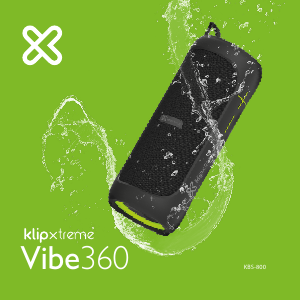

Manual de uso Klip Xtreme KBS-800 Vibe360 Altavoz

Productos relacionados

Categorias relacionadas

×
Download