Manual de uso Klip Xtreme KPS-503 Pantalla proyector

¿Necesita un manual para su Klip Xtreme KPS-503 Pantalla proyector? A continuación puedes ver y descargar el manual en PDF gratis en español. Este producto actualmente tiene 0 preguntas frecuentes, 0 comentarios y tiene 0 votos. Si este no es el manual que desea, , contáctenos.

¿Su producto tiene algún defecto y el manual no ofrece ninguna solución? Vaya a Repair Café para solicitar un servicio de reparación gratuito.

Manual de uso

Loading…
V. Operation
Dimensions
Specifications
Additional information
MPN KPS-501 KPS-502
51.18x67.72x.02in 59.06x78.74x.02in
Screen dimensions
(HxWxD)
Maximum screen size
(Diagonal)
Viewing area height
Viewing area width
Aspect ratio
Weight
Operation type
Mount type
Color
Screen material
Gain
Viewing angle
Fire retardant
Remote control (motorized)
Wall and ceiling
White
Outside PVC layers, internal cloth layer
1.1
100°
Yes
Warranty One year
86in 100in
4:3
120in
48.03in 55.91in 68.90in
65.75in 76.77in 94.09in
15.65lb 17.86lb 21.38lb
KPS-503
72.05x96.03x.02in
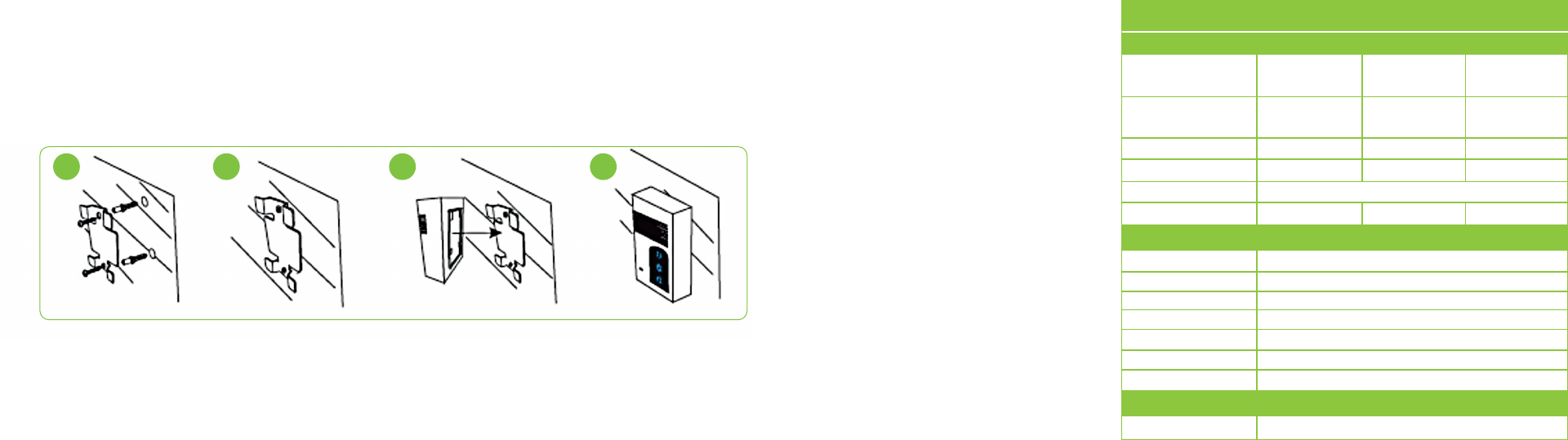
Measure distance on the wall or ceiling, and mark the mounting spots.
Drill the holes, and insert the proper anchors or expansion screws to secure the mount firmly
onto the surface.
Depending on the configuration chosen, carefully hang the screen from the metal hooks or
fasten the screws firmly into the wall at both ends of the case.
After mounting the screen, proceed to install the controller switch using the supplied hardware.
To do so, follow the steps illustrated below:
3.
4.
5.
6.
Plug the controller switch into an AC wall outlet and finish by installing the battery inside the
remote.
7.
To open the screen, press the down button on the remote or controller switch. The mecha-
nism will stop automatically when fully deployed.
To close the screen, press the down button on the remote or controller switch. The screen will
stop automatically when fully retracted.
Variable height settings can be selected using the controller switch or the remote. During
operation, simply press the stop button to lock the rewind mechanism at the desired position.
1.
2.
3.
VI. Technical specifications
1 2 3 4
Descargue el manual en Español (PDF, 0.35 MB)
(Piense en el medioambiente y solo imprima este manual si es de verdad necesario)

Loading…

Puntuación

Dé su opinión de la Klip Xtreme KPS-503 Pantalla proyector calificando el producto. ¿Quiere compartir su experiencia con este producto o hacer una pregunta? Deje un comentario en la parte inferior de la página.
¿Estás satisfecho con elKlip Xtreme KPS-503 Pantalla proyector?
No
Sea el primero en calificar este producto
0 votos

Únase a la conversación sobre este producto

Aquí puedes compartir lo que piensas sobre Klip Xtreme KPS-503 Pantalla proyector. Si tiene alguna pregunta, primero lea atentamente el manual. Puede solicitar un manual utilizando nuestro formulario de contacto.

Más sobre este manual

Entendemos que es bueno tener un manual en papel para tus Klip Xtreme KPS-503 Pantalla proyector. Siempre puedes descargar el manual desde nuestro sitio web e imprimirlo tú mismo. Si deseas tener un manual original te recomendamos contactar con Klip Xtreme. Es posible que puedan proporcionar un manual original. ¿Estás buscando el manual de tu Klip Xtreme KPS-503 Pantalla proyector en otro idioma? Elija su idioma preferido en nuestra página de inicio y busque el número de modelo para ver si lo tenemos disponible.

Especificaciones

Marca Klip Xtreme
Modelo KPS-503
Categoría Pantallas proyector
Tipo de archivo PDF
Tamaño del archivo 0.35 MB

Todos los manuales para Klip Xtreme Pantallas proyector
Más manuales de Pantallas proyector
Manual de uso Klip Xtreme KPS-503 Pantalla proyector

Productos relacionados

Categorias relacionadas

×
Download