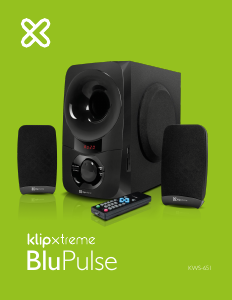
Manual de uso Klip Xtreme KWS-651 BluPulse Altavoz

¿Necesita un manual para su Klip Xtreme KWS-651 BluPulse Altavoz? A continuación puedes ver y descargar el manual en PDF gratis en español. Este producto actualmente tiene 5 preguntas frecuentes, 2 comentarios y tiene 0 votos. Si este no es el manual que desea, , contáctenos.

¿Su producto tiene algún defecto y el manual no ofrece ninguna solución? Vaya a Repair Café para solicitar un servicio de reparación gratuito.

Manual de uso

Loading…

1.
2.
3.
4.
5.
6.
7.
8.
V. Initial setup
General
Speaker
Connectivity
Additional information
2.1 stereo speaker system with wireless technology
60W
Subwoofer: 5.25 inches
Satellites: 3 inches
Type
Maximum power output (RMS)
Wireless, USB and 3.5mm
SD
2.4GHz-2.48GHz
33ft
Connection type
Memory card slot
Wireless RF frequency
Wireless range
14.3lb
3.9ft (3.5mm cable)
One year
Weight
Cable length
Warranty
Driver unit
AC input 110V/220V 60Hz/50Hz (autosensing)
Sensitivity
Subwoofer: 40W
Satellites: 20W (10W+10W)
Maximum power output (RMS)
Subwoofer: 6.7x11.6x13.2in
Satellites: 3.4x6.4x3.1in
Dimensions
Subwoofer: 30Hz-5kHz
Satellites: 100Hz-20kHz
Frequency
Subwoofer: 8Ω
Satellites: 4Ω
Subwoofer: 84dB
Satellites: 91dB
Impedance
VII. Technical specifications
Install the two AAA batteries supplied inside the remote control.
Next, insert the left and right satellite speaker plugs into the matching output jacks on the back
of the main unit.
Connect the auxiliary cable into the input jack on the back of the unit for wired playback.
Proceed to connect an external audio device, such as a laptop, television set, MP3/4 player,
smartphone or tablet.
Plug the AC cable into a wall outlet.
Turn on the speaker by turning the main power switch on the back of the unit to its ON
position. After that, the user can also press the red power button on the remote control to
toggle between active and standby modes.
Select the input mode by pressing the source selector button located on the front of the main
unit or by using the Source button on the remote control. The available modes are:
USB: enables audio playback from compatible files stored in a USB memory stick
SD
TM
: enables audio playback from compatible files stored in a SD
TM
memory card
Bluetooth
®
: enables the streaming of audio wirelessly from compatible devices
Aux: enables audio playback from devices fitted with an auxiliary 3.5mm jack
DVD: additional input that enables audio playback from devices fitted with an auxiliary 3.5mm
jack.
Note: please remember that some commands will not be active or behave differently in both
line in modes (refer to the product diagram for details).
Using the controls on the front of the main unit or the remote, you can manage and select
your tracks, mute the speaker audio, in addition to adjusting the bass and treble control to
the desired level.
If you do not intend to use the speakers for a long time, set the power switch to its OFF
position.
1.
2.
3.
4.
5.
6.
7.
Place both devices not more than one meter away from each other.
Enable the Bluetooth
®
function on your portable device and set it to discover the
KWS-651 wireless speaker.
On the speaker, press the Source button to select the Bluetooth
®
mode as soon as it
appears on the screen. Two short beeps will be generated, making the red dot on
the display to start blinking fast. This indicates that the system has entered into the
pairing mode.
Once the speaker is listed under the newly found Bluetooth devices, accept by pressing
Yes or OK. If you have a lower Bluetooth
®
version, you may be prompted to enter the
passkey=0000 (4 zeros).
If pairing is successful, another short beep will be heard, making the dot on the LED
change to steady red on the speaker screen. On your device, a message will be displayed,
confirming that the wireless connection has been established.
If after 60 seconds the pairing process fails, please repeat steps 1 through 4 described
above.
From then on, your device will be automatically paired with the speaker.
VI. Advanced operation
Note: Before installing this product, please make sure your device has the built-in Bluetooth
®
feature available. If your device is not Bluetooth
®
-enabled, you must purchase a Bluetooth
®
dongle,
preferably version V.2.1 or above.
Pairing the speaker with your Bluetooth
®
device a
Descargue el manual en Español (PDF, 0.43 MB)
(Piense en el medioambiente y solo imprima este manual si es de verdad necesario)

Loading…

Puntuación

Dé su opinión de la Klip Xtreme KWS-651 BluPulse Altavoz calificando el producto. ¿Quiere compartir su experiencia con este producto o hacer una pregunta? Deje un comentario en la parte inferior de la página.
¿Estás satisfecho con elKlip Xtreme KWS-651 BluPulse Altavoz?
No
Sea el primero en calificar este producto
0 votos

Únase a la conversación sobre este producto

Aquí puedes compartir lo que piensas sobre Klip Xtreme KWS-651 BluPulse Altavoz. Si tiene alguna pregunta, primero lea atentamente el manual. Puede solicitar un manual utilizando nuestro formulario de contacto.

Como desbloquiar 26-01-2023
Muy bueno pero necesito desbloquiarlo

responder | Ha sido de gran ayuda (0)
Javier Medina 01-02-2026
Buenas tardes me gustaría comprar este altavoz para ponerle música a mi peluquería 0997630076 es mi número de teléfono

responder | Ha sido de gran ayuda (0) (Traducido por Google)

Más sobre este manual

Entendemos que es bueno tener un manual en papel para tus Klip Xtreme KWS-651 BluPulse Altavoz. Siempre puedes descargar el manual desde nuestro sitio web e imprimirlo tú mismo. Si deseas tener un manual original te recomendamos contactar con Klip Xtreme. Es posible que puedan proporcionar un manual original. ¿Estás buscando el manual de tu Klip Xtreme KWS-651 BluPulse Altavoz en otro idioma? Elija su idioma preferido en nuestra página de inicio y busque el número de modelo para ver si lo tenemos disponible.

Especificaciones

Marca Klip Xtreme
Modelo KWS-651 BluPulse
Categoría Altavoces
Tipo de archivo PDF
Tamaño del archivo 0.43 MB

Todos los manuales para Klip Xtreme Altavoces
Más manuales de Altavoces

Preguntas frecuentes sobre Klip Xtreme KWS-651 BluPulse Altavoz

Nuestro equipo de atención al cliente busca información útil sobre los productos y responde a las preguntas frecuentes. Si encuentra inexactitudes en las preguntas frecuentes, indíquenoslo usando nuestro formulario de contacto.

Quiero conectar un altavoz a mi televisor con HDMI. ¿Qué puerto debo usar? Verificado

Debe usar el puerto HDMI-ARC, que está hecho específicamente para conectar equipos de audio.

Ha sido de gran ayuda (1478) Leer más

¿Qué indican las frecuencias sobre mi altavoz? Verificado

Indican el rango de frecuencias que el altavoz puede producir. Una gama más amplia de frecuencias proporcionará una mayor variación en el sonido y producirá un sonido de mayor calidad.

Ha sido de gran ayuda (788) Leer más

¿Cuándo está la música demasiado alta? Verificado

El sonido por encima de los 80 decibelios (dB) puede causar daños en la audición. Los sonidos por encima de 120 dB dañan la audición de forma inmediata. La gravedad de los daños depende de la frecuencia y la duración del sonido.

Ha sido de gran ayuda (470) Leer más

¿El bluetooth funciona a través de paredes y techos? Verificado

Una señal bluetooth funcionará a través de paredes y techo, a menos que estén hechos de metal. Dependiendo del grosor y del material de la pared, la señal puede perder fuerza.

Ha sido de gran ayuda (230) Leer más

¿Hasta qué nivel es seguro el ruido para los niños? Verificado

Los niños se dañan los oídos antes que los adultos. Por lo tanto, nunca exponga a los niños a un ruido superior a 85 dB. En el caso de los auriculares hay modelos especiales para niños. Con altavoces u en otras situaciones hay que estar atento para que el ruido no supere ese nivel.

Ha sido de gran ayuda (207) Leer más
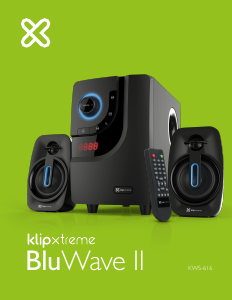
Manual de uso Klip Xtreme KWS-651 BluPulse Altavoz

Productos relacionados

Categorias relacionadas

×
Download