6
Description of Parts
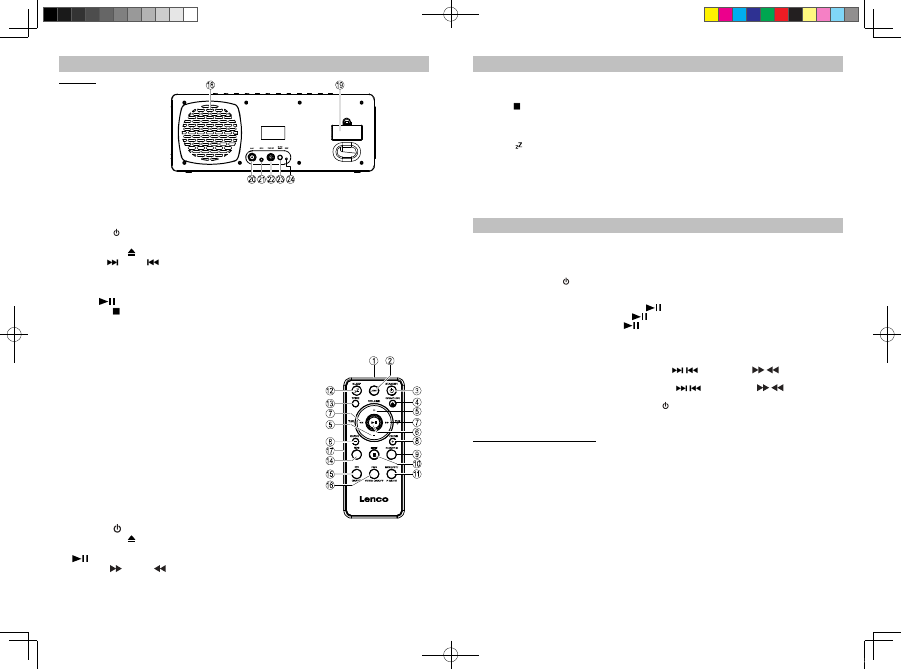
Rear View
Main Unit
1. iPod/iPhone docking station
2. iPod/iPhone docking connector
3. STANDBY
button ----- To turn the unit on and off.
4. VOLUME knob ----- Adjust volume level up or down.
5. OPEN/CLOSE
button ---- Open / Close CD slot.
6. TUN/CH / + and / - buttons ------ In radio mode: Tune the radio frequency up/down; Select
preset channel.
In iPod/iPhone and CD mode: Skip tracks Forward /
Backward; perform high-speed search.
7. MEM /
button ----- iPod/iPhone / CD Play/Pause function; Save radio preset station.
8. PRESET /
/ VIDEO ON/OFF button ---- Select preset radio station mode; Stop CD playback; Select
video-out on/off in iPod/iPhone mode.
9. LIGHT button ----- Turn LCD backlight ON / O FF.
10. FUNCTION button ---- Selection of FM radio / iPod/iPhone / AUX-IN / CD modes.
11. TREBLE button ------- Adjust Treble level.
12. BASS button ---- Adjust Bass level.
13. Power Status indicator
14. CD slot
15. Remote Control Infrared receiver
16. LCD display
17. Speakers
18. Subwoofer
19. Memory backup battery compartment
20. FM antenna connector
21. AUX-IN jack ---- Auxiliary audio signal input.
22. VIDEO-OUT jack ---- Composite video output.
23. DC-in jack -----For the connection of external DC power supply.
24. RESET button ---- For resetting the unit
Remote Control
1. Infrared Transmitter
2. LIGHT button ----- Turn the LCD backlight On / Off.
3. STANDBY
button
4. OPEN/CLOSE button ---- Open / Close CD slot.
5. VOLUME +/- button ----- Adjust volume level up or down.
6.
button ----- iPod/iPhone / CD Play/Pause function
7. TUN/CH
/ + and / - buttons ----- In radio mode: Tune the radio frequency up/down.
In iPod/iPhone and CD mode: Skip tracks Forward /
Backward; perform high-speed search.
7
Description of Parts
8. CH / DIR +/- button ----- In radio mode: Select preset channel.
In CD mode: Select MP3 song directory/folder.
9. FUNCTION button ---- Select FM radio / iPod/iPhone / AUX-IN / CD modes.
10. MEM /
button ---- Save radio preset station; Stop CD playback.
11. MODE / ST. / P-MODE button ----- In Standby mode: Set clock and 12/24 hour format.
In CD mode: Select CD play mode.
In FM radio mode: Select FM stereo / mono receiving.
12. SLEEP
button ----- Select the time duration of the sleep timer.
13. TONE button ----- For Bass and Treble settings
14. RDS button ---- In FM radio mode: Select RDS function.
15. ID3 ON/OFF button ---- In CD mode: Enable / Disable ID3 function.
16. PGM / VIDEO ON/OFF button ----- Set CD program; Select video-out on/off in iPod/iPhone mode.
17. Battery Compartment ----- Located at the back of the remote control.
Listening to iPod / iPhone
This model supports different iPod/iPhone models. F ollowing steps guide you listening to iPod music.
1. Insert your iPod/iPhone into the docking port by placing the connector on the bottom of the
iPod/iPhone onto connector in the docking bay.
Caution: Please be careful when seating the iPod/iPhone into the docking to avoid damaging the
30-pin connector on the iPod/iPhone or in the docking system.
2. Press the STANDBY
button to turn on the unit and the power status indicator lights on.
3. Press the FUNCTION button to select iPod/iPhone mode.
In iPod/iPhone mode:
- To start playback music, press the
button once.
- To pause the music, press the
button.
- To resume music, press the
button again.
- You may rotate the VOLUME knob (from the main unit) or press the VOLUME +/- button
(from the remote control) to adjust the volume to a desired level.
Note: The volume level cannot be adjusted using the volume control on your iPod / iPhone after being
docked.
- During song playback, press and hold the
/ button, or the / button from the
remote control, to perform high speed search forward / backward.
- To skip to next or previous song, press the
/ button, or the / button from the
remote control.
- To turn off the unit, press the STANDBY
button and the power status indicator will light off.
- When the unit is powered by external DC adaptor and once the iPod/iPhone connected to
the docking station, the unit recharges the iPod/iPhone battery.
iPhone
1. You can connect this unit to a television or other video display that has composite video input.
2. Securely dock the iPod (with video) / iPhone.
3. Connect the yellow RCA cable (not included) to rear RCA video jack on the unit.
4. Connect the other end of the yellow RCA cable to VIDEO IN of television or video display.
5. Press the FUNCTION button to select iPod/iPhone mode.
6. Select a movie from your iPod/iPhone menu.
Note:
For earlier iPod with video models (with click wheel): (a) On the main menu choose video then select
video setting. (b) Set the TV Out section to “ON”. (c) Switch back to the movie library and ready for
playback a movie of your choice.
For iPod Touch, iPhone : TV OUT “ON” is automatically set which TV OUT setting is not available for
user’s selection.
7. The movie will playback on the Apple device screen.
8. Press the VIDEO ON/OFF button which toggle between the video out “ON” (watch movie on TV) and
video out “OFF” (watch movie on Apple device screen).
iPD-9000 5L IB.indd 6-7 2011-10-17 10:06:55


Únase a la conversación sobre este producto
Aquí puedes compartir lo que piensas sobre Lenco IPD-9000 Docking station. Si tiene alguna pregunta, primero lea atentamente el manual. Puede solicitar un manual utilizando nuestro formulario de contacto.