Manual de uso Lexibook DMP20SP Reproductor de Mp3

¿Necesita un manual para su Lexibook DMP20SP Reproductor de Mp3? A continuación puedes ver y descargar el manual en PDF gratis en español. Este producto actualmente tiene 4 preguntas frecuentes, 0 comentarios y tiene 0 votos. Si este no es el manual que desea, , contáctenos.

¿Su producto tiene algún defecto y el manual no ofrece ninguna solución? Vaya a Repair Café para solicitar un servicio de reparación gratuito.

Manual de uso

Loading…
12
English
English
13
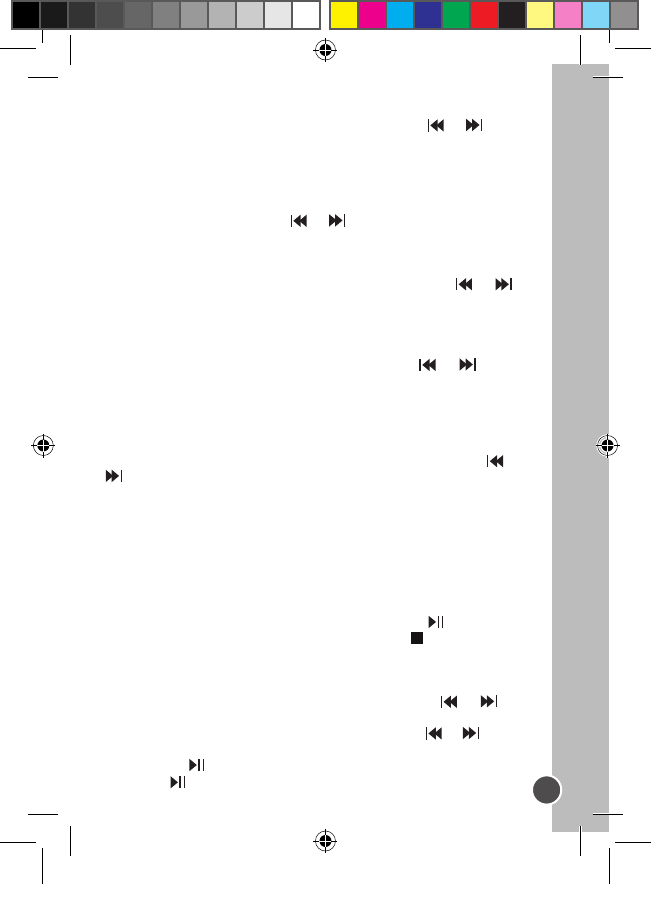
A-B Repeat function
1. In music playback mode, press the M key to dene the starting
point of the segment, and “A-” will appear on display.
2. Then, press the M key again to dene the ending point of the
segment. “A-B” will appear on display.
3. When the A-B Repeat function has been enabled, the unit will play
the specied segment again and again.
4. Press the M key once more to cancel the A-B Repeat function and
return to normal play mode.
Function menu
In stop or pause mode, press the M key to enter the main menu. Use
the or key to toggle the various menu options: Navigation, Play
Music, Voice, Setting, Record, Delete, About, and Exit. Press the M
key to enter a menu option.
Navigation
1. Press the or key to toggle all the music folders and music
les under the root folder.
2. To view the les in a folder, select that folder and press the VOL +
or – key.
3. Press the M key to play the selected music le or folder.
Play Music
Select this option to return to normal music playback. Press the M key
to start the playback from the rst track. Press to begin playback.
Voice
In this mode, use the or key to toggle the voice les available
and press to play a voice le. To exit this mode, you will need to go
back to the menu and select “Play music” as described above.
Setting
This sub menu offers several settings:
EQ set
In setting mode, press M to enter EQ set. Use the or key to
toggle the equalizer options available: Natural, Rock, Jazz, Classic,
Pop, Soft, DBB and then press the M key to conrm.
Play mode
In setting mode, press M to enter Play mode. Use the or key to
toggle the play mode options available: Normal, Repeat All, Repeat
One, Random, Random All, Preview and then press the M key to conrm.
Contrast
In setting mode, press M to enter Contrast. The current “Contrast”
level will be displayed. Use the or key to increase/decrease
the contrast level of the LCD screen. Press the M key to conrm.
Backlight
In setting mode, press M to enter Backlight mode. Use the or
key to select the time duration the backlight stays on after pressing a
key: 5s, 10s, 15s, 20s, 25s, 30s, 35s, 40s, 45s, 0s, backlight off.
Powerset (Auto-off)
In setting mode, press M to enter Powerset. Use the or key to
select the time duration before the unit switches to auto-power off: 2
mins, 10 mins, 30 mins or disable (no auto-power off). Then press the
M key to conrm.
Language
In setting mode, press M to enter the Language menu. Use the or
key to select the desired on-screen display language: ENGLISH
& GB, ENGLISH & BIG5, Simplied Chinese, Traditional Chinese,
ENGLISH & KOR (English/Korea), ENGLISH & JAP (English/Japan),
Français, Deutsch, ENGLISH/EUR(English/Europe), Italiano,
Nederlands, Spanish, Portugues or Exit. Then press the M key to
conrm.
Record
As soon as you press the M key to enter this menu, the unit will start
recording. Speak clearly in the microphone. Press the key to pause
recording. Press again to continue. Press the Stop key to stop the
recording. You will then be in voice recording playback mode.
Delete
In setting mode, press M to enter Delete mode. Use the or key
to select one of the following options: Delete music les, Delete voice
les, or Exit. Press the M key to conrm, and use the or key to
select the le you want to delete. Press the + or - key to choose Yes,
and press the key to delete the le. Press the M key again and
then press to exit.
DMP20seriesIM0177.indd 13 5/7/07 1:56:14 PM
Descargue el manual en Español (PDF, 1.3 MB)
(Piense en el medioambiente y solo imprima este manual si es de verdad necesario)

Loading…

Puntuación

Dé su opinión de la Lexibook DMP20SP Reproductor de Mp3 calificando el producto. ¿Quiere compartir su experiencia con este producto o hacer una pregunta? Deje un comentario en la parte inferior de la página.
¿Estás satisfecho con elLexibook DMP20SP Reproductor de Mp3?
No
Sea el primero en calificar este producto
0 votos

Únase a la conversación sobre este producto

Aquí puedes compartir lo que piensas sobre Lexibook DMP20SP Reproductor de Mp3. Si tiene alguna pregunta, primero lea atentamente el manual. Puede solicitar un manual utilizando nuestro formulario de contacto.

Más sobre este manual

Entendemos que es bueno tener un manual en papel para tus Lexibook DMP20SP Reproductor de Mp3. Siempre puedes descargar el manual desde nuestro sitio web e imprimirlo tú mismo. Si deseas tener un manual original te recomendamos contactar con Lexibook. Es posible que puedan proporcionar un manual original. ¿Estás buscando el manual de tu Lexibook DMP20SP Reproductor de Mp3 en otro idioma? Elija su idioma preferido en nuestra página de inicio y busque el número de modelo para ver si lo tenemos disponible.

Especificaciones

Marca Lexibook
Modelo DMP20SP
Categoría Reproductores de Mp3
Tipo de archivo PDF
Tamaño del archivo 1.3 MB

Todos los manuales para Lexibook Reproductores de Mp3
Más manuales de Reproductores de Mp3

Preguntas frecuentes sobre Lexibook DMP20SP Reproductor de Mp3

Nuestro equipo de atención al cliente busca información útil sobre los productos y responde a las preguntas frecuentes. Si encuentra inexactitudes en las preguntas frecuentes, indíquenoslo usando nuestro formulario de contacto.

Cuando conecto un auricular a mi dispositivo, no funciona correctamente, ¿qué puedo hacer? Verificado

Es posible que se haya acumulado suciedad en la abertura donde está conectado el auricular, impidiendo que haga un contacto adecuado. La mejor forma de limpiarlo es con aire comprimido. En caso de duda, haga que lo haga un profesional.

Ha sido de gran ayuda (52) Leer más

¿Cuál es la diferencia entre MP3, WAV, AIFF y FLAC? Verificado

La diferencia es que WAV, AIFF y FLAC son tipos de archivo sin pérdida de calidad mientras que MP3 es un tipo de archivo “con pérdida”. Esto significa que para crear un MP3 el archivo se comprime más, por lo que estos archivos son más pequeños. La desventaja es que se pierde en calidad.

Ha sido de gran ayuda (38) Leer más

¿Qué significa Mp3? Verificado

Mp3 es la abreviatura de MPEG3, que son las siglas en inglés para Grupo de Expertos en Imágenes en Movimiento Capa de Audio 3. Mp3 es el formato de archivo más utilizado para almacenar y reproducir música u otros tipos de audio.

Ha sido de gran ayuda (27) Leer más

¿Cuántos bytes son un kilobyte, megabyte, gigabyte y terabyte? Verificado

Un kilobyte consta de 1000 bytes. 1 megabyte = 1000 kilobytes. 1 gigabyte = 1000 megabytes. 1 terabyte = 1000 gigabytes.

Ha sido de gran ayuda (23) Leer más
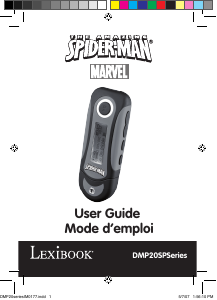
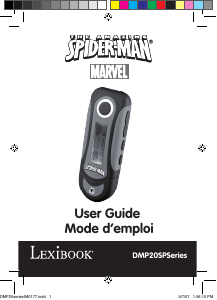
Manual de uso Lexibook DMP20SP Reproductor de Mp3

Productos relacionados

Categorias relacionadas

×
Download