Manual de uso LG S60Q Sistema de home cinema

¿Necesita un manual para su LG S60Q Sistema de home cinema? A continuación puedes ver y descargar el manual en PDF gratis en español. Este producto actualmente tiene 0 preguntas frecuentes, 0 comentarios y tiene 0 votos. Si este no es el manual que desea, , contáctenos.

¿Su producto tiene algún defecto y el manual no ofrece ninguna solución? Vaya a Repair Café para solicitar un servicio de reparación gratuito.

Manual de uso

Loading…

ENGLISH
Installing and Using the Product
Please read this manual carefully before operating your set and retain it for future reference.
To view the instructions of advanced features, visit http://www.lg.com or scan QR code and then download
Owner’s Manual. Some of the content in this manual may differ from your product.
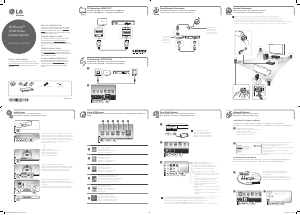
A Sound bar
B Remote Control Receiver / Status LED (Refer to below table)
C Wireless Subwoofer - Install it close to the sound bar.
D External Device - (Blu-ray player, game console, etc.)
Power on Standby
OPTICAL /
HDMI
(eARC/ARC)
Bluetooth
ready
Bluetooth LG TV HDMI IN USB
Red blinking Red White Blue blinking Blue White White Green
a Connect the sound bar to your TV via an optical cable or an HDMI cable.
b If you are using an external device (ex. Blu-ray player, game console, etc.), connect it to the sound bar via an HDMI cable.
c Connect to power in the following order: wireless subwoofer [ sound bar. Then, turn on the sound bar. When the connection is
automatically established with the sound bar, the LED on the wireless subwoofer will light up green.
d Using the product with your TV
A Press the Function
button repeatedly until the rst from above LED lights up in white among the three LEDs.
B On your TV’s settings, set the output speaker to [HDMI ARC], [Optical], or [External Speaker].
e Connecting the product to your smartphone via Bluetooth
A Tap the Settings
button on your smartphone and select Bluetooth.
Turn on the Bluetooth function. ( Off > On)
B Press the Bluetooth pair
button. After a moment, the second LED lights up in blue and blinking among the three LEDs.
C Find and tap the product on your smartphone. The product appears as “LG S60Q (XX)”.
f Connecting to the LG Sound Bar app
A Find and install the LG Sound Bar app on Google Play or App Store from your smartphone.
B You can get more information regarding its use by selecting [Help] in [Setting].
If you see a red LED on the front of the wireless subwoofer, it means that the sound bar is not connected to the subwoofer. If this is the
case, connect them in the following order.
A Press the Power
button on the sound bar to turn it off.
B Press the PAIRING button on the back of the disconnected wireless subwoofer. Check if LED blinks green.
- If you still see a red LED on the front of the wireless subwoofer, press and hold the button on the back of the subwoofer again.
C Press the Power
button on the sound bar to turn it on.
D When the connection is established, you will see a green LED light on the front of the wireless subwoofer.
Keep the sound bar, the subwoofer away from the device (ex. wireless router, microwave oven, etc.) over 1 m to prevent wireless interference.
y Design and specications are subject to change without notice.
y Google Play is a trademark of Google LLC.
S60Q.CEUSLLK_SIMPLE_COV37283221.indd 3 2023-03-29  2:36:03
Descargue el manual en Español (PDF, 16.58 MB)
(Piense en el medioambiente y solo imprima este manual si es de verdad necesario)

Loading…

Puntuación

Dé su opinión de la LG S60Q Sistema de home cinema calificando el producto. ¿Quiere compartir su experiencia con este producto o hacer una pregunta? Deje un comentario en la parte inferior de la página.
¿Estás satisfecho con elLG S60Q Sistema de home cinema?
No
Sea el primero en calificar este producto
0 votos

Únase a la conversación sobre este producto

Aquí puedes compartir lo que piensas sobre LG S60Q Sistema de home cinema. Si tiene alguna pregunta, primero lea atentamente el manual. Puede solicitar un manual utilizando nuestro formulario de contacto.

Más sobre este manual

Entendemos que es bueno tener un manual en papel para tus LG S60Q Sistema de home cinema. Siempre puedes descargar el manual desde nuestro sitio web e imprimirlo tú mismo. Si deseas tener un manual original te recomendamos contactar con LG. Es posible que puedan proporcionar un manual original. ¿Estás buscando el manual de tu LG S60Q Sistema de home cinema en otro idioma? Elija su idioma preferido en nuestra página de inicio y busque el número de modelo para ver si lo tenemos disponible.

Especificaciones

Marca LG
Modelo S60Q
Categoría Sistemas de home cinema
Tipo de archivo PDF
Tamaño del archivo 16.58 MB

Todos los manuales para LG Sistemas de home cinema
Más manuales de Sistemas de home cinema

Manual de uso LG S60Q Sistema de home cinema

Productos relacionados

Categorias relacionadas

×
Download