EN
6
MODEL SHINE BT REF DNI069
ENGLISH USER MANUAL P 2/2
EN
5
Press "
AALLAARRMM 11••VVOOLLUUMMEE--
" and "
AALLAARRMM 22 ••VV OOLL UUMMEE++
" keys to set
the volume level.
If the radio reception is poor in FM, you can move the antenna to
optimize it.
To stop the listening and put the unit in standby, press and hold the
start key "
••SSOOUURRCCEE
".
SS NN OO OO ZZ EE KK EE YY
SS LL EE EE PP FF UU NN CC TT II OO NN
SS EE TT TT II NN GG TT HH EE RR AA DD II OO
SS TT OO RR II NN GG TT HH EE RR AA DD II OO SS TT AA TT II OO NN SS
You can store up to 20 stations.
1• In Radio mode, press and hold the "
>>IIII//
PPRR EESS EETT
" key until the
flashing of the preselection.
2• Press the "
<<<<•• HHOOUURR
" and "
>>>> ••MMIINN UUTTEE
" keys to choose its
position.
3• Press the "
>>IIII//
PPRREESSEETT
" key to store up your selection.
Repeat the operation for the other radio stations.
In Radio mode, to listen to your stored radio stations, press the
"
>>IIII//
PPRR EESS EETT
" key, the last selection is displayed.
Press immediately the "
<<<<••HHOOUURR
" and "
>>>>••MMIINNUUTTEE
" keys to listen to
your preselections (1 to 20).
This key will allow you to interrupt the alarm during 9 minutes.
It will be reactivated during a length of 59 minutes.
This function allows you to fall asleep with music.
Choose your sound source.
Press several times the "
SSLLEEEEPP
" key to choose the listening
time from 10 to 90 minutes, the icon will be displayed.
To stop the listening before the end of the cycle, press the
key "
•• SS OO UU RR CC EE
".
Press several times the key "
••SSOOUURRCCEE
" and select the radio.
Press "
<<<<••HHOOUURR
" and "
>>>>••MMIINNUUTTEE
" keys to listen to the
desired station. For an automatic tuning, press and hold
briefly these keys.
For a quick search, press and hold these keys and release
them on the desired frequency. The frequency will be
displayed for a few seconds then will return to clock mode.
EN
7
LL II SS TT EE NN II NN GG VV II AA BB LL UU EE TT OO OO TT HH
•• PP aa ii rr ii nn gg aa bb ll uu ee tt oo oo tt hh dd ee vv ii cc ee
You first have to pair the bluetooth device you want to connect to your speaker.
1
Press several times the start key
"
//SS OOUU RR CC EE
" and select the icon " " that will
appear flashing on the display.
2
On the device to connect, make sure the Bluetooth mode is activated and go
to "Bluetooth settings".
3 Select in the list "
NNAAFF BBTT 006699--007700
".
You will hear a beep, and the icon " " will stop flashing.
If a confidential code is requested,enter 4 times zero "0000". Your Bluetooth device will be automati-
cally recognized by your docking station, if this is not the case,you will have to repeat the procedure.
To delete the paired device, press and hold the "
>>IIII//PPRREESSEETT
" key until you hear the
Beep sound, the icon flashes.
•• LL ii ss tt ee nn ii nn gg vv ii aa BB ll uu ee tt oo oo tt hh
1 Press several times the start key "
//SS OOUU RR CC EE
" and select the icon " " which will
appear flashing on the display.
Press the "
>>IIII//PPRREESSEETT
" key to start the listening or to pause it.
To forward or backward the songs listening, press briefly the
"
<<<<••HHOOUURR
" and
"
>>>>••MMIINNUUTTEE
" keys.
You will be able to listen to your music wirelessly within a radius of about 10 meters.
PS..If you do not use your speaker for 15 minutes, it will turn off automatically.
Please take care when dis-
posing of this product. At
the end of the product’s
life it should be entered
into a recycling scheme. It
should not be disposed of
in normal domestic waste.
EN
9
EN
10
• Model Shine BT reference DNI069
• Clock Radio FM PLL Bluetooth
• Frequency range : FM 87.5 - 108,0 Mhz - 20 presets
• 2W audio digital amplifier with a passive radiator
• Bluetooth type 3.0 + EDR
• Distance : 10 meters
• 2 alarms : radio, buzzer, Bluetooth
• Sleep function
• Snooze key
• 3v battery backup function
• Adjustable orange LED display
• Supply: 220V AC - 50 Hz
• Backup supply : 3 volts battery (CR2025)
• Dimensions: 135 x 63 x 92 mm
• Weight : 160 grams (without battery)
Registered Trademark and model, XZ
2016
. Designs
and specifications may be altered without notice.
The Bluetooth® word mark and logos are registered
trademarks owned by Bluetooth SIG, Inc.
SS PP EE CC II FF II CC AA TT II OO NN SS PP RR EE CC AA UU TT II OO NN SS
GGUUAARRAANNTTEEEE AANNDD SSUUPPPPOORRTT
- Your appliance must be placed in an environment enough ventilated. Do not install this
equipment in a confined space such as a book case or similar unit without proper ventila-
tion or near heat sources .
- The ventilation should not be impeded by covering the ventilation openings with items
such as newspaper, table-cloths, curtains etc in order to prevent internal heat.
-The appliance shall notbe exposed to dripping or splashing and that no objects filled with
liquids, such as vases, shall be placed on the appliance.
- Where the mains plug or an appliance coupler is used as the disconnect device, the
disconnect device shall remain readily operable.
- We advise you against the use of your appliance in a damp environment as bathroom.
- To clean your appliance, never use solvents but a product that does not damage plastic
with a cloth to avoid scratching.
Shine BT is guaranteed for parts and labor for two years from the date shown on your
purchase invoice. The guarantee does not cover defects or damage caused by incorrect use,
accidents, a dismantling out of our after-sales service or due to external phenomena.
In some cases, it may be necessary to reset your appliance.
- Unplug the appliance from the mains power
- Remove the battery from its compartment
Wait a few minutes, then reinstall all the elements. Check that the back-up battery is new.
If the problem continues, contact your retailer.
For further information, e-mail: support@nafnaf.fr
EN
8
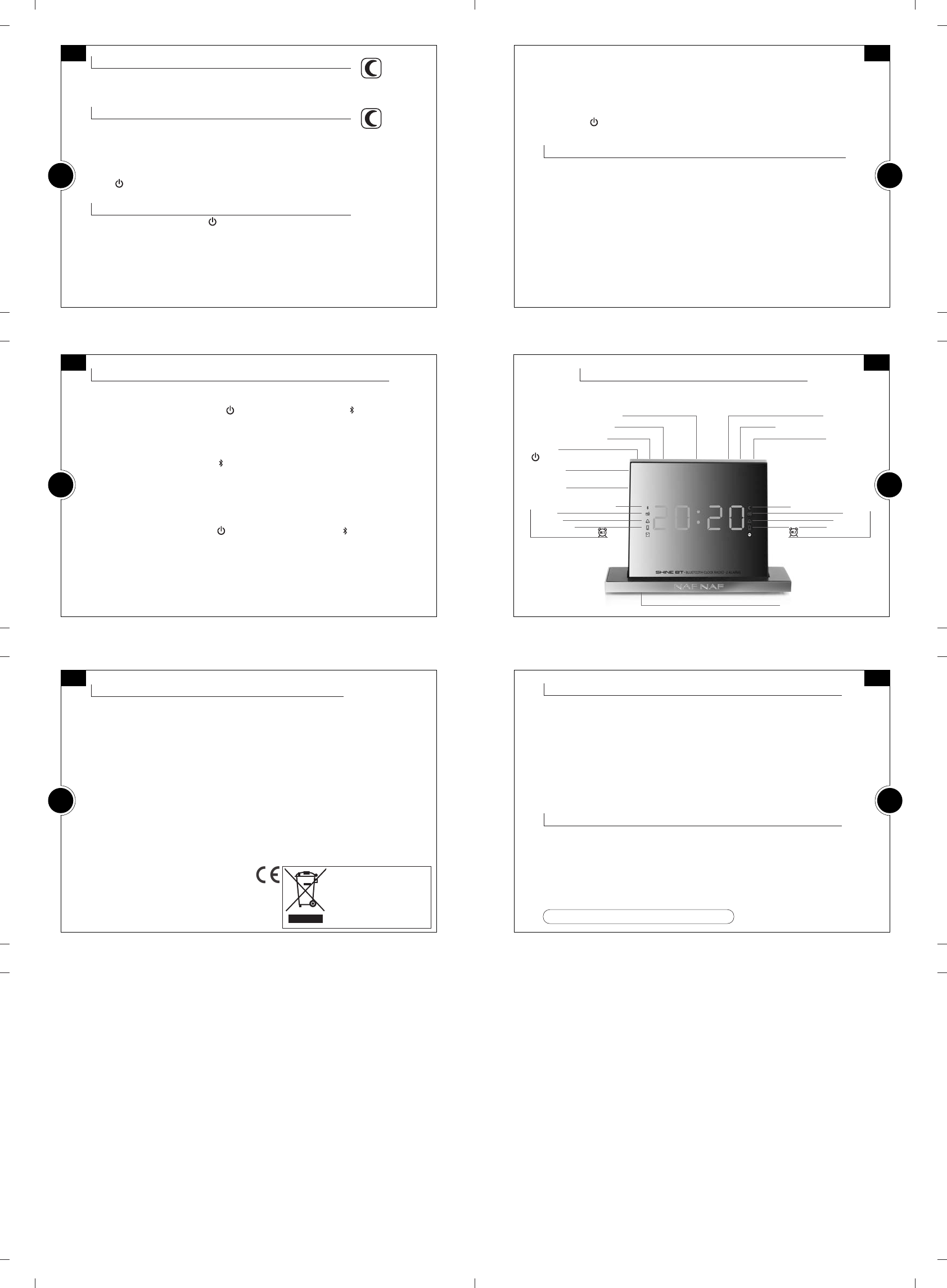
DD EE SS CC RR II PP TT II OO NN OO FF FF UU NN CC TT II OO NN SS
Clock key
Play
>>IIII
/Pause/Preset key
Sleep key
Snooze/Sleep icon
Radio
Buz zer
Bluetooth
Alarm 2 icons
Battery compartment
Snooze / Dimmer key
FWD >>/ Minute key
REW <</ Hour key
On/Off
/Source key
Alarm 1
/ Volume - key
Alarm 2
/ Volume + key
Bluetooth mode icon
Radio
Buzzer
Bluetooth
Alarm 1 icons


Únase a la conversación sobre este producto
Aquí puedes compartir lo que piensas sobre Nafnaf DNI069 Shine BT Radiodespertador. Si tiene alguna pregunta, primero lea atentamente el manual. Puede solicitar un manual utilizando nuestro formulario de contacto.