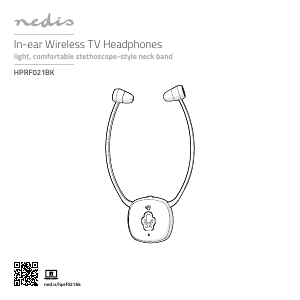
Manual de uso Nedis HPRF021BK Auriculares

¿Necesita un manual para su Nedis HPRF021BK Auriculares? A continuación puedes ver y descargar el manual en PDF gratis en español. Este producto actualmente tiene 6 preguntas frecuentes, 1 comentario y tiene 2 votos con una calificación promedio de producto de 0/100. Si este no es el manual que desea, , contáctenos.

¿Su producto tiene algún defecto y el manual no ofrece ninguna solución? Vaya a Repair Café para solicitar un servicio de reparación gratuito.

Manual de uso

Loading…

5
3.5 mm audio cable + RCA adapter cable
a. Plug A
e
into A
s
.
b. Plug the other end of A
e
into the RCA adapter cable (female)
A
r
.
c. Plug the other end of A
r
into your audio source device (e.g. TV
or Hi-Fi system).
Optical audio cable
a. Plug the optical audio cable A
t
into the optical audio input
A
p
.
b. Plug the other end of A
t
into your audio source device (e.g. TV
or Hi-Fi system).
4. Slide A
5
to the ON position to switch on the product.
4
If there is no audio signal from the audio source, or if the signal
is too weak for proper reception, the transmitter turns o
automatically after about 5 minutes. As soon as the audio signal
returns, the transmitter turns back on automatically.
Pairing an additional headset
You can listen to the same audio source device with more people by
connecting multiple headphones to a single transmitter.
Follow these instructions to pair additional headphones to A
8
.
1. Unplug A
y
from the power outlet.
2. Slide A
5
to the ON position to switch on the additional
headphones.
3. Press and hold the mute button A
4
for 5 seconds.
The indicator LED A
3
blinks quickly to indicate pairing mode is
active.
4. Plug A
y
into the power outlet.
A
3
lights up continuously to indicate pairing is successful.
Using the product
1. Switch on the audio source that is connected to the transmitter.
The power indicator LED A
q
lights up green.
2. Slide A
5
to the ON position to switch on the product.
A
3
lights up blue.
4
Rotate the volume wheel A
2
to adjust the volume to the desired
sound level.
4
Rotate the sound balance switch A
i
to adjust the volume
balance between the left and the right earbud.
Switching between modes
Follow these instructions to switch between listening mode and
conversation mode without taking o the headphones.
1. Press the mute button A
4
to switch to ambient sound mode.
Sounds and voices picked up by the microphone are amplied
through the headphones.
Using headphones with both ears covered while participating in
trac is discouraged and may be illegal in some areas.
Some wireless products may interfere with implantable medical
devices and other medical equipment, such as pacemakers,
cochlear implants and hearing aids. Consult the manufacturer of
your medical equipment for more information.
Do not use the product at locations where the use of wireless
devices is prohibited due to potential interference with other
electronic devices, which may cause safety hazards.
This product is equipped with a non-removable internal battery.
Do not attempt to replace the battery yourself.
Charge the battery for at least 3 hours when you use it for the rst
time.
Do not use any charger other than that specifcally provided for
use with the product.
The charger must only be plugged into an earthed socket-outlet.
During charging, the battery must be placed in a well-ventilated
area.
Do not leave a battery on prolonged charge when not in use.
Only power the product with the voltage corresponding to the
markings on the product.
Children of less than 8 years should be kept away.
Cleaning and user maintenance shall not be done by children
without supervision.
This product is not a toy. Never allow children or pets to play with
this product.
Charging the headphones
-
Charge the battery for at least 3 hours when you use it for the
rst time.
1. Slide the on / o switch A
5
to the OFF position to switch o the
product.
2. Place the headphones A
1
with the charging contacts A
7
onto
the charging pins A
9
.
The charging indicator LED A
w
lights up red to indicate that the
headphones are charging, and turns green when the battery is fully
charged.
Connecting the transmitter
1. Plug the power adapter A
y
into the power input A
o
.
2. Plug the other end of A
y
into a power outlet.
3. Choose one of the three options to connect the transmitter.
3.5 mm audio cable
a. Plug the audio cable A
e
into the audio port A
s
.
b. Plug the other end of A
e
into your audio source device (e.g. TV
or Hi-Fi system).
Descargue el manual en Español (PDF, 1.28 MB)
(Piense en el medioambiente y solo imprima este manual si es de verdad necesario)

Loading…

Puntuación

Dé su opinión de la Nedis HPRF021BK Auriculares calificando el producto. ¿Quiere compartir su experiencia con este producto o hacer una pregunta? Deje un comentario en la parte inferior de la página.
¿Estás satisfecho con elNedis HPRF021BK Auriculares?
No
0%
100%
2 votos

Únase a la conversación sobre este producto

Aquí puedes compartir lo que piensas sobre Nedis HPRF021BK Auriculares. Si tiene alguna pregunta, primero lea atentamente el manual. Puede solicitar un manual utilizando nuestro formulario de contacto.

Hans 14-10-2024
Auriculares conectados al receptor de TV con cable óptico. Funciona bien. Pero el transmisor pierde la fuente de alimentación (230 voltios) cuando no está en uso y debe volver a conectarse a la corriente antes de cada uso.

responder | Ha sido de gran ayuda (0) (Traducido por Google)

Más sobre este manual

Entendemos que es bueno tener un manual en papel para tus Nedis HPRF021BK Auriculares. Siempre puedes descargar el manual desde nuestro sitio web e imprimirlo tú mismo. Si deseas tener un manual original te recomendamos contactar con Nedis. Es posible que puedan proporcionar un manual original. ¿Estás buscando el manual de tu Nedis HPRF021BK Auriculares en otro idioma? Elija su idioma preferido en nuestra página de inicio y busque el número de modelo para ver si lo tenemos disponible.

Especificaciones

Marca Nedis
Modelo HPRF021BK
Categoría Auriculares
Tipo de archivo PDF
Tamaño del archivo 1.28 MB

Todos los manuales para Nedis Auriculares
Más manuales de Auriculares

Preguntas frecuentes sobre Nedis HPRF021BK Auriculares

Nuestro equipo de atención al cliente busca información útil sobre los productos y responde a las preguntas frecuentes. Si encuentra inexactitudes en las preguntas frecuentes, indíquenoslo usando nuestro formulario de contacto.

Cuando conecto un auricular a mi dispositivo, no funciona correctamente, ¿qué puedo hacer? Verificado

Es posible que se haya acumulado suciedad en la abertura donde está conectado el auricular, impidiendo que haga un contacto adecuado. La mejor forma de limpiarlo es con aire comprimido. En caso de duda, haga que lo haga un profesional.

Ha sido de gran ayuda (1163) Leer más

¿Cuándo está la música demasiado alta? Verificado

El sonido por encima de los 80 decibelios (dB) puede causar daños en la audición. Los sonidos por encima de 120 dB dañan la audición de forma inmediata. La gravedad de los daños depende de la frecuencia y la duración del sonido.

Ha sido de gran ayuda (1051) Leer más

¿Qué es la cancelación de ruido? Verificado

La cancelación de ruido es una técnica que se utiliza principalmente en auriculares. El control de ruido activo se utiliza para reducir o eliminar la influencia del ruido ambiental.

Ha sido de gran ayuda (644) Leer más

¿El bluetooth funciona a través de paredes y techos? Verificado

Una señal bluetooth funcionará a través de paredes y techo, a menos que estén hechos de metal. Dependiendo del grosor y del material de la pared, la señal puede perder fuerza.

Ha sido de gran ayuda (254) Leer más

¿Hasta qué nivel es seguro el ruido para los niños? Verificado

Los niños se dañan los oídos antes que los adultos. Por lo tanto, nunca exponga a los niños a un ruido superior a 85 dB. En el caso de los auriculares hay modelos especiales para niños. Con altavoces u en otras situaciones hay que estar atento para que el ruido no supere ese nivel.

Ha sido de gran ayuda (181) Leer más

¿Puedo enrollar el cable alrededor del dispositivo después de su uso? Verificado

Es mejor no hacer esto, porque puede dañar el cable. Lo mejor que puede hacer es enrollar el cable tal como estaba cuando se empacó el producto.

Ha sido de gran ayuda (181) Leer más
Manual de uso Nedis HPRF021BK Auriculares

Productos relacionados

Categorias relacionadas

×
Download