R
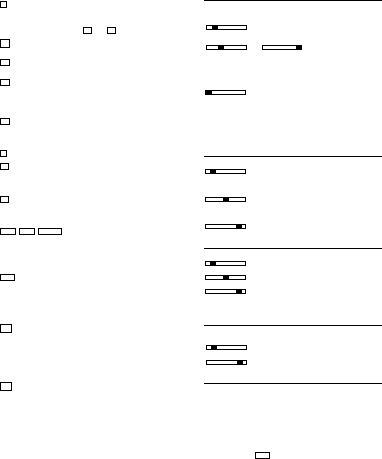
esult key for multiplications and divisions
- Conclude calculation.
Result is requested.
T
he result can be further used with the (+, -, x, 앦) command or
transferred to the memory with and .
M
emory total key
- Recall / Clear memory contents.
M
emory sub-total key
- Recall memory contents.
Memory subtraction key
-
The entered value is subtracted from the memory con-
tents.
- Conclude calculation.
T
he result is subtracted from the memory contents.
Memory addition key
-
The entered value is added to the memory contents.
- Conclude calculation.
The result is added to the memory contents.
Paper transport key
P
ercent mark-up key
- The percentage value is added.
To be proceeded by stored percentage or entered percen-
t
age.
Delta %
- For the calculation of percentage differences of two va-
lues.
Calculation
- Used for calculating the cost, selling price and profit mar-
gin amount.
Enter the value of any 2 items to obtain automatically the un-
known value item. (e.g. enter the value of the cost and the
selling price to obtain automatically the profit margin %.)
Rate set key
To perform with function key and numeral key.
- Recall and set the 1st currency and 2nd currency.
- Recall and store the currency rates.
- Recall the stored rate and store the rate for TAX and %+
calculations.
- Negative value can not be entered as any rate.
Currency conversion-1 / Tax plus key
TAX+ Selection slide switch at the CONV mode position:
- Convert from 2nd currency to 1st currency.
To be proceeded by conversion rates of originally installed
11-currency and user stored currencies.
Selection slide switch at the TAX mode position:
- The Tax value is added.
To be proceeded by stored tax rate.
Currency conversion-2 / Tax minus key
TAX– Selection slide switch at the CONV mode position:
- Convert from 1st currency to 2nd currency.
To be proceeded by conversion rates of originally installed
11-currency and user stored currencies.
Selection slide switch at the TAX mode position:
- The Tax value is subtracted.
To be proceeded by stored tax rate.
B.5 Sliding switches
B
.5.1 Point selection
A F 0 2 3 4 6 Floating decimal point ON
R
esult to maximum number of decimal places.
A F 0 2 3 4 6 A F 0 2 3 4 6 Fixed point ON
T
he result is given, depending on the switch setting, to 0,2,3,4 or 6
decimal places.
Sums which extend beyond the number of places to the left of the
d
ecimal point, limited by a fix point, results in the decimal places
being truncated.
A
F 0 2 3 4 6 Rapid adding ON (add mode)
After entering the digits (without point) and pressing the Addition or
Subtraction keys, the decimal point is automatically set in front of
t
he last two digits.
At Conversion-Mode:
I
f conversion result is ʻ Euroʼ, the decimal point will be automatically
set at 2 & 5/4, excluding the case of decimal setting at ʻ Fʼ position.
B.5.2 Rounding selection
▼
5/4 ▲ Truncation ON
The decimal places extending beyond the set number are trunca-
ted.
▼ 5/4 ▲ Rounding ON
The decimal number extending beyond the set number of places is
rounded up or down.
▼ 5/4 ▲ General rounding to 1 digit
B.5.3 Calculation mode and item counter selection
D P IC Display mode
D P IC Print and Display mode
D P IC Item counter (+),ON
- Counts all + and - entries, upwards
When switching from D to P or IC, a control paper feeding of 1 line
is executed.
B.5.4 Currency conversion mode and Tax calculation mode
selection
CONV TAX Currency conversion mode
CONV TAX Tax calculation mode
B.6 Display indication
M - The memory contains data
– - Negative value
E - Capacity overflow
Currency symbols on display are shown in “Currency code table”
(page 29)
When depressing SEt will be appeared on display.
When Tax rate is stored or recalled, t will be appeared with num-
ber on display.
When %+ rate is stored or recalled, P will be appeared with num-
ber on display.
RATE
=
M–M+
M쏄
M◊
M
_
M+
앖
%+
∆%
RATE
왘5 1
왘5 2
COST SELL MARGIN
8


Únase a la conversación sobre este producto
Aquí puedes compartir lo que piensas sobre Olympia CPD 3212 T Calculadora con impresoras. Si tiene alguna pregunta, primero lea atentamente el manual. Puede solicitar un manual utilizando nuestro formulario de contacto.
responder | Ha sido de gran ayuda (0) (Traducido por Google)
responder | Ha sido de gran ayuda (0) (Traducido por Google)