Manual de uso Panasonic RP-SM04GCE1K Tarjeta SD

¿Necesita un manual para su Panasonic RP-SM04GCE1K Tarjeta SD? A continuación puedes ver y descargar el manual en PDF gratis en español. Este producto actualmente tiene 4 preguntas frecuentes, 0 comentarios y tiene 0 votos. Si este no es el manual que desea, , contáctenos.

¿Su producto tiene algún defecto y el manual no ofrece ninguna solución? Vaya a Repair Café para solicitar un servicio de reparación gratuito.

Manual de uso

Loading…
2
Use an oil-based felt pen to write on the card. Do not use
pencils or ballpoint pens as these can damage the card and
data on it. Take care to keep the metal terminals free from ink.
While data is being read or written, do not remove the card or
turn off any equipment using the card. Do not remove the
batteries from battery-operated equipment. These actions can
cause data to be destroyed.
Make backup copies of your data wherever possible.
Panasonic will not accept responsibility for any data loss or loss
directly or indirectly caused by data loss.
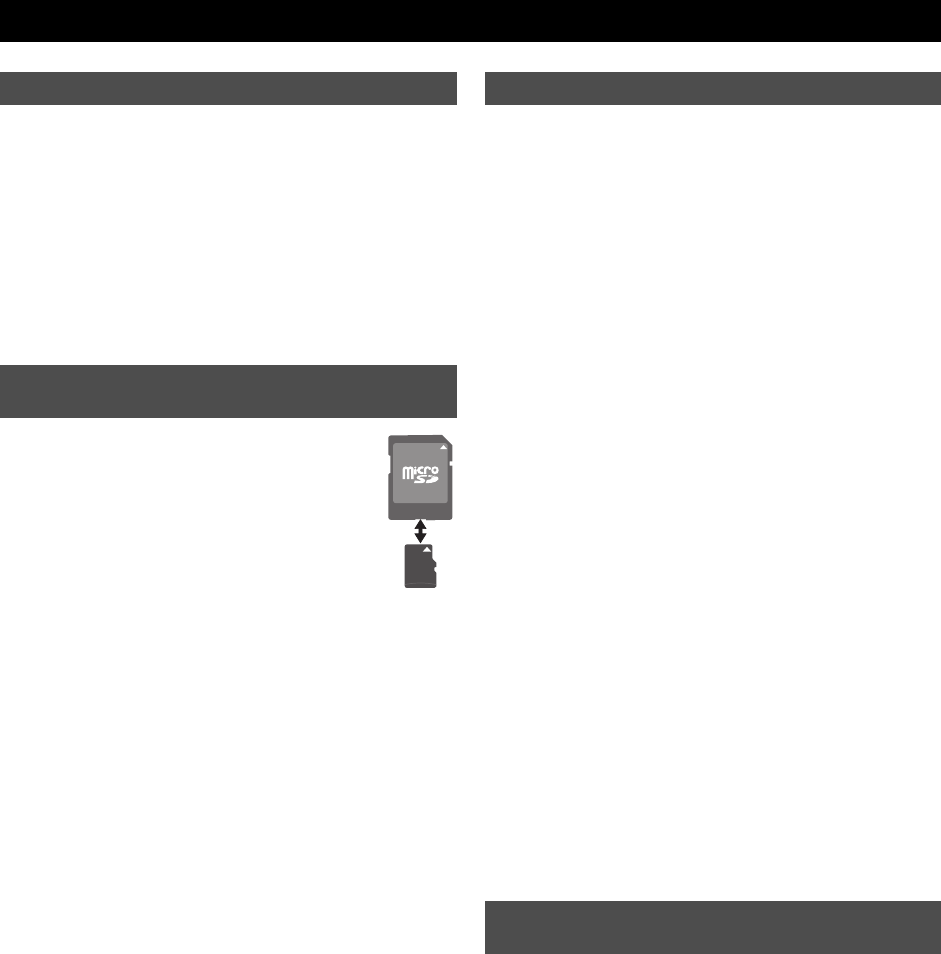
A microSDHC(microSD) card can be used on a
device having an SD memory card slot by inserting it
into the dedicated microSDSD adaptor (not
supplied). (When fitting the card, verify its orientation
and insert it into the adaptor as far as it will go. When
removing the card, pull it out in the opposite
direction.)
Keep out of reach of children. If swallowed, seek medical
advice immediately.
This card is coated with a bittering agent
¢
to prevent it from
being swallowed. The effect and sustentation of the bittering
agent is limited.
¢ The bittering agent tastes bitter, but has no harmful effects
(denatonium benzoate is used).
If a microSDHC(microSD) card is used on devices supporting
SDHC(SD) memory cards, always fit it to the exclusive adaptor.
Insert or remove the microSDHC(microSD) card together with
the adaptor. Do not leave the adaptor connected to the device.
Otherwise, this may cause a malfunction, or a device or data
failure.
This card is formatted to the SDHC(SD) memory card standard.
If reformatting is ever necessary, format it using SDHC(SD)
compatible equipment or SD formatting software compatible
with SDHC(SD) memory card. Formatting the card with any
other software will make the card non-standard and cause
problems with compatibility and performance. For a free version
of SD formatting software, visit Panasonic’s homepage.
http://panasonic.jp/support/audio/sd/download/sd_formatter_e.html
When a microSDHC(microSD) card or an adaptor is removed
from the device, do not leave the card or adaptor out in the
open.
Do not disassemble or remodel.
Do not impact, bend, drop, or wet.
Do not touch the metal terminals with your hands or metal
objects.
Do not attach other labels or stickers.
Do not use or store this card in a location subjected to static
electricity or electrical noise. If the host device does not operate
normally due to the effects of static electricity on the card, then
remove the card from the host device and insert it again.
Do not use or store in locations directly exposed to sunlight, a
heat vent, or a heating appliance.
Do not use or store in humid or dusty locations.
Do not use or store in locations exposed to corrosive gases.
microSDHC(microSD)/SDHC(SD) compatible equipment may
contain the functions “Format” and “Erase”. However, in most
cases all data on the card will not be completely erased even
after performing these functions. When disposing or transferring
ownership of the card, we recommend using Panasonic
formatting software (http://panasonic.jp/support/audio/sd/
download/sd_formatter_e.html) to completely erase all data from
the card.
microSDHC Logo is a trademark.
microSD Logo is a trademark.
ENGLISH
Protecting your data
To use this card on a device supporting
SDHC(SD) memory cards
Handling and storage precautions
Cautions about disposal or transferring
ownership of this card
RP-SM_E2.book 2 ページ 2009年5月27日 水曜日 午後1時48分
Descargue el manual en Español (PDF, 2.26 MB)
(Piense en el medioambiente y solo imprima este manual si es de verdad necesario)

Loading…

Puntuación

Dé su opinión de la Panasonic RP-SM04GCE1K Tarjeta SD calificando el producto. ¿Quiere compartir su experiencia con este producto o hacer una pregunta? Deje un comentario en la parte inferior de la página.
¿Estás satisfecho con elPanasonic RP-SM04GCE1K Tarjeta SD?
No
Sea el primero en calificar este producto
0 votos

Únase a la conversación sobre este producto

Aquí puedes compartir lo que piensas sobre Panasonic RP-SM04GCE1K Tarjeta SD. Si tiene alguna pregunta, primero lea atentamente el manual. Puede solicitar un manual utilizando nuestro formulario de contacto.

Más sobre este manual

Entendemos que es bueno tener un manual en papel para tus Panasonic RP-SM04GCE1K Tarjeta SD. Siempre puedes descargar el manual desde nuestro sitio web e imprimirlo tú mismo. Si deseas tener un manual original te recomendamos contactar con Panasonic. Es posible que puedan proporcionar un manual original. ¿Estás buscando el manual de tu Panasonic RP-SM04GCE1K Tarjeta SD en otro idioma? Elija su idioma preferido en nuestra página de inicio y busque el número de modelo para ver si lo tenemos disponible.

Especificaciones

Marca Panasonic
Modelo RP-SM04GCE1K
Categoría Tarjetas SD
Tipo de archivo PDF
Tamaño del archivo 2.26 MB

Todos los manuales para Panasonic Tarjetas SD
Más manuales de Tarjetas SD

Preguntas frecuentes sobre Panasonic RP-SM04GCE1K Tarjeta SD

Nuestro equipo de atención al cliente busca información útil sobre los productos y responde a las preguntas frecuentes. Si encuentra inexactitudes en las preguntas frecuentes, indíquenoslo usando nuestro formulario de contacto.

No puedo agregar archivos a mi tarjeta SD, ¿por qué? Verificado

Las tarjetas SD estándar tienen un interruptor de bloqueo en el lado izquierdo de la tarjeta. Si el bloqueo está activado, es imposible agregar o borrar archivos a la tarjeta. Desactive el bloqueo para tener acceso completo a la tarjeta.

Ha sido de gran ayuda (8) Leer más

¿Cuántos bytes son un kilobyte, megabyte, gigabyte y terabyte? Verificado

Un kilobyte consta de 1000 bytes. 1 megabyte = 1000 kilobytes. 1 gigabyte = 1000 megabytes. 1 terabyte = 1000 gigabytes.

Ha sido de gran ayuda (3) Leer más

¿Qué significa SD? Verificado

SD son las siglas de Secure Digital. Las tarjetas SD son el medio de almacenamiento estándar para muchas cámaras digitales.

Ha sido de gran ayuda (3) Leer más

Mi tarjeta SD no encaja en el lector, ¿por qué? Verificado

Hay diferentes tamaños de tarjeta SD, SD estándar, miniSD y microSD. Hay adaptadores para que las tarjetas SD más pequeñas se adapten a los lectores SD normales.

Ha sido de gran ayuda (2) Leer más
Manual de uso Panasonic RP-SM04GCE1K Tarjeta SD

Productos relacionados

Categorias relacionadas

×
Download