6
BASIC OPERATION
OFF
/
ON
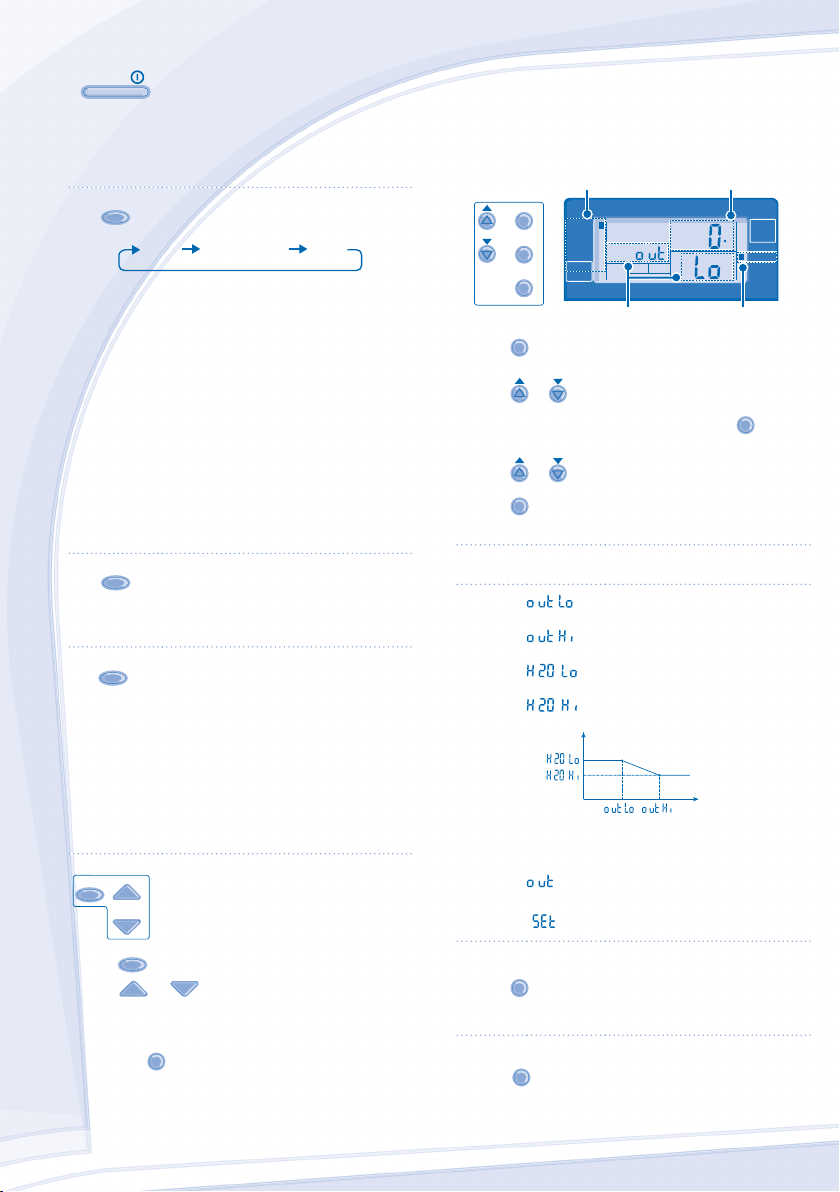
TO TURN ON OR OFF THE UNIT
• When unit is ON, operation LED is lit and the actual
temperature for water outlet and outdoor ambient are
shown on the control panel display.
MODE
TO SELECT OPERATION MODE
HEAT HEAT+TANK TANK
• HEAT MODE
- To turn ON or OFF the panel/fl oor heating operation.
- In this mode, the outdoor unit will provide heating
capacity to the indoor unit.
• HEAT + TANK MODE
- In this mode, the outdoor unit will provide heating
capacity to the sanitary tank and indoor unit.
- This operation is not used when the sanitary water
tank is not installed.
• TANK MODE
- To turn ON or OFF the sanitary tank operation.
- In this mode, the outdoor unit will provide heating
capacity to the sanitary tank.
QUIET
TO ENJOY QUIET ENVIRONMENT
• This operation reduces outdoor unit noise. In this
condition, it may cause decrease in heating capacity.
HEATER
TO ENABLE THE BACKUP
HEATER
• The backup heater provides extra heating capacity
during cold outdoor temperature and only can operated
at heat mode operation for indoor unit when he was
enabled by pushing this button.
• The backup heater will automatically turn ON when the
setting conditions is fulfi lled.
• To disabled the Heater operation manually, press the
respective button again.
STATUS
SEARCH
CHECK
SYSTEM STATUS CHECK MODE
1. Press
CHECK
for 5 seconds to enter STATUS mode.
2. Press or to check the Water Inlet
Temperature, Tank Temperature, Compressor Running
Frequency or Error History.
• Press
AN
E
to exit STATUS mode.
• Once STATUS mode is entered, “STATUS”
indicator is ON.
• STATUS mode cannot be activated when the
“SETTING” indicator is ON.
•
It is strongly recommended to contact the nearest
authorized dealer to change the water temperature range.
• Using the control panel could set the temperature
range for water outlet temperature and outdoor ambient
temperature.
SYSTEM SETTING MODE
SET
SELECT
CANCEL
SETTING
TIMER OUTDOOR
HEAT
SETTING
STATUS
SERVICE
BOOSTER
DEFROST
QUIET
TANK
WATER OUTLET
C
HEATER
OPERATION
FORCE
HEATER
ACTUAL
ON
Operation Mode Temperature display
SETTING indicator
Parameter *
1. Press
SET
for 5 seconds to enter “SETTING” mode.
“SETTING” indicator is ON.
2. Press
or to choose a parameter.
3. After selecting the desired parameter, press
SELECT
to enter
the parameter.
4. Press
or to set the desired temperature.
5. Press
SET
again to confi rm the setting.
• Repeat steps 2 to 5 to set other parameters.
Operation
Mode
Parameter * Description
HEAT
Low outdoor ambient set temperature
(-15°C ~ 15°C).
HEAT
High outdoor ambient set temperature
(-15°C ~ 15°C).
HEAT
Water outlet set temperature at low outdoor
ambient temperature (25°C ~ 55°C).
HEAT
Water outlet set temperature at high outdoor
ambient temperature (25°C ~ 55°C).
Water Temperature
Outdoor Temperature
HEAT
OFF
Set temperature for turning OFF heating
operation (5°C ~ 35°C).
HEATER
ON
Outdoor ambient set temperature for turning
ON heater operation (-15°C ~ 20°C).
TANK
Sanitary tank set temperature
(40°C ~ 75°C).
WATER TEMPERATURE THERMO SHIFT SETTING
1. Press
SET
within 5 seconds.
• Repeat steps 3 to 5 to set the desired shift temperature
(-5°C ~ 5°C).
Notes:
• Press
AN
E
or wait 30 seconds to exit “SETTING” mode.
• The setting temperature will be stored in the system once
confi rm.
• “SETTING” mode cannot be activated when the
“SERVICE” and “STATUS” indicator is ON.
ADVANCE OPERATION
F568562_YS0112-0.indb 6F568562_YS0112-0.indb 6 16-Mar-12 9:42:07 AM16-Mar-12 9:42:07 AM
Process CyanProcess CyanProcess MagentaProcess MagentaProcess YellowProcess YellowProcess BlackProcess BlackPANTONE 293 CPANTONE 293 C


Únase a la conversación sobre este producto
Aquí puedes compartir lo que piensas sobre Panasonic WH-SXF09D3E5-1 Bomba de calor. Si tiene alguna pregunta, primero lea atentamente el manual. Puede solicitar un manual utilizando nuestro formulario de contacto.