9
8
EN
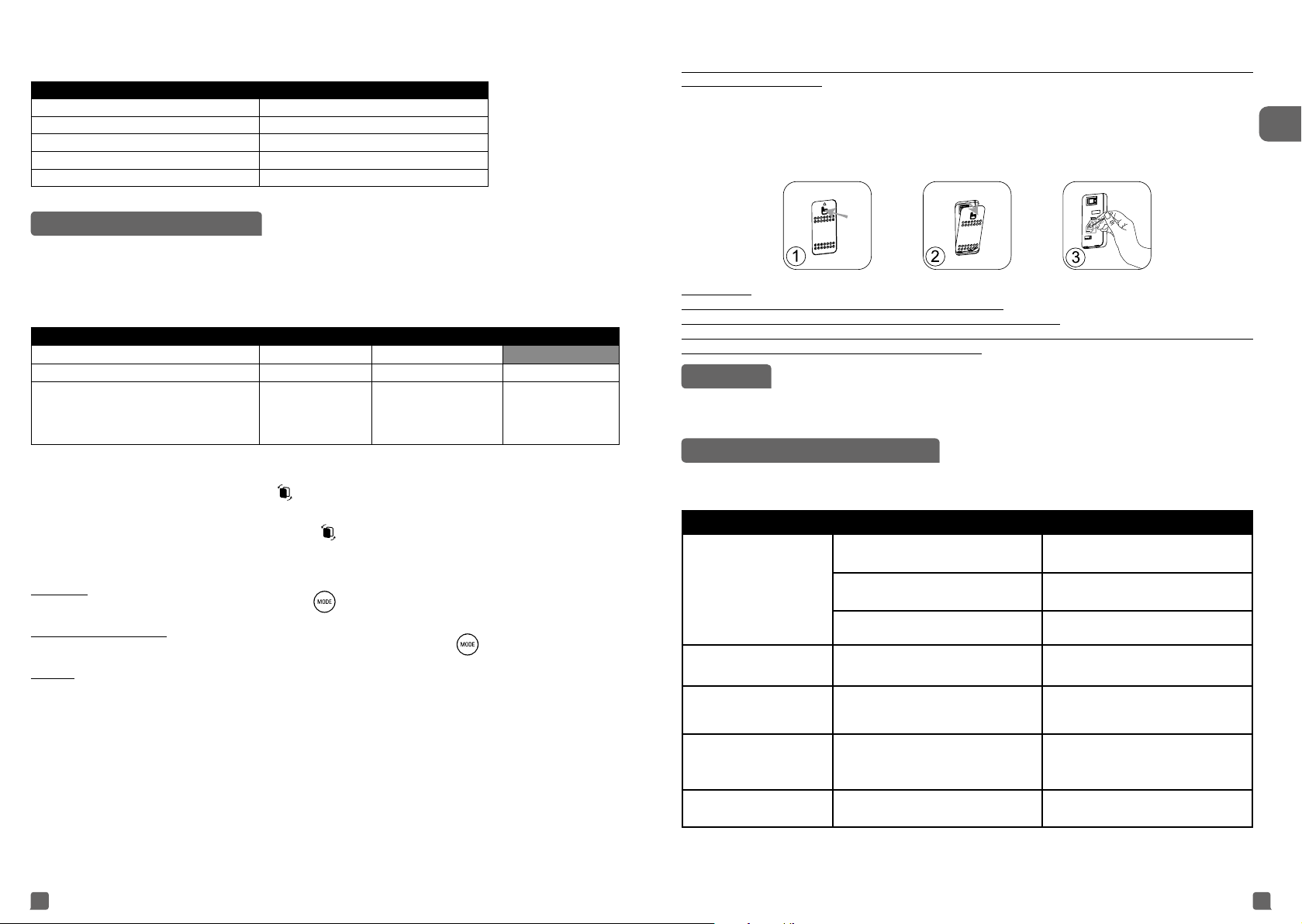
• Indication of air quality
Air quality indicator (12) is located at the front panel (C) of the appliance. The 3 LED will indicate the air quality
level:
Air Quality Air quality indicator color
Excellent Blue
Slight pollution Green
Moderate pollution Yellow
High pollution Orange
Extreme pollution Red
CARE AND MAINTENANCE
Before performing any maintenance work, switch off the air purifier using the on/off button (1).
Use a damp cloth to clean the surface of the product.
Important: Do not use any abrasive materials, as these may damage the surface of the product.
Frequency of cleaning/replacing the lters :
Filter Clean/replace Frequency Filter codes
Pre filter Clean Every 2 months
2in1 Active Carbon & Allergy+ filter Replace Every 12 months XD6231
NanoCaptur+ filter Replace
Color changing (see
color chart on filter)
or every 12 months in
case of no saturation.
XD6082
These figures are based on tests in which the air purifier is used for 8 hours per day in quiet mode.
You may need to replace the filters more often depending on the air quality and how often the air purifier
is used. The filter replacement indicator (7)
will turn on when the filters need to be replaced and you
will receive a notification on your mobile application. To replace the filters, please refer to the section
“Disassembling / Reassembling filters”.
Important! When the filter replacement indicator (7)
turns on, please check on the mobile application in
order to know which filter has to be replaced. If two filters must be changed, please change them one by one.
Change the second filter only after changing the first one and after resetting the first filter.
• The pre-lter can be cleaned with a vacuum cleaner or rinsed in water.
Important: Resetting the filter
After replacing the filter, press the mode button (2) for 3 seconds to reset the filter settings.
Performing a force reset:
If you replace a filter before the end of its lifespan, press the mode button (2) for 3 seconds to reset the
filter settings.
Caution :
If the granules become "white opaque", filter needs to be removed from the purifier until the granules
become transparent again.
If the opaque aspect persists, filter need to be changed.
If the granule become "crumbly", filter need to be changed.
The appliance efficiency can be reduced if the pre-filter is not cleaned regularly.
Never use a pre-filter that is still damp.
The pre-filter is the only filter which can be re-used and washed with water. The 2in1 Active Carbon & Allergy+ filter
cannot be cleaned and re-used. Never wash with water. The 2in1 Active Carbon & Allergy+ filter must be replaced
after the end of its lifespan. For optimum performance of the appliance, only use filters provided by Rowenta. If
the Nanocaptur+ filter granules become opaque white or/and crumbly, the filter needs to be changed.
Please note: certain filters may emit a temporary slight odour, due to the transport and storage conditions.
This odour will vanish and is not dangerous for people.
Pollution sensors
The particle sensor need to be cleaned regularly (every 2 months) and appropriately.
Make sure you turn off and unplug the appliance before cleaning the pollution sensors and follow the
recommendations below:
1. Clean the air inlet and outlet using a soft brush or cloth.
2. Open the sensor cover located on the left hand side of the appliance.
3. Lightly wet a cotton swab and remove any dust from the lens and the inlet/outlet. Wipe using a dry cotton
swab.
4. Clean the sensor using a soft brush or vacuum cleaner.
IMPORTANT:
Never use a detergent or metal object to clean the sensors.
The efficiency of the sensors may be reduced if not cleaned regularly.
Cleaning frequency varies depending on the operating environment of the appliance. If it is used in a
dusty environment, clean the sensors more frequently.
STORAGE
When you are not using the appliance, store it in a cool, dry place with ambient conditions no higher than 35°C
(95°F) 70%RH.
IN THE EVENT OF A PROBLEM
• Do not disassemble the appliance yourself. A poorly repaired appliance may be dangerous for the user.
• Check the troubleshooting table below before contacting an Approved Service Center:
Problem Check Solution
The appliance does not
switch on.
Is the power cord connected?
Connect the power cord to a plug with
the correct voltage.
Are all the display elements off?
Press the on/off button and select the
required function.
Is there a power outage?
You can use your purifier once the
power turns on again.
The air flow does not
change automatically.
Is the appliance in manual mode? Select the correct operating mode.
The flow is a lot weaker
than before.
Does the filter need to be cleaned or
replaced?
Check the filter cleaning and
replacement frequencies and clean/
replace the filter(s) if necessary.
There is an unpleasant
smell coming from the air
outlet.
Does the light still indicate poor air
quality?
Check the filter cleaning and
replacement frequencies and clean/
replace the filter(s) if necessary.
The air quality indicator
does not change color.
Is the sensor lens covered with dust? Clean the sensor lens.


Únase a la conversación sobre este producto
Aquí puedes compartir lo que piensas sobre Rowenta PU3080F0 Pure Air Genius Purificador de aire. Si tiene alguna pregunta, primero lea atentamente el manual. Puede solicitar un manual utilizando nuestro formulario de contacto.