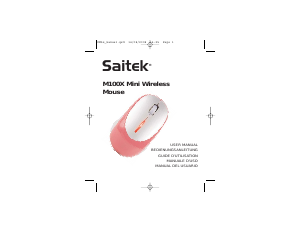
Manual de uso Saitek M100Z Ratón

¿Necesita un manual para su Saitek M100Z Ratón? A continuación puedes ver y descargar el manual en PDF gratis en español. Este producto actualmente tiene 4 preguntas frecuentes, 0 comentarios y tiene 0 votos. Si este no es el manual que desea, , contáctenos.

¿Su producto tiene algún defecto y el manual no ofrece ninguna solución? Vaya a Repair Café para solicitar un servicio de reparación gratuito.

Manual de uso

Loading…
3 Check the wireless receiver is properly inserted in one of your PC’s USB
ports.
4 Insert the wireless receiver in another of your PC’s USB ports.
5 Press the button on the underside of the mouse once to re-establish the
mouse’s wireless connection with the receiver.
Important Information
Some experts believe that using any mouse or trackball may cause serious
injury to hands, wrists, arms, neck, or back. If you feel pain, numbness, or
weakness in these areas, please consult a qualified health professional
immediately.
To reduce the risk of injury, please follow these precautions:
Take frequent breaks, get up and walk around several times every hour.
Vary your tasks throughout the day.
Keep your shoulders relaxed with your elbows at your side. Position your
keyboard and mouse so you do not have to reach.
Adjust your chair and keyboard so your upper arms and wrists are straight.
Avoid resting your wrists on sharp edges.
Technical Support
Can't get started - don't worry, we're here to help you!
Nearly all the products that are returned to us as faulty are not faulty at all - they
have just not been installed properly.
If you experience any difficulty with this product, please first visit our website
www.saitek.com. The technical support area will provide you with all the
information you need to get the most out of your product and should solve any
problems you might have.
If you do not have access to the internet, or if the website cannot answer your
question, please contact your local Saitek Technical Support Team. We aim to
offer quick, comprehensive and thorough technical support to all our users so,
before you call, please make sure you have all the relevant information at hand.
To find your local Saitek Technical Support Center, please see the separate
Technical Support Center sheet that came packaged with this product.
Information for Customers in the United States
FCC Compliance and Advisory Statement
Warning: Changes or modifications to this unit not expressly approved by the
M100Z WIRELESS LASER MOUSE
System Compatibility
PC running Windows XP/XP64/Vista/Mac OS X
Installation
Powering the mouse on/off
The mouse will switch itself on when you insert new batteries. It will enter sleep
mode when not being used and can be woken simply by moving the mouse.
To switch the mouse off when not using for long periods, press and hold the
button next to the battery compartment on the underside of the mouse for three
seconds. To restart the mouse, press and hold the button for three seconds.
An LED behind the scroll wheel will flash to indicate low battery life. We suggest
you replace the batteries when this happens.
Troubleshooting
If the mouse does not work:
1 Check the batteries have not expired and are inserted properly.
2 Make sure the mouse is switched on by pressing the button on the
underside for three seconds.
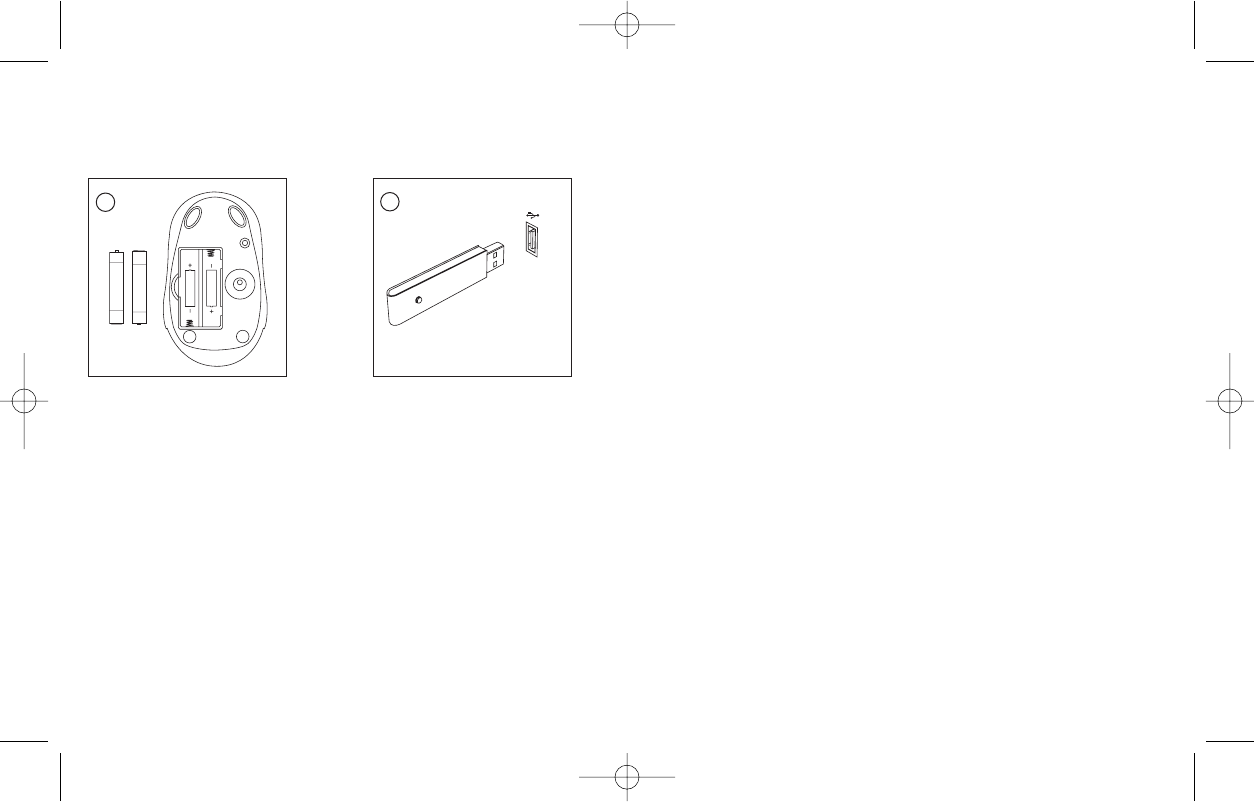
Insert the wireless receiver in
one of your PC’s USB ports. With
your PC switched on, follow the
device installation wizard to
complete the installation of the
new USB device.
On the underside of the mouse,
open the battery compartment,
insert the batteries in the
compartment in the direction
shown and replace the cover.
1
2
PM55_manual.qxd 14/08/2008 09:58 Page 2
Descargue el manual en Español (PDF, 0.28 MB)
(Piense en el medioambiente y solo imprima este manual si es de verdad necesario)

Loading…

Puntuación

Dé su opinión de la Saitek M100Z Ratón calificando el producto. ¿Quiere compartir su experiencia con este producto o hacer una pregunta? Deje un comentario en la parte inferior de la página.
¿Estás satisfecho con elSaitek M100Z Ratón?
No
Sea el primero en calificar este producto
0 votos

Únase a la conversación sobre este producto

Aquí puedes compartir lo que piensas sobre Saitek M100Z Ratón. Si tiene alguna pregunta, primero lea atentamente el manual. Puede solicitar un manual utilizando nuestro formulario de contacto.

Más sobre este manual

Entendemos que es bueno tener un manual en papel para tus Saitek M100Z Ratón. Siempre puedes descargar el manual desde nuestro sitio web e imprimirlo tú mismo. Si deseas tener un manual original te recomendamos contactar con Saitek. Es posible que puedan proporcionar un manual original. ¿Estás buscando el manual de tu Saitek M100Z Ratón en otro idioma? Elija su idioma preferido en nuestra página de inicio y busque el número de modelo para ver si lo tenemos disponible.

Especificaciones

Marca Saitek
Modelo M100Z
Categoría Ratónes
Tipo de archivo PDF
Tamaño del archivo 0.28 MB

Todos los manuales para Saitek Ratónes
Más manuales de Ratónes

Preguntas frecuentes sobre Saitek M100Z Ratón

Nuestro equipo de atención al cliente busca información útil sobre los productos y responde a las preguntas frecuentes. Si encuentra inexactitudes en las preguntas frecuentes, indíquenoslo usando nuestro formulario de contacto.

¿Cuál es la mejor superficie para usar un ratón? Verificado

Un ratón tradicional con “trackball” funcionará mejor en una superficie acolchada como una alfombrilla de ratón. Un ratón óptico funcionará en casi todas las superficies planas, con la excepción de las superficies transparentes o reflectantes. Las superficies con un estampado repetitivo pueden interferir con el funcionamiento del ratón.

Ha sido de gran ayuda (129) Leer más

¿Qué es un mouse ergonómico? Verificado

El uso diario de un mouse normal durante períodos prolongados puede provocar dolor en el brazo y la muñeca. Esto también se llama RSI (lesión por esfuerzo repetitivo). Un mouse ergonómico está diseñado para reducir estos problemas o prevenirlos.

Ha sido de gran ayuda (61) Leer más

¿Cuál es la diferencia entre un mouse normal y un mouse para juegos? Verificado

Cada mouse para juegos se puede usar como un mouse normal. Sin embargo, un mouse para juegos a menudo tiene botones adicionales en lugares específicos para facilitar el juego. Incluso hay ratones para juegos que tienen botones destinados a jugar mejor un juego específico.

Ha sido de gran ayuda (60) Leer más

¿Cuál es el mejor tamaño de ratón para la palma de mi mano? Verificado

Depende en parte de las preferencias personales y las necesidades, pero en general un ratón debe ser alrededor del 60 % del tamaño de su mano. Es lo más cómodo y ergonómico.

Ha sido de gran ayuda (55) Leer más
Manual de uso Saitek M100Z Ratón

Productos relacionados

Categorias relacionadas

×
Download