Manual de uso Samsung SPF-71E Marco digital

¿Necesita un manual para su Samsung SPF-71E Marco digital? A continuación puedes ver y descargar el manual en PDF gratis en español. Este producto actualmente tiene 2 preguntas frecuentes, 0 comentarios y tiene 0 votos. Si este no es el manual que desea, , contáctenos.

¿Su producto tiene algún defecto y el manual no ofrece ninguna solución? Vaya a Repair Café para solicitar un servicio de reparación gratuito.

Manual de uso

Loading…
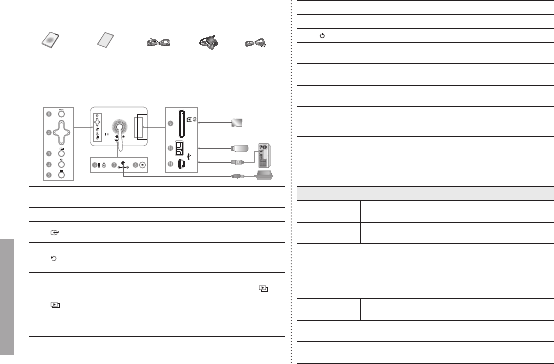
Components
Please check all items are contained in your delivered package.
USB cablePower AdapterPower CodeUser manual Warranty Card
(Not available in
all locations)
Back Overview / Connections
1
[MENU] Menu button
Enters or exits a menu.
(Displays the menu)
2
Navigation buttons Moves around the items and adjusts a value.
3
[ ]
Enter button
Selects a function you want to use.
(Play/Stop during a slide show)
4
[ ] Back button
Returns to the previous screen.
(Hold down this button for two seconds to return
to the Main screen.)
5
[ ] Slideshow button
Starts a slideshow.
When playing a slideshow by pressing the [ ]
button, the photos in the location of the last played
photo are played. If the photos in the location of
the last played photo have been removed, they
are automatically searched for and then played in
a slideshow.
6
Kensington lock
7
Power outlet Connects through power cable and uses.
8
[ ] Power On/Off button
9
SD memory card slot
Allows you to insert SD memory card.
(SD Card only)
0
USB Downstream
Connect your Digital Photo Frame to a USB
supporting storage device.
!
USB Upstream
You can Copy and Delete a Frame Memory Photo
by connecting the USB cable to a PC.
If no button is operated for ten minutes, the screensaver starts to protect
the monitor. However, the screensaver does not start when in the slideshow
mode.
Using
If you press the Menu button, the menu of the selected item is displayed on the
screen.
Photo
When selecting a
folder
Open, Copy, Delete
When selecting a
thumbnail
Start Slideshow, Copy, Copy All les, Delete, Delete All les,
Set as Background
If any le is copied to frame memory, the le size is reduced in order to meet
the optimal resolution for the panel size. Please note that [EXIF(exchangeable
image le format)] information is removed when the copy option is set as
Resized” in the [Settings]→[Options]→[Frame Memory Copy]. If you do
not want the resized copy option, the settings can be changed as follows
[Settings]→[Options]→[Frame Memory Copy]→“Original Size”.
Slide Show
Stop Slideshow, Slideshow Settings, Brightness, Rotate,
Zoom, Aspect Ratio, Delete, Set as Background
Only photos with a resolution of less than 8000 (width) * 8000 (height) pixels
can be displayed on the screen.
This product can only support up to 4,000 pictures. If there are more than 4,000
pictures, slideshow will not be played for the remaining pictures.
2
English
BN68-01567G.indb 2 05/22/2009 1:36:56 PM
Descargue el manual en Español (PDF, 9.43 MB)
(Piense en el medioambiente y solo imprima este manual si es de verdad necesario)

Loading…

Puntuación

Dé su opinión de la Samsung SPF-71E Marco digital calificando el producto. ¿Quiere compartir su experiencia con este producto o hacer una pregunta? Deje un comentario en la parte inferior de la página.
¿Estás satisfecho con elSamsung SPF-71E Marco digital?
No
Sea el primero en calificar este producto
0 votos

Únase a la conversación sobre este producto

Aquí puedes compartir lo que piensas sobre Samsung SPF-71E Marco digital. Si tiene alguna pregunta, primero lea atentamente el manual. Puede solicitar un manual utilizando nuestro formulario de contacto.

Más sobre este manual

Entendemos que es bueno tener un manual en papel para tus Samsung SPF-71E Marco digital. Siempre puedes descargar el manual desde nuestro sitio web e imprimirlo tú mismo. Si deseas tener un manual original te recomendamos contactar con Samsung. Es posible que puedan proporcionar un manual original. ¿Estás buscando el manual de tu Samsung SPF-71E Marco digital en otro idioma? Elija su idioma preferido en nuestra página de inicio y busque el número de modelo para ver si lo tenemos disponible.

Especificaciones

Marca Samsung
Modelo SPF-71E
Categoría Marcos digitales
Tipo de archivo PDF
Tamaño del archivo 9.43 MB

Todos los manuales para Samsung Marcos digitales
Más manuales de Marcos digitales

Preguntas frecuentes sobre Samsung SPF-71E Marco digital

Nuestro equipo de atención al cliente busca información útil sobre los productos y responde a las preguntas frecuentes. Si encuentra inexactitudes en las preguntas frecuentes, indíquenoslo usando nuestro formulario de contacto.

¿Qué es un megapíxel? Verificado

Un megapíxel (MP) equivale a un millón de pixeles. Los megapíxeles se usan, entre otras cosas, para indicar la resolución de las cámaras digitales y videocámaras. Por ejemplo, una cámara que produce imágenes de 1280x960 píxeles tiene una resolución de aproximadamente 1,3 MP. Aunque hay muchos factores que influyen en la calidad de una imagen, se puede decir que, en general, cuantos más megapíxeles, mejor imagen.

Ha sido de gran ayuda (96) Leer más

¿Qué significa SD? Verificado

SD son las siglas de Secure Digital. Las tarjetas SD son el medio de almacenamiento estándar para muchas cámaras digitales.

Ha sido de gran ayuda (28) Leer más
Manual de uso Samsung SPF-71E Marco digital

Productos relacionados

Categorias relacionadas

×
Download