Manual de uso SereneLife SLBCAM20EU Vigilabebés

¿Necesita un manual para su SereneLife SLBCAM20EU Vigilabebés? A continuación puedes ver y descargar el manual en PDF gratis en español. Este producto actualmente tiene 2 preguntas frecuentes, 0 comentarios y tiene 0 votos. Si este no es el manual que desea, , contáctenos.

¿Su producto tiene algún defecto y el manual no ofrece ninguna solución? Vaya a Repair Café para solicitar un servicio de reparación gratuito.

Manual de uso

Loading…
21 3 4 5 6
7 8
3.2 PAIRING CAMERA
The enclosed baby unit has already been
registered, You do not need to register it again
unless the baby unit loses its link with the
parent unit. See section “5.2 Camera
Registration for more details.
3.3 VOX FUNCTION
Press VOX key will turn on VOX mode, The VOX
mode automatically puts the display in sleep
mode to save battery. It reactivates
automatically, when it detects noise in the
baby's room.
3.4 MUSIC PLAYER
Press music key will turn on the music player
and play lullaby through the baby unit; press
music key again will turn o it.
3.5 TALK FUNCTION
Press and hold PTT key on the parent unit to
talk to your baby through the baby unit loud-
speaker. The symbol will be displayed at the
bottom of the screen.
3.6 ADJUSTING THE VOLUME
When the video is playing mode, press Volume-
key to decrease volume or Volume+ key to
increase volume. The display will show the
current volume for 5 seconds.
10
www.SereneLifeHome.com 11www.SereneLifeHome.com 12www.SereneLifeHome.com
14www.SereneLifeHome.com 15www.SereneLifeHome.com 16www.SereneLifeHome.com13www.SereneLifeHome.com
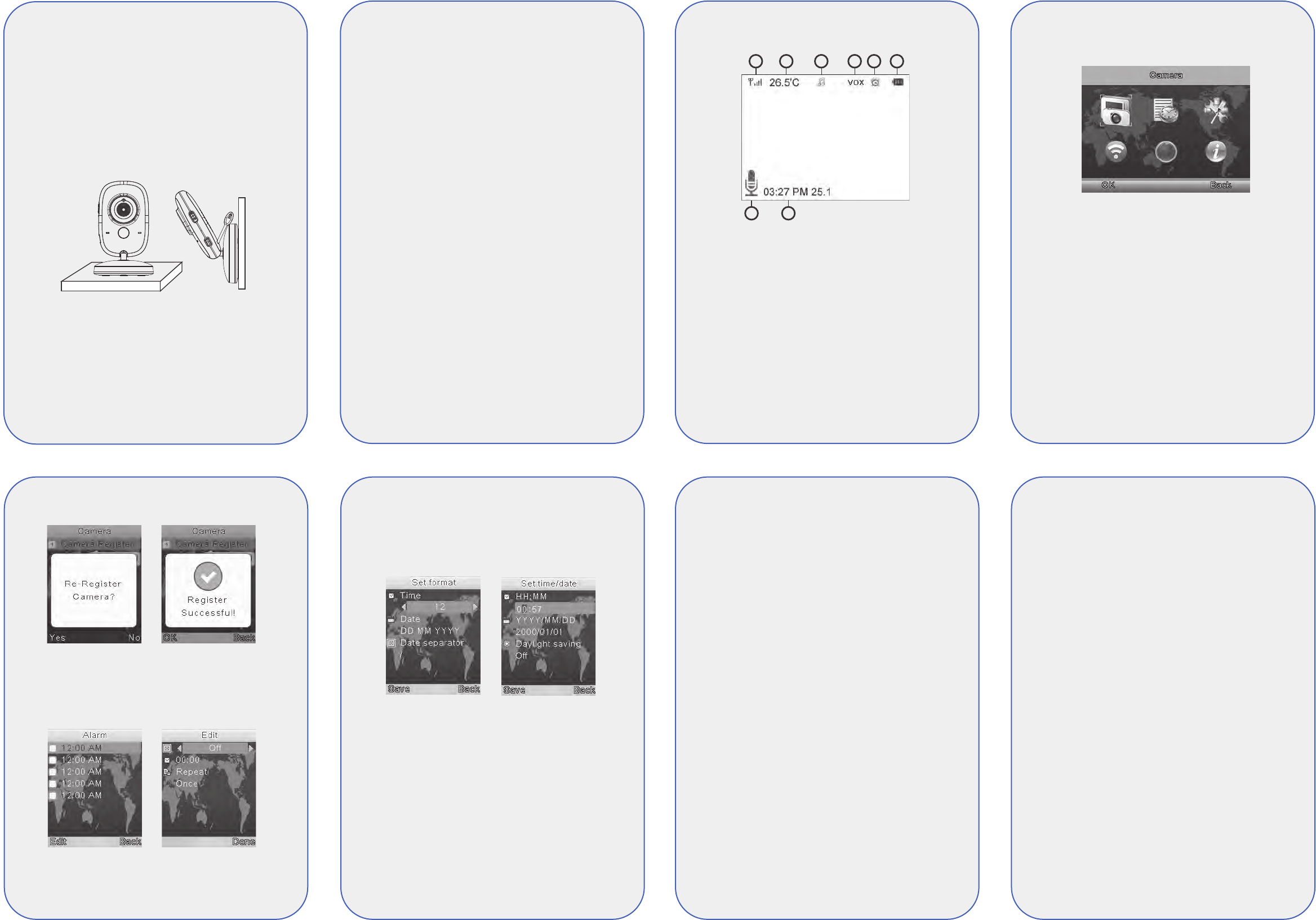
4. MONITORING SCREEN ICONS
1. Signal strength indicator
2. Temperature of the baby's room
3. Lullaby is playing
4. Vox function activated
5. Alarm activated
5. Battery indicator
6. PTT function activated
7. Date and time ( HH:MM AM/PM DD/MM )
5. MENU OPTIONS
5.1 MAIN MENU
Press OK/Menu” key at monitoring screen will
enter the main menu, It contains 6 items :
1. Camera
2. Alarm
3. Settings
4. VOX
5. Languages
6. System info
You can press the Up key or Down key to
move the cursor to select an item and press
Menu key will enter the sub-menu which you
selected.
Press “Return key will back to monitoring
screen
5.2 CAMERA REGISTRATION
Press “OK/Menu key to entry registering
screen, then push the pair key on the back of
baby unit within 10 seconds.
5.3 ALARM
Press ”PTT key to move the cursor and
Up/Down key to change value .
5.4 SETTINGS
5.4.1 TIME AND DATE
There are contains 2 items in this menu
Set time / date
Set format
Press ”PTT key to move the cursor and
Up/Down key to change value .
5.4.2 TEMPERATURE UNIT
Switch the unit to Celsius or Fahrenheit
5.4.3 ANTIFLICKER
You are able to adjust the frequency of 50 / 60
HZ to suit your lighting for anti-icker
5.4.4 LCD BACKLIGHT
You are be able to adjust the brightness of the
LCD you are viewing and the LCD backlight
active time in menu operation.
5.5 VOX
5.5.1 SYSTEM MODE
This menu allows you to choose the working
mode from the following:
Normal mode / VOX mode
5.5.2 VOX SENSITIVITY
Switch the Vox sensitivity at Low / Medium /
High level
5.6 LANGUAGE
Language setting menu allows you to choose
your language from the following :
English
French ( Francais )
Spanish ( Espanol )
Portuguese ( Portugues )
Italian ( Italiano )
German ( Deutsch )
Turkey ( Turkce )
5.7 SYSTEM INFO
Contains system information such as
Project id, Hardware version, software version,
build date etc.
6. TECHNICAL FEATURES
- Frequency: 2.4 GHz Digital
- Modulation Mode: GFSK
- Operating temperature: -10 to +45°C
- Operating Humidity: <85%
- Range: 260m in open eld
MONITOR
- LCD: 3.2 TFT LCD
- Resolution: 320X240@20fps
- Battery: Li-Polymer 750mAh
- Dimensions (W x H x D): 120mm x 70mm x
17mm
CAMERA
- Sensor: 0.3Mega pix CMOS
- Minimum Illumination: 0Lux ( IR on)
- Night Vision Distance: 15ft ( 5m)
- Lighting sensor
- Temperature sensor
- Dimensions (W x H x D):
67mm x 106mm x 67mm
3. USING THE BABY MONITOR
3.1 SETTING UP
Place the baby unit in a convenient location
(e.g. on a table) and point the camera lens
towards the area you want to monitor. Adjust
the baby unit until you are satised with the
image in the parent unit.
NOTE
Do not place the baby unit within baby's reach!
If there is interference on the picture or sound,
try moving the units to dierent locations, and
ensure they are not close to other electrical
equipment.
9
www.SereneLifeHome.com
EN - 2
Descargue el manual en Español (PDF, 2.48 MB)
(Piense en el medioambiente y solo imprima este manual si es de verdad necesario)

Loading…

Puntuación

Dé su opinión de la SereneLife SLBCAM20EU Vigilabebés calificando el producto. ¿Quiere compartir su experiencia con este producto o hacer una pregunta? Deje un comentario en la parte inferior de la página.
¿Estás satisfecho con elSereneLife SLBCAM20EU Vigilabebés?
No
Sea el primero en calificar este producto
0 votos

Únase a la conversación sobre este producto

Aquí puedes compartir lo que piensas sobre SereneLife SLBCAM20EU Vigilabebés. Si tiene alguna pregunta, primero lea atentamente el manual. Puede solicitar un manual utilizando nuestro formulario de contacto.

Más sobre este manual

Entendemos que es bueno tener un manual en papel para tus SereneLife SLBCAM20EU Vigilabebés. Siempre puedes descargar el manual desde nuestro sitio web e imprimirlo tú mismo. Si deseas tener un manual original te recomendamos contactar con SereneLife. Es posible que puedan proporcionar un manual original. ¿Estás buscando el manual de tu SereneLife SLBCAM20EU Vigilabebés en otro idioma? Elija su idioma preferido en nuestra página de inicio y busque el número de modelo para ver si lo tenemos disponible.

Especificaciones

Marca SereneLife
Modelo SLBCAM20EU
Categoría Vigilabebés
Tipo de archivo PDF
Tamaño del archivo 2.48 MB

Todos los manuales para SereneLife Vigilabebés
Más manuales de Vigilabebés

Preguntas frecuentes sobre SereneLife SLBCAM20EU Vigilabebés

Nuestro equipo de atención al cliente busca información útil sobre los productos y responde a las preguntas frecuentes. Si encuentra inexactitudes en las preguntas frecuentes, indíquenoslo usando nuestro formulario de contacto.

¿Por qué el alcance del monitor para bebés es menor que el descrito en el folleto/manual? Verificado

Las marcas suelen indicar un alcance basado en un uso sin obstáculos, como paredes o una distancia que abarque varias plantas. Si el alcance es insuficiente, intente ubicar el monitor para bebés con el mínimo de obstáculos posibles.

Ha sido de gran ayuda (686) Leer más

Cuando escucho a mi bebé puedo oír claramente su respiración, pero no la oigo a través del vigilabebés. ¿Por qué? Verificado

Se debe a la sensibilidad del vigilabebés. Ajuste la configuración para aumentar la sensibilidad y captar los sonidos más silenciosos.

Ha sido de gran ayuda (376) Leer más
Manual de uso SereneLife SLBCAM20EU Vigilabebés

Productos relacionados

Categorias relacionadas

×
Download