Manual de uso Sony CHC-P33D Set de estéreo

¿Necesita un manual para su Sony CHC-P33D Set de estéreo? A continuación puedes ver y descargar el manual en PDF gratis en español. Este producto actualmente tiene 0 preguntas frecuentes, 0 comentarios y tiene 1 voto con una calificación promedio de producto de 100/100. Si este no es el manual que desea, , contáctenos.

¿Su producto tiene algún defecto y el manual no ofrece ninguna solución? Vaya a Repair Café para solicitar un servicio de reparación gratuito.

Manual de uso

Loading…
Chapter 2: the CD Player
EN
8
One Touch Play feature
Press CD when the power is off.
You can listen to the CD without pressing
any other buttons when a CD is in the
player.
Automatic Source Selection
If you press CD while you are listening to
other sound source, the CD player is
selected and playback starts automatically.
If there is no CD in the player
“NO DISC” appears in the display. Press
§ OPEN/CLOSE CD to open the disc tray.
Playing Tracks in
Random Order
(shuffle play)
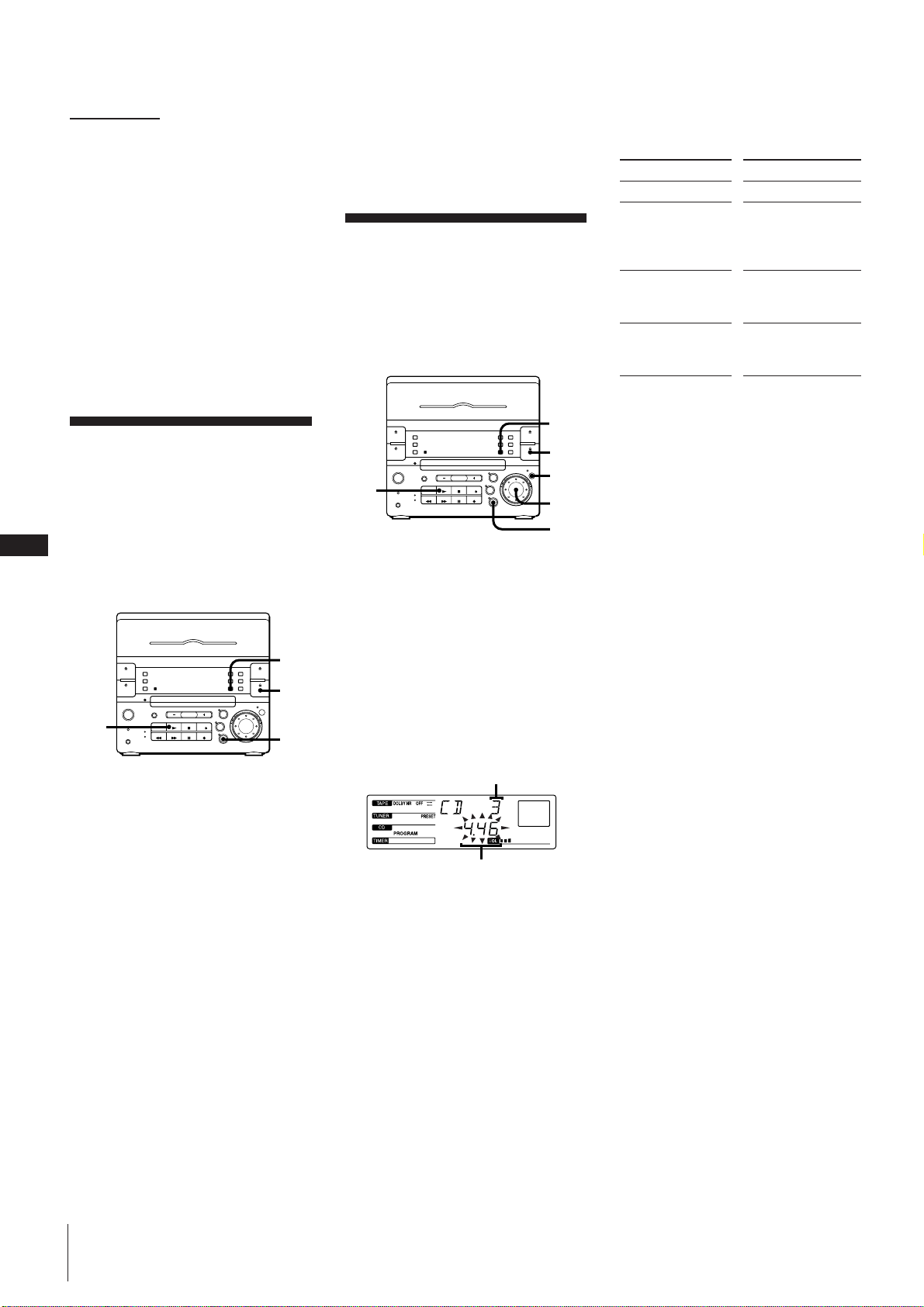
You can play all the tracks on the CD in
random order.
Use the buttons on the unit to do this
operation.
=
+
4
1
2
3
1 Press CD.
2 Press § OPEN/CLOSE CD and place a
CD on the disc tray. Then, press §
OPEN/CLOSE CD again to close the
disc tray.
3 Press PLAY MODE repeatedly until
“SHUFFLE” appears in the display.
4 Press (.
J ” appears and then all the tracks
play in random order.
To cancel shuffle play
Press PLAY MODE repeatedly until
“SHUFFLE” disappears from the display,
and tracks continue playing in their original
order.
If you press PLAY MODE to display
“SHUFFLE” during normal play
You can play all the tracks on the CD in
random order.
To skip an undesired track
Turn the jog dial clockwise (or press +
on the remote) .
Playing Tracks in the
Desired Order
(programme play)
You can programme up to 32 tracks to play
in any order you choose.
=
+
7
4
1
2
5
3
1 Press CD.
2 Press § OPEN/CLOSE CD and place a
CD on the disc tray. Then, press
§ OPEN/CLOSE CD again to close the
disc tray.
3 Press PLAY MODE repeatedly until
“PROGRAM” appears in the display.
4 Turn the jog dial to choose a track.
The track number and the total playing
time appear in the display.
If you want to choose this track, go to
the next step. If not, turn the jog dial
again to choose another track.
5 Press ENTER/NEXT.
The chosen track number and total
playing time appear in the display. If
the track number and the total playing
time disappear before you press
ENTER/NEXT, go back to step 4.
6 Repeat steps 4 and 5 to programme the
remaining tracks you want to play in the
order you want them to play.
7 Press (.
All the tracks play in the order you
chose.
To change the order of programmed
tracks
To change the order, erase the entire
programme and create a new one.
After all the programmed tracks have been
played
The programme order remains stored in the
CD player’s memory, so that you can listen
to the same programme again by just
pressing (.
Note
If “- - . - - ” appears instead of the total
playing time, this means:
the total programmed time has exceeded
100 minutes, or
you have programmed a track number
which exceeds 20.
continued
Do this
Press p
Press PLAY MODE
repeatedly until
“PROGRAM”
disappears
Turn the jog dial to
choose a track and
press ENTER/NEXT
Press p once in stop
mode, twice during
play
Track number
Total playing time
To
Stop play
Cancel the
programme play
Programme another
track at the end
Erase the entire
programme
Descargue el manual en Español (PDF, 3.62 MB)
(Piense en el medioambiente y solo imprima este manual si es de verdad necesario)

Loading…

Puntuación

Dé su opinión de la Sony CHC-P33D Set de estéreo calificando el producto. ¿Quiere compartir su experiencia con este producto o hacer una pregunta? Deje un comentario en la parte inferior de la página.
¿Estás satisfecho con elSony CHC-P33D Set de estéreo?
No
100%
0%
1 voto

Únase a la conversación sobre este producto

Aquí puedes compartir lo que piensas sobre Sony CHC-P33D Set de estéreo. Si tiene alguna pregunta, primero lea atentamente el manual. Puede solicitar un manual utilizando nuestro formulario de contacto.

Más sobre este manual

Entendemos que es bueno tener un manual en papel para tus Sony CHC-P33D Set de estéreo. Siempre puedes descargar el manual desde nuestro sitio web e imprimirlo tú mismo. Si deseas tener un manual original te recomendamos contactar con Sony. Es posible que puedan proporcionar un manual original. ¿Estás buscando el manual de tu Sony CHC-P33D Set de estéreo en otro idioma? Elija su idioma preferido en nuestra página de inicio y busque el número de modelo para ver si lo tenemos disponible.

Especificaciones

Marca Sony
Modelo CHC-P33D
Categoría Set de estéreo
Tipo de archivo PDF
Tamaño del archivo 3.62 MB

Todos los manuales para Sony Set de estéreo
Más manuales de Set de estéreo
Manual de uso Sony CHC-P33D Set de estéreo

Productos relacionados

Categorias relacionadas

×
Download