Manual de uso Sylvania 6424TFS Televisor

¿Necesita un manual para su Sylvania 6424TFS Televisor? A continuación puedes ver y descargar el manual en PDF gratis en español. Este producto actualmente tiene 5 preguntas frecuentes, 0 comentarios y tiene 0 votos. Si este no es el manual que desea, , contáctenos.

¿Su producto tiene algún defecto y el manual no ofrece ninguna solución? Vaya a Repair Café para solicitar un servicio de reparación gratuito.

Manual de uso

Loading…
MENU
VOLUME
CHANNEL
POWER
LKLK
VIDEO L - AUDIO - R
HEADPHONE
MENU
VOLUME
CHANNEL
POWER
LK LK
VIDEO L - AUDIO - R
HEADPHONE
POWER
POWER
123
456
789
0 +100
DISPLAY
VOL
CH
CH
VOL
SLEEP
CHANNEL
RETURN
MUTE
GAME
INPUT
SELECT
MENU
PREPARATION FOR USE
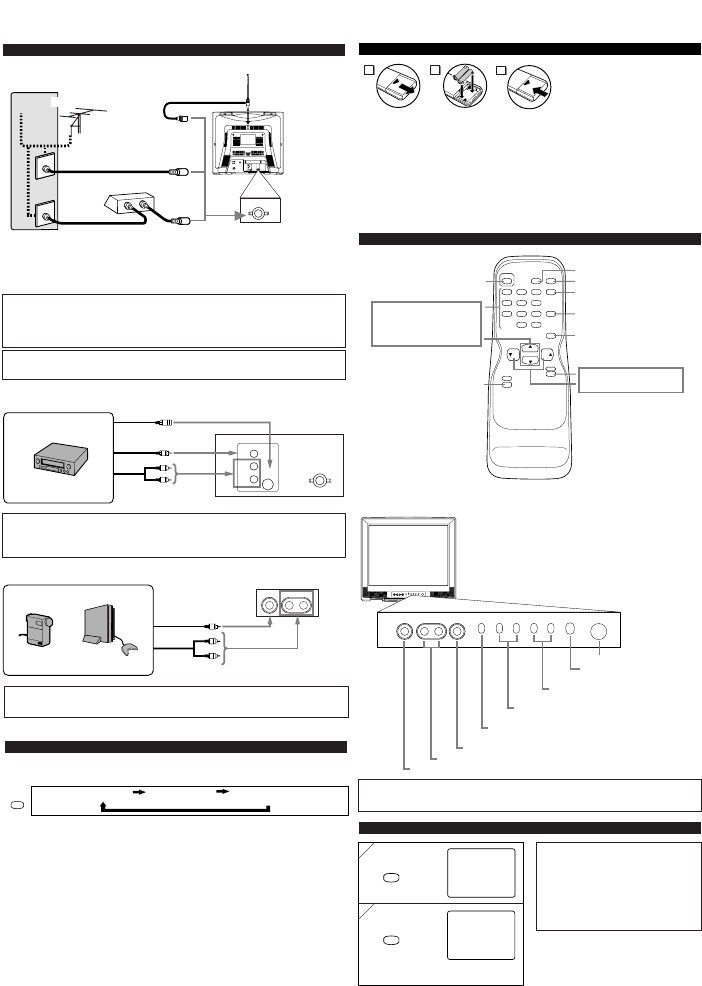
CONNECTIONS
ANT. IN
L
R
VIDEO 1 IN PUT
VIDEO
S-VIDEO
ANT. IN
IN
OUT
*Note (DO NOT DISCONNECT FROM BOX)
Some cable TV systems use scrambled signals and
require a special converter to receive these channels.
Consult your local cable company.
CAUTION: TO PREVENT ELECTRIC SHOCK, MATCH WIDE BLADE OF PLUG TO
WIDE SLOT, FULLY INSERT.
ATTENTION: POUR ÉVITER LES CHOC ÉLECTRIQUES, INTRODUIRE LA LAME LA
PLUS LARGE DE LA FICHE DANS LA BORNE CORRESPONDANTE DE LA PRISE ET
POUSSER JUSQU’AU FOND.
[EXTERNAL CONNECTION]
VIDEO1 input (Rear)
ANT. IN
L
R
VIDEO 1 INPUT
VIDEO
S-VIDEO
VIDEO2 input (Front)
VIDEO L - AUDIO - R
Video Cable
Audio Cable
Video Cassette Recorder
Video Cable
Audio Cable
Video GameVideo Camera
Front of this TV
Rear of this TV
ex.
ex.
Plug the incoming cable into the ANT. jack on the rear of the TV.
OPERATIONS
Note:
If some digits appear in the corner of the screen when the unit is turned on for the first time, hit
[POWER] without unplugging the power cord.
REMOTE CONTROL AND FRONT PANEL FUNCTION
POWER button
To turn TV on/off
Channel number buttons
CH(ANNEL) / buttons
MENU button
To view on-screen menu
GAME button
SLEEP button
DISPLAY button
To display CH No./Audio Status
CHANNEL RETURN button
To return to previous channel
MUTE button
VOL(UME) /buttons
To select channels
To adjust volume
Infrared Sensor Window
POWER button
To turn TV on/off
CHANNEL /buttons
To select channels
VOLUME
XX
/
YY
buttons
To adjust volume
MENU button
To view on-screen menu
AUDIO L/R input jacks
VIDEO input jack
INSTALLING THE BATTERIES
Install two AA batteries (supplied)
matching the polarity indicated inside
battery compartment of the remote con-
trol.
[BATTERY PRECAUTIONS]
Be sure to follow the correct polarity as indicated in the battery compartment.
Reversed batteries may cause damage to the device.
Do not mix different types of batteries together (e.g. Alkaline and Carbon-Zinc) or old batteries
with fresh ones.
If the device is not to be used for a long period of time, remove the batteries to prevent
damage or injury from possible battery leakage.
Do not try to recharge batteries not intended to be recharged; they can overheat and rupture.
2
1
3
HEADPHONE jack
INPUT SELECT button
To select TV or external input
S-Video Cable
OR
SELECTING AUDIO/VIDEO INPUT
When you use the AUDIO/VIDEO input jacks, select “VIDEO1” or “VIDEO2” mode by hit-
ting [INPUT SELECT] on the remote control. The input mode changes by hitting the button
as following:
•To use the jacks on the rear of the TV, select “VIDEO1”.
•To use the jacks on the front of the TV, select “VIDEO2”.
TV channel VIDEO1 (Rear) VIDEO2 (Front)
INPUT
SELECT
Note:
The AUDIO L jack is for mono input. The sound is heard from both speakers. Use this jack for
connecting monaural audio equipment.
Notes:
When you disconnect the unit from the AC
outlet or when you have a power failure, the
sleep time will be lost.
To cancel the sleep timer, hit [SLEEP]
repeatedly until “SLEEP 0” is displayed.
The Sleep Timer Setting display will disap-
pear automatically after 10 seconds of the
operation.
SLEEP TIMER SETTING
1
1
2
2
SLEEP
SLEEP
SLEEP 0
SLEEP 10
The time increases by 10 minutes
up to 90.
repeatedly
Notes:
The AUDIO L jack is for mono input. The sound is heard from both speakers. Use this jack for
connecting monaural audio equipment.
The S-VIDEO jack is given priority over the VIDEO jack on the rear panel.
Note:
For your safety and to avoid damages to the unit, unplug the antenna cable from the
ANT. IN jack before moving the unit.
(OUT)
(OUT)
(OUT)
(IN)
(IN)
(IN)
(OUT)
(IN)
(OUT)
(IN)
OR
Incoming cable from home Antenna /
Cable Company (No Cable Box)
Incoming cable from Cable
Company or Satellite Antenna
Cable Box or
Satellite Box*
Cable
TV signal
Antenna
UHF/VHF Rod Antenna
(Not supplied)
Rear of this TV
OR
Descargue el manual en Español (PDF, 0.58 MB)
(Piense en el medioambiente y solo imprima este manual si es de verdad necesario)

Loading…

Puntuación

Dé su opinión de la Sylvania 6424TFS Televisor calificando el producto. ¿Quiere compartir su experiencia con este producto o hacer una pregunta? Deje un comentario en la parte inferior de la página.
¿Estás satisfecho con elSylvania 6424TFS Televisor?
No
Sea el primero en calificar este producto
0 votos

Únase a la conversación sobre este producto

Aquí puedes compartir lo que piensas sobre Sylvania 6424TFS Televisor. Si tiene alguna pregunta, primero lea atentamente el manual. Puede solicitar un manual utilizando nuestro formulario de contacto.

Más sobre este manual

Entendemos que es bueno tener un manual en papel para tus Sylvania 6424TFS Televisor. Siempre puedes descargar el manual desde nuestro sitio web e imprimirlo tú mismo. Si deseas tener un manual original te recomendamos contactar con Sylvania. Es posible que puedan proporcionar un manual original. ¿Estás buscando el manual de tu Sylvania 6424TFS Televisor en otro idioma? Elija su idioma preferido en nuestra página de inicio y busque el número de modelo para ver si lo tenemos disponible.

Especificaciones

Marca Sylvania
Modelo 6424TFS
Categoría Televisores
Tipo de archivo PDF
Tamaño del archivo 0.58 MB

Todos los manuales para Sylvania Televisores
Más manuales de Televisores

Preguntas frecuentes sobre Sylvania 6424TFS Televisor

Nuestro equipo de atención al cliente busca información útil sobre los productos y responde a las preguntas frecuentes. Si encuentra inexactitudes en las preguntas frecuentes, indíquenoslo usando nuestro formulario de contacto.

¿Cómo mido las pulgadas de mi televisor? Verificado

Para medir las pulgadas de su televisor debe medir la diagonal, por ejemplo, entre la esquina superior izquierda y la esquina inferior derecha de la pantalla (no del marco). Una pulgada equivale a 2,54 centímetros, de manera que, cuando mide 99 centímetros, quiere decir que su televisor es de 39 pulgadas.

Ha sido de gran ayuda (73) Leer más

¿Por qué hay letras junto a los números en el control remoto? Verificado

Algunas configuraciones de televisión pueden requerir que ingrese letras. Por lo general, hay tres letras u otros caracteres en un botón. Cuando se requiera ingresar una letra, puede presionar ese botón una vez para la primera letra, presionar dos veces para la segunda letra y presionar 3 veces para la tercera letra. De esta forma, el texto se puede escribir con un número mínimo de botones.

Ha sido de gran ayuda (45) Leer más

¿Cuál es la distancia óptima para ver la tele? Verificado

Depende en parte de las preferencias personales, pero como regla general la distancia óptima de visión es de unas 3 veces el tamaño diagonal de la pantalla del televisor. Para un televisor de 60 pulgadas (152 cm) la distancia óptima de visión sería de 180 pulgadas o unos 4,5 metros.

Ha sido de gran ayuda (39) Leer más

¿Qué es la relación de contraste? Verificado

La relación de contraste indica la diferencia entre el blanco más blanco y el negro más negro. De este modo, una relación de contraste de 400:1 significa que el negro más negro de la pantalla es 400 veces más oscuro que el blanco más blanco. Una alta relación de contraste contribuye a la nitidez de la imagen.

Ha sido de gran ayuda (30) Leer más

¿Cómo puedo limpiar correctamente mi televisor? Verificado

Apague el televisor y quite el polvo y la suciedad de la pantalla usando un paño de microfibra. No use papel, ya que puede causar rayaduras. No aplique demasiada presión o podría dañar los píxeles. Use un detergente especial o mézclelo usted mismo con una parte de vinagre y otra de agua. Humedezca el paño con el detergente y limpie la pantalla. Asegúrese de que el paño no esté demasiado húmedo. Elimine las manchas haciendo movimientos giratorios. Seque la pantalla con otro paño de microfibra para evitar las rayas.

Ha sido de gran ayuda (29) Leer más
Manual de uso Sylvania 6424TFS Televisor

Productos relacionados

Categorias relacionadas

×
Download