
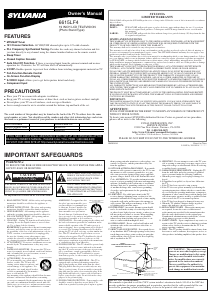
Manual de uso Sylvania 6615LCT Televisor de LCD
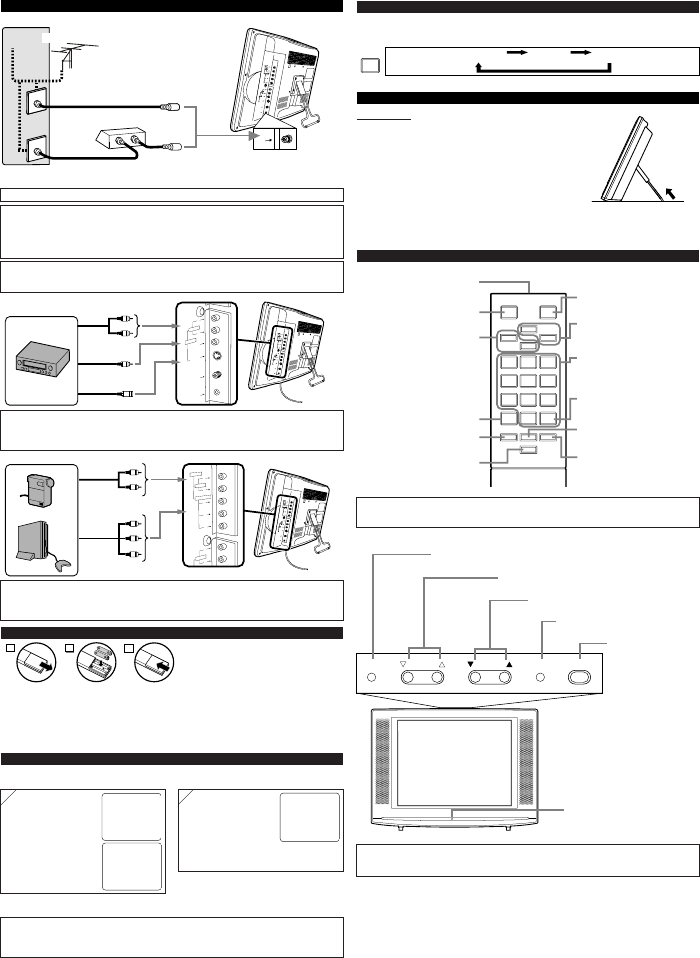
¿Necesita un manual para su Sylvania 6615LCT Televisor de LCD? A continuación puedes ver y descargar el manual en PDF gratis en español. Este producto actualmente tiene 13 preguntas frecuentes, 0 comentarios y tiene 1 voto con una calificación promedio de producto de 100/100. Si este no es el manual que desea, , contáctenos.
¿Su producto tiene algún defecto y el manual no ofrece ninguna solución? Vaya a Repair Café para solicitar un servicio de reparación gratuito.
Manual de uso
Loading…

Loading…
Puntuación
Dé su opinión de la Sylvania 6615LCT Televisor de LCD calificando el producto. ¿Quiere compartir su experiencia con este producto o hacer una pregunta? Deje un comentario en la parte inferior de la página.Más sobre este manual
Entendemos que es bueno tener un manual en papel para tus Sylvania 6615LCT Televisor de LCD. Siempre puedes descargar el manual desde nuestro sitio web e imprimirlo tú mismo. Si deseas tener un manual original te recomendamos contactar con Sylvania. Es posible que puedan proporcionar un manual original. ¿Estás buscando el manual de tu Sylvania 6615LCT Televisor de LCD en otro idioma? Elija su idioma preferido en nuestra página de inicio y busque el número de modelo para ver si lo tenemos disponible.
Especificaciones
| Marca | Sylvania |
| Modelo | 6615LCT |
| Categoría | Televisores de LCD |
| Tipo de archivo | |
| Tamaño del archivo | 0.72 MB |
Todos los manuales para Sylvania Televisores de LCD
Más manuales de Televisores de LCD
Preguntas frecuentes sobre Sylvania 6615LCT Televisor de LCD
Nuestro equipo de atención al cliente busca información útil sobre los productos y responde a las preguntas frecuentes. Si encuentra inexactitudes en las preguntas frecuentes, indíquenoslo usando nuestro formulario de contacto.
¿Cómo conecto un mando a distancia universal a mi televisor? Verificado
Para conectar su mando a distancia universal, necesita el número de modelo y la marca del mando a distancia y del televisor. Encontrará una lista de códigos de marcas y números de modelo en el manual del mando a distancia.
Ha sido de gran ayuda (2260) Leer másQuiero conectar un altavoz a mi televisor LCD con HDMI. ¿Qué puerto debo usar? Verificado
Debe usar el puerto HDMI-ARC, que está hecho específicamente para conectar equipos de audio.
Ha sido de gran ayuda (1583) Leer más¿Importa a qué puerto HDMI conecto mi dispositivo? Verificado
Por norma general, puede conectar un dispositivo como un reproductor Blu-ray o una videoconsola a cualquier puerto HDMI. A continuación debe seleccionar el canal HDMI correspondiente en su televisor para usar el dispositivo.
Ha sido de gran ayuda (797) Leer más¿Cómo mido las pulgadas de mi televisor LCD? Verificado
Para medir las pulgadas de su televisor LCD, debe medir la diagonal, por ejemplo, entre la esquina superior izquierda y la esquina inferior derecha de la pantalla (no del marco). Una pulgada equivale a 2,54 centímetros, de manera que, cuando mide 99 centímetros, quiere decir que su televisor LCD es de 39 pulgadas.
Ha sido de gran ayuda (543) Leer más¿Funcionará mi mando a distancia también en otros modelos de televisores de la misma marca? Verificado
A menudo, un control remoto de un televisor también funcionará en modelos similares de la misma marca. Sin embargo, es inusual que funcione en todos los modelos de esa marca. Los controles remotos universales son más adecuados para hacer esto.
Ha sido de gran ayuda (340) Leer más¿Cuál es la diferencia entre LCD y LED? Verificado
Ambas técnicas utilizan una pantalla LCD que no emite luz por sí misma. La diferencia está en la iluminación detrás de la pantalla. En el caso de las pantallas LCD esto se realiza mediante CCFL (lámpara fluorescente de cátodo frío), mientras que con televisores LED se emplean luces led.
Ha sido de gran ayuda (304) Leer más¿Puedo reparar un píxel muerto yo mismo? Verificado
Hay una diferencia entre un pixel muerto y un pixel atascado. Un píxel atascado todavía está coloreado y puede repararse al aplicar una ligera presión exactamente sobre el píxel hasta que se restaure por sí mismo. Un píxel muerto siempre es blanco o negro y no lo puede reparar usted mismo.
Ha sido de gran ayuda (300) Leer más¿Qué significa HDMI? Verificado
HDMI son las siglas de High-Definition Multimedia Interface. HDMI es una conexión para enviar video y audio de alta calidad de un dispositivo a otro.
Ha sido de gran ayuda (276) Leer más¿Por qué hay letras junto a los números en el control remoto? Verificado
Algunas configuraciones de televisión pueden requerir que ingrese letras. Por lo general, hay tres letras u otros caracteres en un botón. Cuando se requiera ingresar una letra, puede presionar ese botón una vez para la primera letra, presionar dos veces para la segunda letra y presionar 3 veces para la tercera letra. De esta forma, el texto se puede escribir con un número mínimo de botones.
Ha sido de gran ayuda (247) Leer más¿Qué es la relación de contraste? Verificado
La relación de contraste indica la diferencia entre el blanco más blanco y el negro más negro. De este modo, una relación de contraste de 400:1 significa que el negro más negro de la pantalla es 400 veces más oscuro que el blanco más blanco. Una alta relación de contraste contribuye a la nitidez de la imagen.
Ha sido de gran ayuda (212) Leer más¿Cómo puedo limpiar correctamente mi televisor LCD? Verificado
Apague el televisor y quite el polvo y la suciedad de la pantalla usando un paño de microfibra. No use papel, ya que puede causar rayaduras. No aplique demasiada presión o podría dañar los píxeles. Use un detergente especial o mézclelo usted mismo con una parte de vinagre y otra de agua. Humedezca el paño con el detergente y limpie la pantalla. Asegúrese de que el paño no esté demasiado húmedo. Elimine las manchas haciendo movimientos giratorios. Seque la pantalla con otro paño de microfibra para evitar las rayas.
Ha sido de gran ayuda (209) Leer más¿Cuál es la distancia óptima para ver la tele? Verificado
Depende en parte de las preferencias personales, pero como regla general la distancia óptima de visión es de unas 3 veces el tamaño diagonal de la pantalla del televisor. Para un televisor de 60 pulgadas (152 cm) la distancia óptima de visión sería de 180 pulgadas o unos 4,5 metros.
Ha sido de gran ayuda (206) Leer más¿Qué significa LCD? Verificado
LCD son las siglas en inglés de Pantalla de Cristal Líquido. Es una tecnología con la que los cristales líquidos polarizan la luz para generar colores.
Ha sido de gran ayuda (205) Leer más
Únase a la conversación sobre este producto
Aquí puedes compartir lo que piensas sobre Sylvania 6615LCT Televisor de LCD. Si tiene alguna pregunta, primero lea atentamente el manual. Puede solicitar un manual utilizando nuestro formulario de contacto.