Manual de uso Timex TW2Y18500 Classic Design Inspired by our Heritage. Reloj de pulsera

¿Necesita un manual para su Timex TW2Y18500 Classic Design Inspired by our Heritage. Reloj de pulsera? A continuación puedes ver y descargar el manual en PDF gratis en español. Este producto actualmente tiene 6 preguntas frecuentes, 0 comentarios y tiene 0 votos. Si este no es el manual que desea, , contáctenos.

¿Su producto tiene algún defecto y el manual no ofrece ninguna solución? Vaya a Repair Café para solicitar un servicio de reparación gratuito.

Manual de uso

Loading…
3
ENGLISH
TO SET DAILY ALARM
1. PRESS pusher “A” to bring up DAILY ALARM display: “ALARM” will appear
for 3 seconds followed by the current alarm setting time and time zone. The
ALARM mode symbol “AL” and the applicable time zone symbol “T1” or “T2”
alternate to give complete information.
2. PRESS pusher “D” to let time zone flash.
3. PRESS pusher “C” to select time zone.
4. PRESS pusher “A” to let hour flash.
5. PRESS pusher “C” to advance hour.
6. PRESS pusher “A” and “C” as above to adjust tens of minutes and minute.
7. PRESS pusher “D” to complete setting.
8. Alarm is automatically activated after setting
S is displayed.
NOTE:
When the alarm sounds, it will beep for 20 seconds.
To stop the alarm beep, PRESS any pusher.
PRESS and HOLD pusher “C” for 2 seconds in setting mode, to activate
fast advance.
TO SET DAILY ALARM OR CHIME ON/OFF
1. PRESS pusher “A” to bring up DAILY ALARM display.
2. PRESS pusher “C” to activate or deactivate daily alarm and chime
accordingly.
NOTE:
a or C will appear or disappear according to daily alarm activation or
deactivation.
N orBwill appear or disappear according to chime activation or deactivation.
The alarm coordinates with the digital time not analog time.
The alarm will sound only if the digital time zone (T1 or T2) selected in the
Alarm set mode is currently displayed, as confirmed by the alarm symbol a
or C.
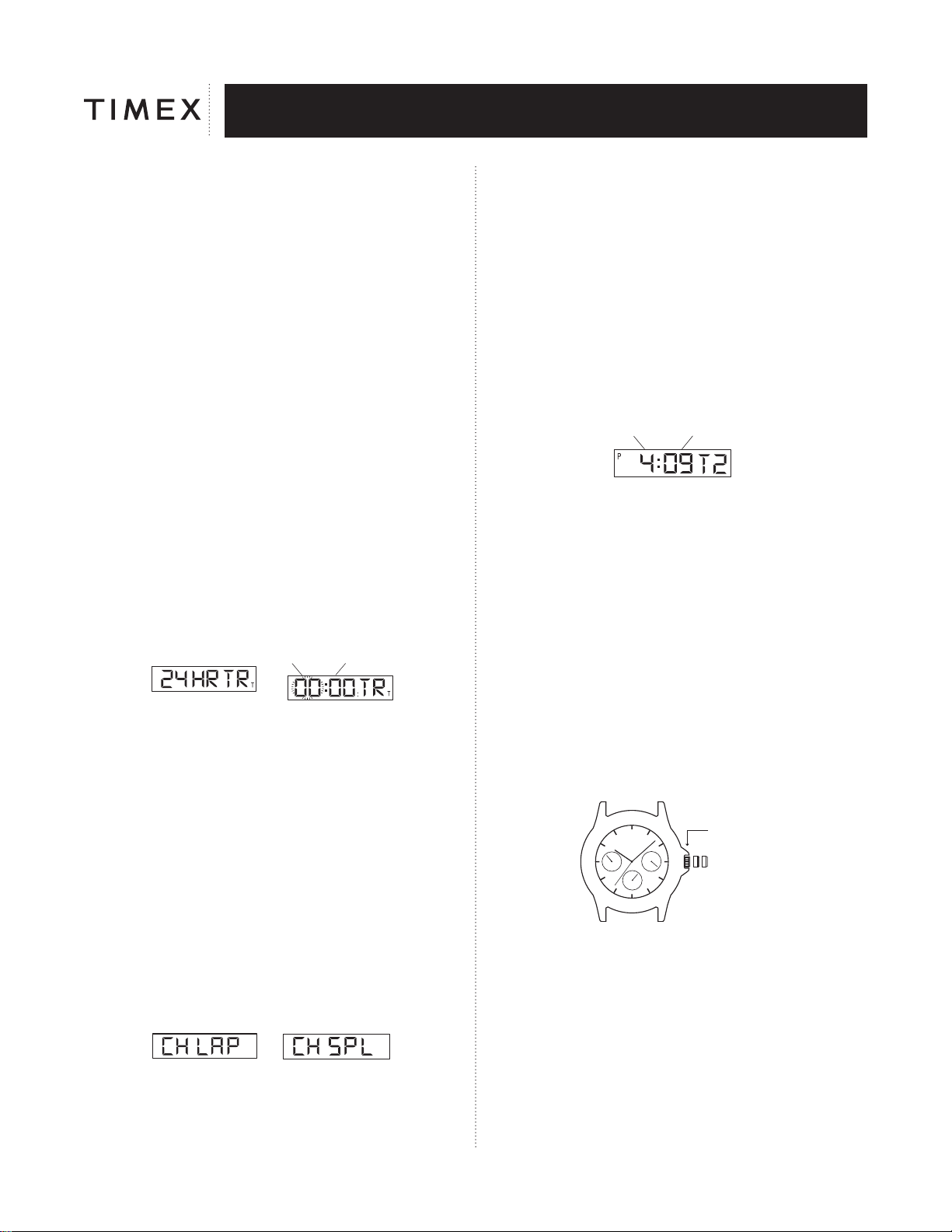
TO USE COUNTDOWN TIMER
SETTING MODE
HOUR MINUTE
1. PRESS pusher “A” to bring up COUNTDOWN TIMER display. “24 HR TR”
will appear.
2. PRESS pusher “D” to let hour flash.
3. PRESS pusher “C” to advance hour.
4. PRESS pusher “A” to set tens of minutes.
5. PRESS pusher “C” to advance tens of minutes.
6. PRESS pusher “A” and “C” as above to adjust minute.
7. PRESS pusher “D” to complete setting.
8. PRESS pusher “C” to start the timer.
9. PRESS pusher “D” to stop the timer.
10. PRESS pusher “D” again to resume timer to the preset time.
NOTE: When the timer counts down to zero it will beep for 20 seconds.
To stop the timer beep, PRESS any pusher.
“T” will appear to designate that the countdown timer is running.
Countdown time up to 24 hours.
PRESS and HOLD pusher “C” for 2 seconds in setting mode, to activate fast
advance.
TO USE CHRONOGRAPH FOR STANDARD MEASUREMENT:
OR
1. PRESS pusher “A” to bring up CHRONOGRAPH display; “CH LAP” or “CH
SPL” will appear.
2. PRESS pusher “C” to start timing.
3. PRESS pusher “D” to stop timing.
4. PRESS pusher “D” to reset.
TO USE CHRONOGRAPH FOR LAP OR SPLIT TIME MEASUREMENT:
1. PRESS pusher “A” to bring up CHRONOGRAPH display; “CH LAP” or
“CH SPL” will appear.
2. PRESS pusher “D” to select LAP or SPLIT.
3. PRESS pusher “C” to start timing.
4. PRESS pusher “C” to record the first Lap or Split time; digits will be frozen for
15 seconds; “L” or “S” will flash to indicate that the next Lap or Split time is
being recorded in the background.
5. PRESS pusher “A” to view the running display while the display is frozen.
6. PRESS pusher “C” to take another Lap or Split.
7. PRESS pusher “D” to stop.
8. PRESS pusher “D” again to reset.
NOTE: CHRONOGRAPH must be reset to zero to switch between LAP and
SPLIT.
Records time up to 24 hours and shows 1/100 of seconds for the first hour.
TO SET DUAL TIME:
HOUR MINUTE
1. PRESS pusher “A” to bring up DUAL TIME display. “T2” will appear beside
the dual time.
2. PRESS and HOLD pusher “D”; “Hold” will display until hour flashes.
3. PRESS pusher “C” to advance hour.
4. PRESS pusher “A” to let month flash.
5. PRESS pusher “C” to advance month.
6. PRESS pusher “A” and “C” as above to adjust date, day, and to set
12 / 24 hour format.
7. PRESS pusher “D” to complete setting.
NOTE: PRESS and hold pusher “C” for 2 seconds in setting mode to activate
fast advance.
NOTE:
1. While in setting of any mode, if no pusher is pressed for 90 seconds the
display will automatically return to TIME / CALENDAR mode.
2. While in any mode other than TIME / CALENDAR mode, whenever pusher
“C” or “D” is pressed, the next press of pusher “A” will automatically return
the display to TIME / CALENDAR mode.
MULTI-FUNCTION MODELS
CB
A
CROWN POSITION
NORMAL POSITION
Your watch has a normal large face display and three small faces displaying
date, day and 24-hour time.
TO SET THE DAY
1. Pull crown all the way out and turn CLOCKWISE until correct day appears.
2. Push crown in to restart.
NOTE: You must set day before setting time.
TO SET THE TIME
1. Pull crown all the way out and turn to correct time.
2. Push crown in to restart.
NOTE: 24-hour display will set automatically.
Descargue el manual en Español (PDF, 8.49 MB)
(Piense en el medioambiente y solo imprima este manual si es de verdad necesario)

Loading…

Puntuación

Dé su opinión de la Timex TW2Y18500 Classic Design Inspired by our Heritage. Reloj de pulsera calificando el producto. ¿Quiere compartir su experiencia con este producto o hacer una pregunta? Deje un comentario en la parte inferior de la página.
¿Estás satisfecho con elTimex TW2Y18500 Classic Design Inspired by our Heritage. Reloj de pulsera?
No
Sea el primero en calificar este producto
0 votos

Únase a la conversación sobre este producto

Aquí puedes compartir lo que piensas sobre Timex TW2Y18500 Classic Design Inspired by our Heritage. Reloj de pulsera. Si tiene alguna pregunta, primero lea atentamente el manual. Puede solicitar un manual utilizando nuestro formulario de contacto.

Más sobre este manual

Entendemos que es bueno tener un manual en papel para tus Timex TW2Y18500 Classic Design Inspired by our Heritage. Reloj de pulsera. Siempre puedes descargar el manual desde nuestro sitio web e imprimirlo tú mismo. Si deseas tener un manual original te recomendamos contactar con Timex. Es posible que puedan proporcionar un manual original. ¿Estás buscando el manual de tu Timex TW2Y18500 Classic Design Inspired by our Heritage. Reloj de pulsera en otro idioma? Elija su idioma preferido en nuestra página de inicio y busque el número de modelo para ver si lo tenemos disponible.

Especificaciones

Marca Timex
Modelo TW2Y18500 Classic Design Inspired by our Heritage.
Categoría Relojes de pulsera
Tipo de archivo PDF
Tamaño del archivo 8.49 MB

Todos los manuales para Timex Relojes de pulsera
Más manuales de Relojes de pulsera

Preguntas frecuentes sobre Timex TW2Y18500 Classic Design Inspired by our Heritage. Reloj de pulsera

Nuestro equipo de atención al cliente busca información útil sobre los productos y responde a las preguntas frecuentes. Si encuentra inexactitudes en las preguntas frecuentes, indíquenoslo usando nuestro formulario de contacto.

La pila de mi dispositivo está oxidada. ¿Puedo seguir usándolo con seguridad? Verificado

Sí, todavía puede usar el dispositivo con seguridad. En primer lugar, retire la pila oxidada. Nunca la toque con sus manos desnudas al hacerlo. A continuación, limpie el compartimento de la pila con un bastoncillo de algodón mojado en vinagre o zumo de limón. Déjelo secar e inserte nuevas pilas.

Ha sido de gran ayuda (939) Leer más

Mi reloj mecánico va rápido, ¿qué puedo hacer? Verificado

La exposición a un campo magnético podría ser la causa. Un relojero profesional podría resolverlo mediante un proceso de desmagnetización.

Ha sido de gran ayuda (878) Leer más

¿Qué significa AM y PM? Verificado

AM significa Ante Meridiem e indica que la hora es antes del mediodía. PM significa Post Meridiem e indica que la hora es después del mediodía.

Ha sido de gran ayuda (754) Leer más

¿Qué es un cronógrafo? Verificado

Un cronógrafo es literalmente un “escritor del tiempo”. El término se utiliza para describir los relojes que indican la hora del día, además de medir un cierto intervalo de tiempo, como un cronómetro.

Ha sido de gran ayuda (659) Leer más

¿Qué significan las siglas GMT? Verificado

GMT son las siglas en inglés del tiempo medio de Greenwich (a veces llamado UTC, que significa tiempo universal coordinado). Es la hora en el meridano cero, que pasa por Greenwich cerca de Londres.

Ha sido de gran ayuda (499) Leer más

¿Qué es el movimiento de cuarzo? Verificado

Los relojes con movimiento de cuarzo son alimentados por una batería. Esta envía una corriente eléctrica a través de cristales de cuarzo, que vibrarán. Estas vibraciones se transmiten al movimiento. Como las vibraciones tienen una frecuencia fija, los relojes con movimiento de cuarzo son extremadamente precisos.

Ha sido de gran ayuda (482) Leer más
Manual de uso Timex TW2Y18500 Classic Design Inspired by our Heritage. Reloj de pulsera

Productos relacionados

Categorias relacionadas

×
Download