Manual de uso Topcom Twintalker 9500 Airsoft Edition Walkie talkie

¿Necesita un manual para su Topcom Twintalker 9500 Airsoft Edition Walkie talkie? A continuación puedes ver y descargar el manual en PDF gratis en español. Este producto actualmente tiene 0 preguntas frecuentes, 1 comentario y tiene 6 votos con una calificación promedio de producto de 67/100. Si este no es el manual que desea, , contáctenos.

¿Su producto tiene algún defecto y el manual no ofrece ninguna solución? Vaya a Repair Café para solicitar un servicio de reparación gratuito.

Manual de uso

Loading…
7Twintalker 9500 Airsoft Edition
ENGLISH
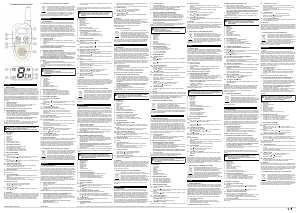
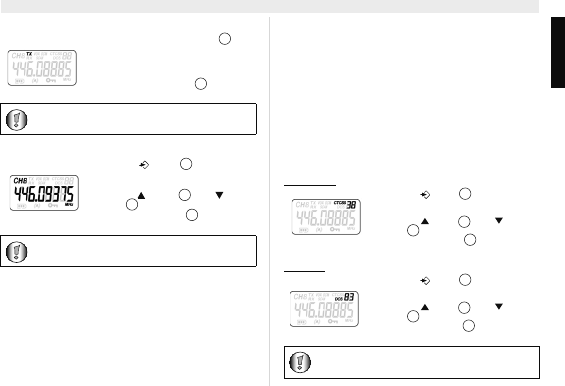
13.5 Transmitting a Signal
13.6 Changing Channels
13.7 CTCSS (Continious Tone Coded Squelch System) /
DCS (Digital Coded Squelch)
License free PMR radio's operating on the 446 MHz frequency band, like
the Twintalker 9500 PMR, have 8 available radio channels. If there are
many PMR users in your neighborhood, there is a chance that some of
these users are operating on the same radio channel.
To prevent that you receive signals from other users, sub-channels have
been integrated.
Two PMR radio's will only be able to communicate with each other when
they are operating on the same radio channel and when they have
selected exactly the same sub-channel.
There are two kind of sub-channels :
Continuous Tone Coded Squelch System (CTCSS)
Digital Coded Squelch (DCS)
When using CTCSS, a low frequency tone (between 67 and 250 Hz) will
be transmitted along with the voice signal. There are 38 available tones
to choose from. You are free to choose one of these 38 available tones.
Due to filtering, these tones will generally not be audible so they will not
disturb the communication.
DCS is similar to CTCSS, but instead of sending a continuous tone of a
selected frequency, a digital data transmission is added to the radio
signal. This Digital Code is transmitted at a really low rate, around 134
bits per second (the code is 23 bits long). Only the PMR's of the latest
generation will support DCS. There are 83 available DCS codes that can
be used. Since earlier models will only support CTCSS it will be better to
use DCS to prevent that other users will be audible during your PMR
conversations.
13.7.1 CTCSS
13.7.2 DCS
Press and hold the - button to
transmit. The TX symbol is displayed.
Hold the unit in a vertical position with the
microphone 10cm from the mouth and
speak into the microphone.
Release the - button when you
want to stop transmitting.
To check the channel activity use the monitor function
(See chapter “13.8 Monitor”).
Press the -button once, the
current channel number flashes on the
display.
Press the - button or the -
button to change the channel.
Press the - button to confirm
and return to stand-by mode.
If no button is pressed within 5 seconds during setting,
the unit will return to standby.
PTT
12
PTT
12
7
11
10
PTT
12
Press the -button twice :
"CTCSS" and the current CTCSS code
flashes on the display.
Press the -button or the -
button to change to another code.
Press the -button to confirm and
return to stand-by mode.
Press the -button three times :
"DCS" and the current DCS code flashes
on the display.
Press the -button or the -
button to change to another code.
Press the -button to confirm and
return to stand-by mode.
To disable CTCSS or DCS, select code "00" for CTCSS or
for DCS in the menu. When the entry is confirmed, "OF"
will be displayed.
7
11
10
PTT
12
11
10
PTT
12
Descargue el manual en Español (PDF, 1.48 MB)
(Piense en el medioambiente y solo imprima este manual si es de verdad necesario)

Loading…

Puntuación

Dé su opinión de la Topcom Twintalker 9500 Airsoft Edition Walkie talkie calificando el producto. ¿Quiere compartir su experiencia con este producto o hacer una pregunta? Deje un comentario en la parte inferior de la página.
¿Estás satisfecho con elTopcom Twintalker 9500 Airsoft Edition Walkie talkie?
No
67%
33%
6 votos

Únase a la conversación sobre este producto

Aquí puedes compartir lo que piensas sobre Topcom Twintalker 9500 Airsoft Edition Walkie talkie. Si tiene alguna pregunta, primero lea atentamente el manual. Puede solicitar un manual utilizando nuestro formulario de contacto.

Gianbattista Pasinetti 25-09-2021
Nada de que quejarse del funcionamiento. Están bien, pero después de haberlos abandonado durante casi un año en su estuche (maletín)., Los volví a tomar en mi mano y el cuerpo de ambos está pegajoso .. se pegan a las manos !! Pero, ¿qué historia es esta?

responder | Ha sido de gran ayuda (0) (Traducido por Google)

Más sobre este manual

Entendemos que es bueno tener un manual en papel para tus Topcom Twintalker 9500 Airsoft Edition Walkie talkie. Siempre puedes descargar el manual desde nuestro sitio web e imprimirlo tú mismo. Si deseas tener un manual original te recomendamos contactar con Topcom. Es posible que puedan proporcionar un manual original. ¿Estás buscando el manual de tu Topcom Twintalker 9500 Airsoft Edition Walkie talkie en otro idioma? Elija su idioma preferido en nuestra página de inicio y busque el número de modelo para ver si lo tenemos disponible.

Especificaciones

Marca Topcom
Modelo Twintalker 9500 Airsoft Edition
Categoría Walkie talkie
Tipo de archivo PDF
Tamaño del archivo 1.48 MB

Todos los manuales para Topcom Walkie talkie
Más manuales de Walkie talkie
Manual de uso Topcom Twintalker 9500 Airsoft Edition Walkie talkie

Productos relacionados

Categorias relacionadas

×
Download