Manual de uso Black and Decker CTO6300 Horno

¿Necesita un manual para su Black and Decker CTO6300 Horno? A continuación puedes ver y descargar el manual en PDF gratis en español. Este producto actualmente tiene 5 preguntas frecuentes, 0 comentarios y tiene 0 votos. Si este no es el manual que desea, , contáctenos.

¿Su producto tiene algún defecto y el manual no ofrece ninguna solución? Vaya a Repair Café para solicitar un servicio de reparación gratuito.

Manual de uso

Loading…
4. For toasting bread, press ; the digital display shows TOAST. For bagels, press ;
the digital display shows TOAST BGL. In both modes, you see a blinking 4 (the preset toast
shade level) and four bars on the digital display. The ON indicator light blinks for 5 seconds.
Important: You have only 5 seconds to press . If do not press , the digital
display goes back to the time of day and the ON indicator light goes out. You will have to restart
the routine.
5. Use and to select desired toast/bagel shade level (from 1 to 7). For best
results, select the medium setting (4) for your first cycle, then adjust lighter or darker to suit your
taste.
6. After you press , ON indicator light becomes steady and the toast cycle begins. The
selected toast shade setting blinks throughout the toasting cycle.
7. Once toasting cycle is finished, you hear 5 short beeps. The ON indicator light goes out and the
digital display changes to the time of day.
Note: For your convenience, the unit will remember the last programmed toast setting.
8. Open oven door and using an oven mitt or pot holder, slide out the rack to remove bread or
bagels.
Caution: The unit is hot. Do not let any part of your skin touch any surface.
BAKING
Note: The oven will automatically preheat to the temperature you set for baking.
1. Press . The digital display shows BAKE and flashes 350°F (180°C). The On indicator
light blinks for 5 seconds.
Important: You have only 5 seconds to press . If you do not press , the digital
display goes back to the time of day and the ON indicator light goes out. You will have to restart
the routine.
2. To set desired temperature:
For Celsius, press then use and to change in increments of 10°.
For Fahrenheit, press then use and to change it in increments
of 25°.
3. Once you select desired temperature, if you want to preset baking time, press .
For 5 seconds, digital display shows blinking 1:00 (default time) and BAKE TIMER.
Use and to change default time (1:00) until it reaches desired baking time.
Note: You can program the timer for up to 2 hours.
Important: You have only 5 seconds to press or . If you do not press
or , the digital display goes back to
the time of day and the ON indicator light goes out. You will have to restart the routine.
4. Press . The digital display starts blinking LO then Preheat.
5. Open oven door. The oven beeps.
6. Place bake pan (drip tray) or pizza pan containing food on the slide rack (see Cooking Chart for
recommended rack positions).
7. Close oven door. The oven will beep at 1-minute interval and the ON indicator light keeps
blinking to signal that you MUST press again to activate the baking function.
Important: Every time you open the oven door, you must press to activate the baking
function. If you do not press , the ON indicator light keeps blinking and the oven beeps
signaling that the Bake function is not active and the oven is not heating.
8. After you press , the ON indicator light becomes steady and digital display keeps
blinking LO then Preheat until oven reaches set temperature. The Oven then beeps and digital
display blinks between set temperature and set baking time. The Timer starts countdown to set
baking time.
6
5
How to Use
This product is for household use only.
GETTING STARTED
Remove packing materials and any stickers. Peel off clear protective film from electronic
control panel.
Wash all parts as instructed in Care and Cleaning.
Select a location for the unit. Leave some space between the back of the unit and your counter
to allow heat to flow without damaging counter space.
Insert crumb tray underneath the bottom heating elements.
SETTING THE CLOCK
1. Plug unit into a standard wall outlet. 12:00 flashes on the digital display.
2. Press . Use and to set the time of day.
Tip: To speed up the time sequence, press and hold the control.
3. Once you reach the correct time, press .
Note: If power is interrupted, you will need to set the time again.
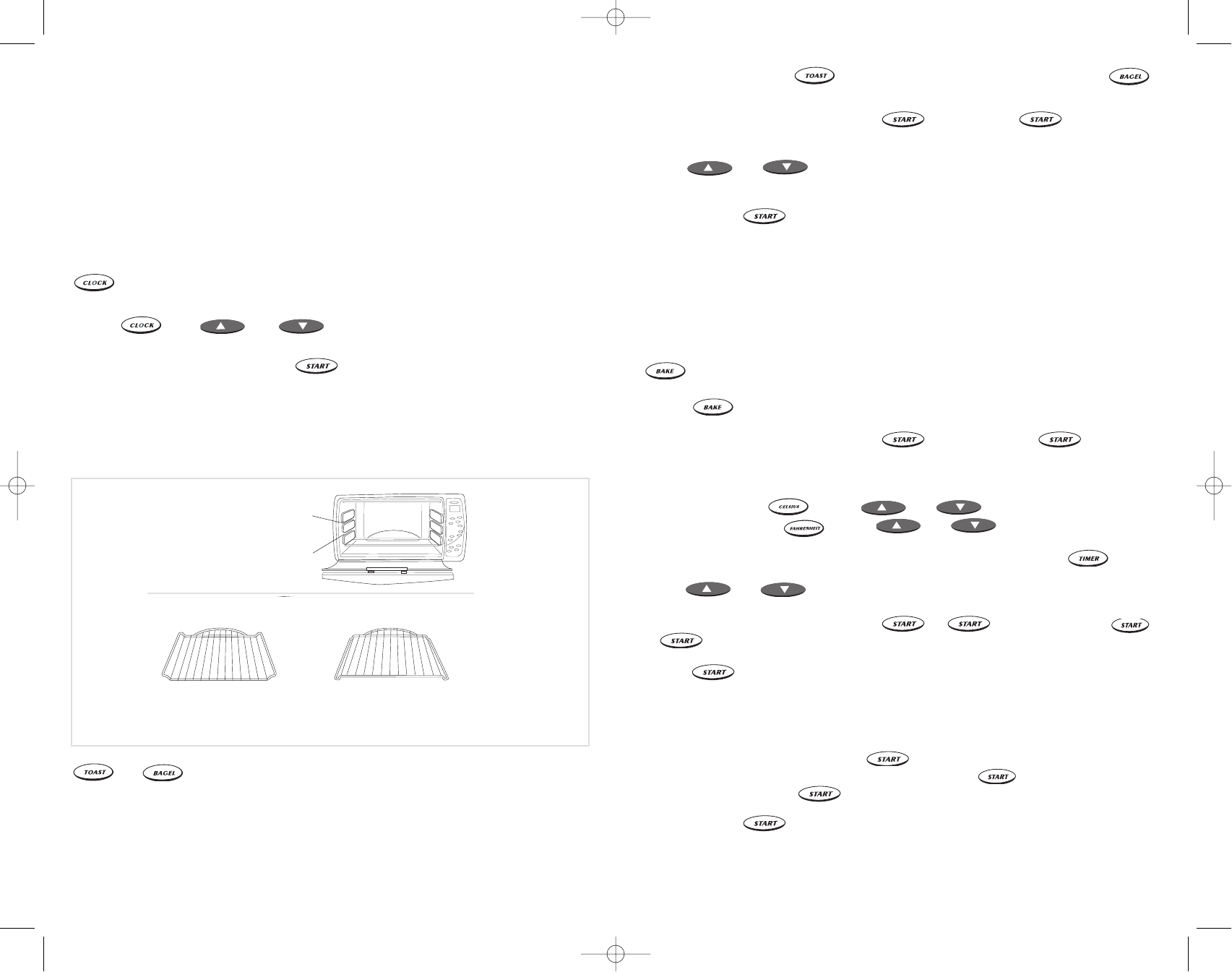
USING SLIDE RACK
The slide rack must be used for all cooking functions. It may be inserted in either the upper
or lower rack slot. It can also be inverted for two additional positions (C).
1 - Bottom down 2 - Bottom up
3 - Top down 4 - Top up
Slide Rack Positions
Upper slot
(use rack positions 1 and 3)
Lower slot
(use rack positions 2 and 4)
C
TOASTING BREAD OR BAGELS
or
Note: The toasting time and temperature are preset and cannot be adjusted.
1. Open oven door.
2. Place up to 6 slices of bread or 6 bagel halves on the slide rack. It is not necessary to preheat
the oven for toasting.
Note: For best performance, use rack positions 2 and 3 (C).
3. Close oven door.
CTO6300Pub1000000356RV2 7/14/05 2:53 PM Page 6
Descargue el manual en Español (PDF, 3.13 MB)
(Piense en el medioambiente y solo imprima este manual si es de verdad necesario)

Loading…

Puntuación

Dé su opinión de la Black and Decker CTO6300 Horno calificando el producto. ¿Quiere compartir su experiencia con este producto o hacer una pregunta? Deje un comentario en la parte inferior de la página.
¿Estás satisfecho con elBlack and Decker CTO6300 Horno?
No
Sea el primero en calificar este producto
0 votos

Únase a la conversación sobre este producto

Aquí puedes compartir lo que piensas sobre Black and Decker CTO6300 Horno. Si tiene alguna pregunta, primero lea atentamente el manual. Puede solicitar un manual utilizando nuestro formulario de contacto.

Más sobre este manual

Entendemos que es bueno tener un manual en papel para tus Black and Decker CTO6300 Horno. Siempre puedes descargar el manual desde nuestro sitio web e imprimirlo tú mismo. Si deseas tener un manual original te recomendamos contactar con Black and Decker. Es posible que puedan proporcionar un manual original. ¿Estás buscando el manual de tu Black and Decker CTO6300 Horno en otro idioma? Elija su idioma preferido en nuestra página de inicio y busque el número de modelo para ver si lo tenemos disponible.

Especificaciones

Marca Black and Decker
Modelo CTO6300
Categoría Hornos
Tipo de archivo PDF
Tamaño del archivo 3.13 MB

Todos los manuales para Black and Decker Hornos
Más manuales de Hornos

Preguntas frecuentes sobre Black and Decker CTO6300 Horno

Nuestro equipo de atención al cliente busca información útil sobre los productos y responde a las preguntas frecuentes. Si encuentra inexactitudes en las preguntas frecuentes, indíquenoslo usando nuestro formulario de contacto.

Mi horno no se calienta lo suficiente, ¿qué debo hacer? Verificado

El termostato hace que el horno se caliente a la temperatura elegida. Probablemente el termostato está defectuoso. Hágalo reemplazar. En caso de duda, póngase en contacto con el fabricante.

Ha sido de gran ayuda (3183) Leer más

¿Qué es la pirólisis? Verificado

Algunos hornos están equipados con una función de pirólisis. Se trata de un sistema de limpieza que quema la suciedad y la grasa en el horno alcanzando temperaturas muy altas. Después de la pirólisis, toda la suciedad se habrá convertido en cenizas por lo que es fácil de eliminar. Si el horno tiene una función de pirólisis, aconsejamos utilizarla de 3 a 4 veces al año para mantenerlo limpio.

Ha sido de gran ayuda (3176) Leer más

Cuando utilizo el horno, a menudo quedan restos de comida que caen al fondo y provocan humo. ¿Cómo puedo prevenir esto? Verificado

Muchos hornos vienen con una rejilla y una bandeja para hornear. Cuando se preparan alimentos en la parrilla, la bandeja de horno se puede colocar en la parte inferior para evitar que los restos de alimentos se quemen y provoquen humo.

Ha sido de gran ayuda (805) Leer más

El humo se acumula en el horno cuando se calienta. ¿Por qué? Verificado

Probablemente hay restos de comida de un plato anterior en el horno. Los restos de alimentos muy grasientos pueden generar humo cuando se calientan. Limpie el horno a fondo.

Ha sido de gran ayuda (797) Leer más

¿Puedo asar varios alimentos simultáneamente si uso más de una bandeja de parrilla? Verificado

Técnicamente, es posible. Sin embargo, según el tipo de alimento es posible que tenga que ajustar el tiempo de cocción o cambiar las bandejas a mitad del tiempo de preparación.

Ha sido de gran ayuda (794) Leer más
Manual de uso Black and Decker CTO6300 Horno

Productos relacionados

Categorias relacionadas

×
Download