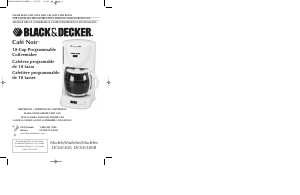
Manual de uso Black and Decker DCM1400B Máquina de café

¿Necesita un manual para su Black and Decker DCM1400B Máquina de café? A continuación puedes ver y descargar el manual en PDF gratis en español. Este producto actualmente tiene 2 preguntas frecuentes, 0 comentarios y tiene 0 votos. Si este no es el manual que desea, , contáctenos.

¿Su producto tiene algún defecto y el manual no ofrece ninguna solución? Vaya a Repair Café para solicitar un servicio de reparación gratuito.

Manual de uso

Loading…
4
How to Use
This product is for household use only.
GETTING STARTED
1. Remove all stickers, packing material, and literature.
Important: For warranty verification, please do not remove line cord sticker.
2. Wash the carafe, carafe lid and filter holder in warm sudsy water—rinse thoroughly.
These parts are also top rack, dishwasher safe.
CLEANING BEFORE FIRST USE
Cycle the unit once with water to help remove any sediment.
1. Open lid and pour cold water into water reservoir up to the
10-cup level mark on the water window (A). Do not overfill.
2. Close the reservoir lid.
3. Follow steps (8-10) in "Brewing Coffee" (Do not use ground
coffee or a paper filter).
4. When cycle is finished discard water from the carafe.
SETTING THE CLOCK
To set the current time of day:
1. Plug in the coffeemaker. The display indicates 12:00 a.m. until the time is set.
a. Press the HOUR button until you see the correct A.M. or P.M. hour. The Red dot
in the top left corner of the display indicates P.M. time.
b. Press the MIN button to select the correct minutes. The clock is set and will continue
to keep correct time.
Note: Unplugging the unit will reset the clock to 12:00.
BREWING COFFEE
You do not have to set the clock or program the coffeemaker to brew coffee.
1. Make sure the unit is OFF.
2. Open the one-piece cover to expose the water reservoir.
3. Use the carafe to fill the water reservoir with cold water. Watch water window for the
desired level.
4. Be sure filter holder is inserted properly and secure.
a) Align tabs on filter holder with notches of the brew basket.
b) Press down and turn filter holder applying slight pressure.
c) Tabs lock into place on both sides underneath the groove
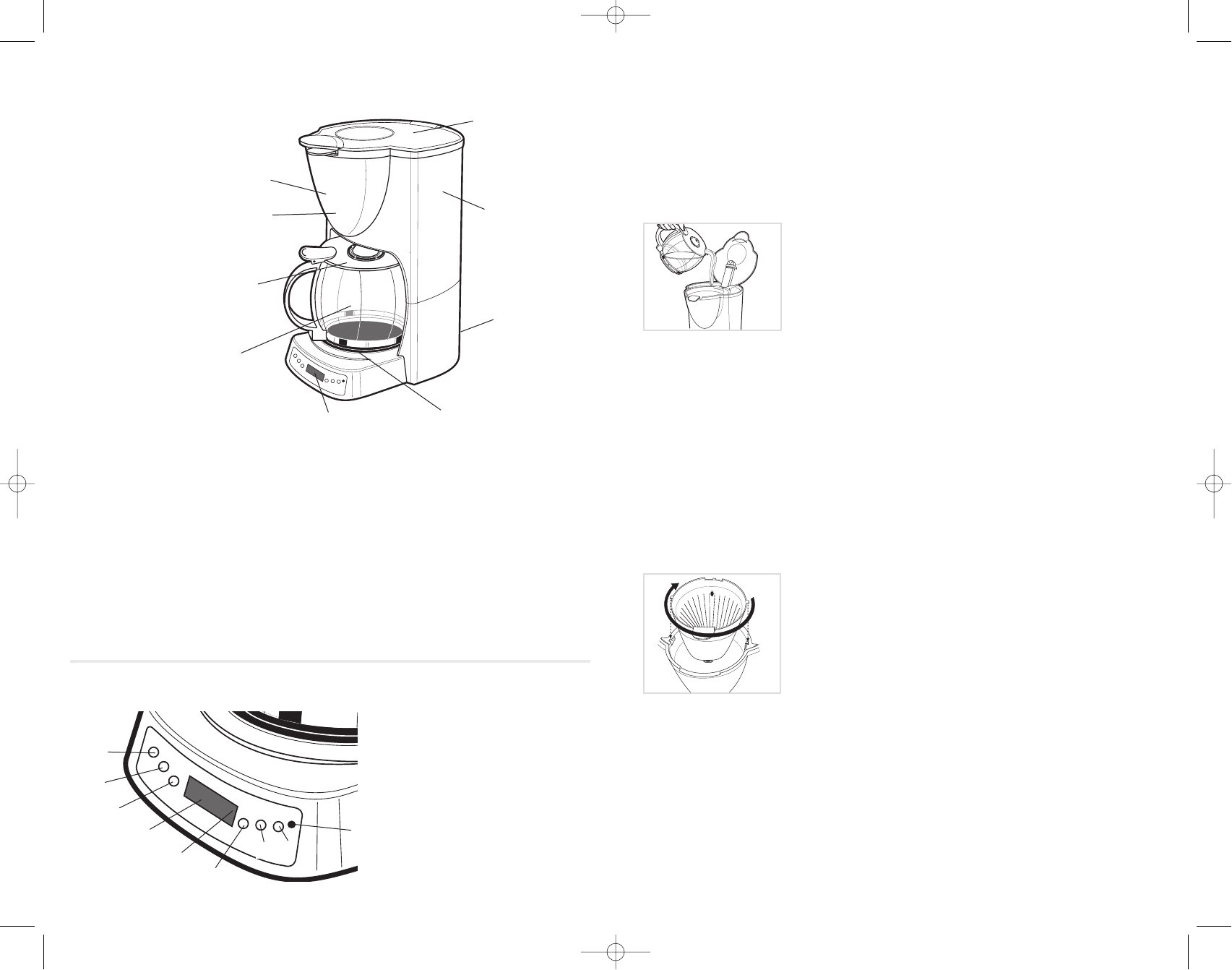
in the brew basket (B)
Note: Filter holder must be locked into place or Sneak-A-Cup®
feature will not work.
5. Insert a cone-shaped #4 paper filter into the filter basket.
6. Add ground coffee into filter (we recommend one heaping tablespoon for every
two cups).
7. Place the carafe into the coffeemaker.
8. Plug in the coffeemaker.
9. Press the On button. The indicator light illuminates to show that brewing is in
progress.
10. Replace the carafe on the "Keep Hot" plate when not serving to keep coffee hot.
Note: The coffeemaker shuts off automatically after 2 hours, or you may press the "OFF"
button to instantly turn off the coffeemaker.
TO BREW A SECOND POT
3
Product may vary slightly from what is illustrated.
1. One-Piece Cover
2. Water Reservoir
3. Cord Storage
4. “Keep Hot” Plate
5. Programmable Digital Timer
†6.Carafe (Part #GC1400) (Part #GC1400B)
†7.Carafe Lid (Part #DCM1400-01) (Part #DCM1400B-01)
8. Brew Basket
†9.Inner Cone Filter Holder (inside of unit)
(Part # DCM1400-02) (Part# DCM-1400B-02)
† Consumer replaceable
1. PM indicator Light
2. Auto mode indicator light
3. AUTO
4. On indicator light
H= Hour
M= Minute
PROG= Programmer
AUTO= Auto
0= OFF
1= ON
A
B
CONTROL PANEL
H
M
PROG.
O
1
DCM1400Pub178998RV1 8/9/05 12:40 PM Page 4
Descargue el manual en Español (PDF, 7.82 MB)
(Piense en el medioambiente y solo imprima este manual si es de verdad necesario)

Loading…

Puntuación

Dé su opinión de la Black and Decker DCM1400B Máquina de café calificando el producto. ¿Quiere compartir su experiencia con este producto o hacer una pregunta? Deje un comentario en la parte inferior de la página.
¿Estás satisfecho con elBlack and Decker DCM1400B Máquina de café?
No
Sea el primero en calificar este producto
0 votos

Únase a la conversación sobre este producto

Aquí puedes compartir lo que piensas sobre Black and Decker DCM1400B Máquina de café. Si tiene alguna pregunta, primero lea atentamente el manual. Puede solicitar un manual utilizando nuestro formulario de contacto.

Más sobre este manual

Entendemos que es bueno tener un manual en papel para tus Black and Decker DCM1400B Máquina de café. Siempre puedes descargar el manual desde nuestro sitio web e imprimirlo tú mismo. Si deseas tener un manual original te recomendamos contactar con Black and Decker. Es posible que puedan proporcionar un manual original. ¿Estás buscando el manual de tu Black and Decker DCM1400B Máquina de café en otro idioma? Elija su idioma preferido en nuestra página de inicio y busque el número de modelo para ver si lo tenemos disponible.

Especificaciones

Marca Black and Decker
Modelo DCM1400B
Categoría Máquinas de café
Tipo de archivo PDF
Tamaño del archivo 7.82 MB

Todos los manuales para Black and Decker Máquinas de café
Más manuales de Máquinas de café

Preguntas frecuentes sobre Black and Decker DCM1400B Máquina de café

Nuestro equipo de atención al cliente busca información útil sobre los productos y responde a las preguntas frecuentes. Si encuentra inexactitudes en las preguntas frecuentes, indíquenoslo usando nuestro formulario de contacto.

¿Qué dice la molienda sobre el café? Verificado

El tipo de molienda determina en gran medida el sabor del café. La molienda más fina generalmente significa un sabor más pronunciado, mientras que la molienda más gruesa resulta en un sabor más suave. Con la molienda muy fina el café puede estar amargo.

Ha sido de gran ayuda (765) Leer más

¿Cuál es la mejor forma de almacenar el café? Verificado

El café se almacena mejor en una lata limpia y hermética.

Ha sido de gran ayuda (378) Leer más
Manual de uso Black and Decker DCM1400B Máquina de café

Productos relacionados

Categorias relacionadas

×
Download