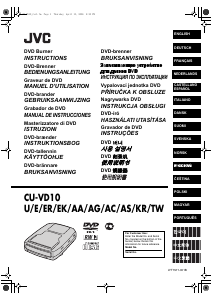
Manual de uso JVC CU-VD20 Reproductor DVD

¿Necesita un manual para su JVC CU-VD20 Reproductor DVD? A continuación puedes ver y descargar el manual en PDF gratis en español. Este producto actualmente tiene 2 preguntas frecuentes, 0 comentarios y tiene 0 votos. Si este no es el manual que desea, , contáctenos.

¿Su producto tiene algún defecto y el manual no ofrece ninguna solución? Vaya a Repair Café para solicitar un servicio de reparación gratuito.

Manual de uso

Loading…
6 EN
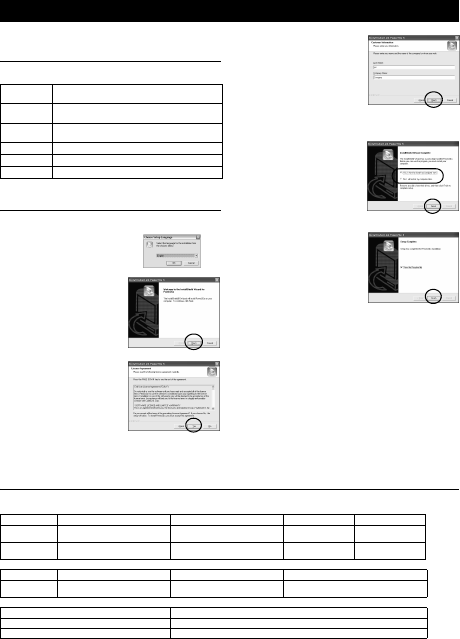
Power2Go 5.5 Lite is software for writing video, image, audio, and
other data files to data DVDs.
System Requirements
The following shows the system requirements for installation.
* If you use USB1.1 cable, it will take approximately 3 hours to write.
Installation Procedure
1. Insert the installation CD-ROM in the CD-ROM drive.
The installation is now finished.
NOTES:
The above procedure is just a brief explanation on installing the
software. For details on operating Power2Go 5.5 Lite, refer to the
User’s guide, Help, and ReadMe installed at the same time as the
software. You can view the User’s guide, Help, and ReadMe from
the start menu of the PC.
This product does not apply to write files into CD-R or CD-RW.
Also, it is not responded to all the functions of Power2Go 5.5 Lite.
To get customer support and to register the software, you need
the following product key (CD-Key):
PXNVM-NWE4G-XQD9Q-CU9DX-3FQFN-NAKUS
Power2Go 5.5 Lite does not support conversion of audio files to
MP3 format.
When the [Enter Activation Key] screen appears while using
Power2Go 5.5 Lite, close the screen without entering the
activation key.
CyberLink Power2Go 5.5 Lite Contact Information
For information on CyberLink Power2Go 5.5 Lite or other products, use the following contact information.
Telephone/fax support
Paid voice support
Support web/e-mail
Writing Software — CyberLink Power2Go 5.5 Lite —
Operating
system
Windows
®
XP Home Edition [XP] (pre-installed) or
Windows
®
XP Professional [XP] (pre-installed)
CPU
Intel
®
Pentium
®
III, at least 800 MHz
(Intel
®
Pentium
®
4, at least 2 GHz recommended)
Free hard disk
space
At least 50 MB for installation
At least 5 GB recommended for making DVDs
RAM At least 128 MB (at least 256 MB recommended)
Connector USB 2.0/1.1* connector
Display Must be capable of displaying 800 x 600 dots
2. The language selection screen
appears.
3. The installation start screen
appears.
Click [Next].
4. Confirm the contents and then
click [Yes].
5. Enter the user information and
then click [Next].
Follow the on-screen instructions.
6. Installation starts.
7. The screen on the right appears
when the installation is complete.
Select the desired checkbox and
then click [Finish].
If you select [No, I will restart
my computer later.], the setup
complete screen in step 8.
appears.
8. Click [Finish].
Location Language Office hours (Mon. to Fri.) Phone # Fax #
Germany English / German / French /
Spanish/Italian/Dutch
9:00 am to 5:00 pm +49-700-462-92375 +49-241-70525-25
Taiwan Mandarin 9:00 am to 6:00 pm +886-2-8667-1298
ext. 333
+886-2-8667-1300
Location Language Lines are open (Mon. to Fri.) URL
U.S.A. English 1:00 pm to 10:00 pm CST http://www.cyberlink.com/english/cs/support/
new_site/voice_support.jsp
Language URL/e-mail address
English http://www.cyberlink.com/english/cs/support/new_site/support_index.html
German / French / Spanish / Italian [email protected]
CU-VD20.book Page 6 Thursday, March 1, 2007 5:55 PM
Descargue el manual en Español (PDF, 10.88 MB)
(Piense en el medioambiente y solo imprima este manual si es de verdad necesario)

Loading…

Puntuación

Dé su opinión de la JVC CU-VD20 Reproductor DVD calificando el producto. ¿Quiere compartir su experiencia con este producto o hacer una pregunta? Deje un comentario en la parte inferior de la página.
¿Estás satisfecho con elJVC CU-VD20 Reproductor DVD?
No
Sea el primero en calificar este producto
0 votos

Únase a la conversación sobre este producto

Aquí puedes compartir lo que piensas sobre JVC CU-VD20 Reproductor DVD. Si tiene alguna pregunta, primero lea atentamente el manual. Puede solicitar un manual utilizando nuestro formulario de contacto.

Más sobre este manual

Entendemos que es bueno tener un manual en papel para tus JVC CU-VD20 Reproductor DVD. Siempre puedes descargar el manual desde nuestro sitio web e imprimirlo tú mismo. Si deseas tener un manual original te recomendamos contactar con JVC. Es posible que puedan proporcionar un manual original. ¿Estás buscando el manual de tu JVC CU-VD20 Reproductor DVD en otro idioma? Elija su idioma preferido en nuestra página de inicio y busque el número de modelo para ver si lo tenemos disponible.

Especificaciones

Marca JVC
Modelo CU-VD20
Categoría Reproductores de DVD
Tipo de archivo PDF
Tamaño del archivo 10.88 MB

Todos los manuales para JVC Reproductores de DVD
Más manuales de Reproductores de DVD

Preguntas frecuentes sobre JVC CU-VD20 Reproductor DVD

Nuestro equipo de atención al cliente busca información útil sobre los productos y responde a las preguntas frecuentes. Si encuentra inexactitudes en las preguntas frecuentes, indíquenoslo usando nuestro formulario de contacto.

¿Puede un reproductor de DVD también reproducir discos CD? Verificado

Sí, casi todos los reproductores de DVD son capaces de reproducir discos CD.

Ha sido de gran ayuda (200) Leer más

¿Puedo reparar yo mismo los arañazos en un DVD? Verificado

Los rayones impiden que el láser lea el disco correctamente. Cuando los rayones son solo superficiales, es posible repararlos usted mismo puliendo el disco con un compuesto ligeramente abrasivo. Lo ideal es utilizar un compuesto abrasivo profesional, pero también es posible utilizar pasta de dientes normal. Después de pulir el disco, es necesario lavarlo y dejarlo secar. Hay empresas especializadas que pueden hacer esto.

Ha sido de gran ayuda (92) Leer más
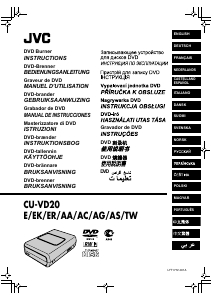
Manual de uso JVC CU-VD20 Reproductor DVD

Productos relacionados

Categorias relacionadas

×
Download