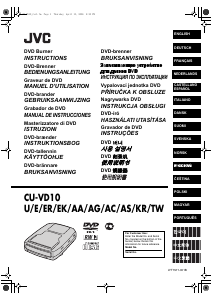
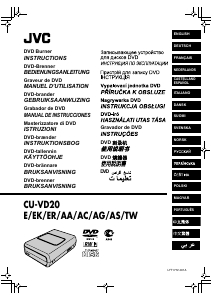
Manual de uso JVC CU-VD20 Reproductor DVD

¿Necesita un manual para su JVC CU-VD20 Reproductor DVD? A continuación puedes ver y descargar el manual en PDF gratis en español. Este producto actualmente tiene 2 preguntas frecuentes, 0 comentarios y tiene 0 votos. Si este no es el manual que desea, , contáctenos.

¿Su producto tiene algún defecto y el manual no ofrece ninguna solución? Vaya a Repair Café para solicitar un servicio de reparación gratuito.

Manual de uso

Loading…
EN 7
If you think there is a malfunction, first check the following items. If you are still unable to solve the problem, consult your local JVC dealer.
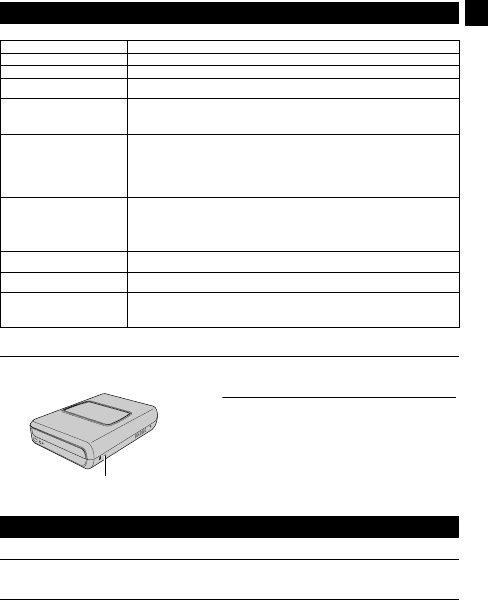
Force Eject Hole
If a disc cannot be ejected with the eject button because of a malfunction, use this hole to eject the disc.
Copyrights
Duplicating copyright protected material, for other than personal use, without the permission of the copyright holder is prohibited by
copyright law.
Registered Trademarks and Trademarks
Windows
®
is either registered trademark or trademark of Microsoft Corporation in the United States and/or other countries.
Other company and product names mentioned herein are registered trademarks and/or trademarks of their respective holders.
Troubleshooting
Trouble Cause/Action
Cannot turn the power on. Make sure the AC adapter is connected properly.
The camera/PC is not recognized. Make sure the USB cable is connected properly.
The burner or AC adapter is hot. This is not a malfunction. If the burner is abnormally hot, remove the AC adapter and consult the
dealer from which you purchased the burner.
Cannot open the disc tray. A disc cannot be ejected by pressing the eject button if data is being written to the disc. Wait until
writing finishes.
If a disc cannot be ejected with the eject button because of a failure or a malfunction caused by,
for example, the burner being dropped, use the force eject hole to eject the disc. (See below.)
Writing fails. Make sure an appropriate disc is being used. (A pg. 3, 8)
Use discs recommended for the burner. (A pg. 8)
Insert the disc with the label facing up.
Make sure the writing surface of the disc is not damaged.
Make sure the disc tray is not dirty.
Writing to irregularly shaped discs such as heart-shaped discs or octagonal discs is not possible.
Check the writing speed of the disc being used.
Reading fails. Insert the disc with the label facing up.
Make sure the writing surface of the disc is not damaged.
Writing to irregularly shaped discs such as heart-shaped discs or octagonal discs is not possible.
Any CD recorded using the packet-write method cannot be played.
Any CD that does not comply with standards such as the CD-DA standard (copy-control CDs)
cannot be played.
Writing/reading at maximum speed
is not possible.
Reading at maximum speed may not be possible if a non-standard disc is used.
Use discs recommended for the burner. (A pg. 8)
Commercial DVDs cannot be played
when the burner is connected to PC.
Check the region code. (A pg. 3)
It is impossible to dub the DVD discs,
which were written with this burner,
with DVD recorder with HDD.
Connect the burner to the camera, playback using [PLAY DVD] function of the camera, and dub
the DVD discs with the DVD recorder.
(Refer to “Connecting to a TV, VCR or DVD Recorder” or “Using a DVD Burner for Dubbing” in the
camera’s manual.)
Proce
d
ure
A Turn off the burner and disconnect the USB cable and AC adapter.
B Insert a thin rod of about 10 cm long into the force eject hole
located on the left side of the burner. The disc tray will be ejected
for about 10 mm.
C Pull out the disc tray manually and take out the disc.
NOTE:
Be sure to place the burner horizontally.
Force eject hole
Copyrights and Trademarks
CU-VD20.book Page 7 Thursday, March 1, 2007 5:55 PM
Descargue el manual en Español (PDF, 10.88 MB)
(Piense en el medioambiente y solo imprima este manual si es de verdad necesario)

Loading…

Puntuación

Dé su opinión de la JVC CU-VD20 Reproductor DVD calificando el producto. ¿Quiere compartir su experiencia con este producto o hacer una pregunta? Deje un comentario en la parte inferior de la página.
¿Estás satisfecho con elJVC CU-VD20 Reproductor DVD?
No
Sea el primero en calificar este producto
0 votos

Únase a la conversación sobre este producto

Aquí puedes compartir lo que piensas sobre JVC CU-VD20 Reproductor DVD. Si tiene alguna pregunta, primero lea atentamente el manual. Puede solicitar un manual utilizando nuestro formulario de contacto.

Más sobre este manual

Entendemos que es bueno tener un manual en papel para tus JVC CU-VD20 Reproductor DVD. Siempre puedes descargar el manual desde nuestro sitio web e imprimirlo tú mismo. Si deseas tener un manual original te recomendamos contactar con JVC. Es posible que puedan proporcionar un manual original. ¿Estás buscando el manual de tu JVC CU-VD20 Reproductor DVD en otro idioma? Elija su idioma preferido en nuestra página de inicio y busque el número de modelo para ver si lo tenemos disponible.

Especificaciones

Marca JVC
Modelo CU-VD20
Categoría Reproductores de DVD
Tipo de archivo PDF
Tamaño del archivo 10.88 MB

Todos los manuales para JVC Reproductores de DVD
Más manuales de Reproductores de DVD

Preguntas frecuentes sobre JVC CU-VD20 Reproductor DVD

Nuestro equipo de atención al cliente busca información útil sobre los productos y responde a las preguntas frecuentes. Si encuentra inexactitudes en las preguntas frecuentes, indíquenoslo usando nuestro formulario de contacto.

¿Puede un reproductor de DVD también reproducir discos CD? Verificado

Sí, casi todos los reproductores de DVD son capaces de reproducir discos CD.

Ha sido de gran ayuda (200) Leer más

¿Puedo reparar yo mismo los arañazos en un DVD? Verificado

Los rayones impiden que el láser lea el disco correctamente. Cuando los rayones son solo superficiales, es posible repararlos usted mismo puliendo el disco con un compuesto ligeramente abrasivo. Lo ideal es utilizar un compuesto abrasivo profesional, pero también es posible utilizar pasta de dientes normal. Después de pulir el disco, es necesario lavarlo y dejarlo secar. Hay empresas especializadas que pueden hacer esto.

Ha sido de gran ayuda (92) Leer más
Manual de uso JVC CU-VD20 Reproductor DVD

Productos relacionados

Categorias relacionadas

×
Download