Manual de uso Klip Xtreme KLS-650 Charme Altavoz

¿Necesita un manual para su Klip Xtreme KLS-650 Charme Altavoz? A continuación puedes ver y descargar el manual en PDF gratis en español. Este producto actualmente tiene 5 preguntas frecuentes, 2 comentarios y tiene 0 votos. Si este no es el manual que desea, , contáctenos.

¿Su producto tiene algún defecto y el manual no ofrece ninguna solución? Vaya a Repair Café para solicitar un servicio de reparación gratuito.

Manual de uso

Loading…
Press this button to select the previous track on your play list. Available in
Bluetooth
®
, SD
TM
, USB and FM modes.
Press and hold this button to move backward rapidly.
In the FM mode, press this button to move to the previous channel.
Note: The first time the speaker is used, press the button to search available
FM radio stations automatically.
This button doesn’t work in the auxiliary mode.
Press this button to select the next track on your play list. Available in Bluetooth
®
,
SD
TM
, USB and FM modes.
Press and hold this button to move forward rapidly.
In the FM mode, press this button to move to the previous channel.
Note: The first time the speaker is used, press the button to search available
FM radio stations automatically.
This button doesn’t work in the auxiliary mode.
Use this button to adjust the bass, treble, mic. vol., and echo effects in the unit.
When this button is pressed the indications BS –Bass, TE-Treble, CV-MIC Volume,
DP-MIC`s Reverberation, DS - Reverberation delays, will appear on the screen.
Rotate the main volume knob to increase or decrease the audio level.
Press and hold this button to reset factory settings.
Press this button to enhance the mega bass effect in the loudspeaker.
Press it again to turn it off.
Adjust the volume level by turning this button clockwise (to increase the volume)
or counterclockwise (to decrease the volume). The BASS/TREBLE/ECHO can also
be adjusted by using this button
In USB, SD™ or Bluetooth® mode, briefly press this button to start and pause media.
In tuner mode, press it to initiate the scanning of channels from the lowest up to the
highest frequency, and store them automatically as presets in the memory
Note: This button doesn’t work in the auxiliary mode.
Press this button briefly to toggle through the different audio sources available:
Bluetooth
®
, USB, SD
TM
, Line In, FM. As there is no default mode assigned, the system
starts playing automatically the last media source inserted.
Press and hold this button to enter the standby mode.
This screen displays the selected input mode: Bluetooth
®
, USB, Aux, SD
TM
and tuner,
the volume level, the track being played, and the selected channel.
They light up in purple, green, yellow, red, light blue, and white.
Back panel
Control Description
1. Guitar input
2. Mic input
3. Previous track
4. Next track
5. Menu button
7. SD
TM
card slot
8. USB port
9. Mega bass button
10. Play/Pause button
11. Mode button
12. LED display
13. LED lights
6. Main volume and
BASS/TREBLE/ECHO
adjustment button
This ¼in input will be used to connect a guitar.
Insert an SD
TM
card here to play MP3 and WMA music files
Enables audio playback from MP3 and WMA music files stored in a USB memory stick
This ¼in microphone input will be used to connect a wired microphone,
which will work in all modes.
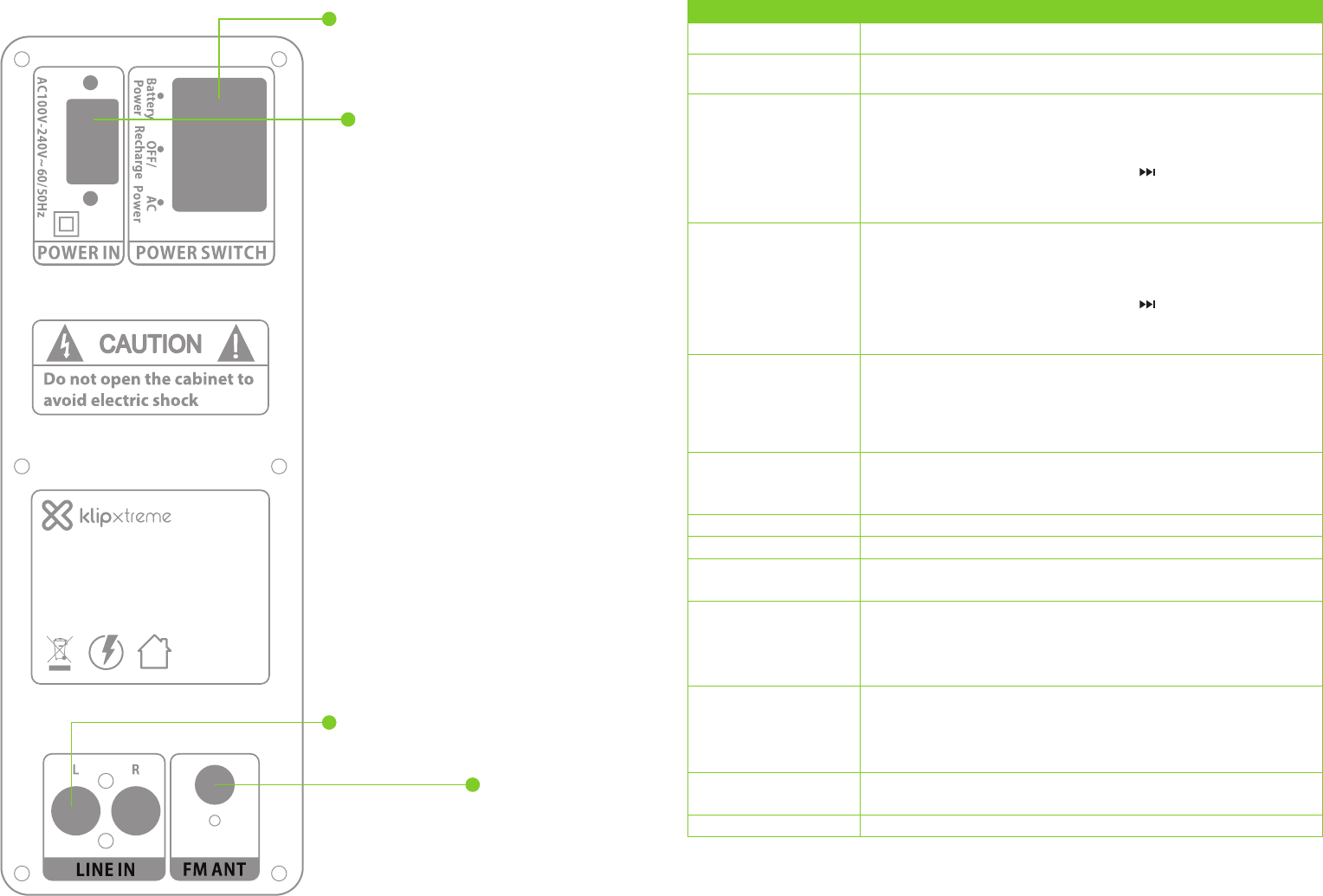
1. Power switch: Turns the unit ON and OFF.
a. Battery power: Use it to power the unit
with its internal battery.
b. OFF/Recharge: Use it to charge the internal
battery if it is connected to a main outlet.
c. AC power: Insert the power cord plug to
power the unit.
2. Line in INPUT (Left and right): Connect a CD
player, digital media player or other media
source to these left and right audio inputs.
3. AC 100V-240V Power in selector: Plug the
supplied power cable in this jack. Make sure to
set the correct AC voltage based on the utility
power available in your area.
4. FM antenna: Picks up radio waves for the
tuner.
1
3
2
4
Model #: KLS-650
Portable Loudspeaker System
Input voltage (AC): 100-240V
60/50Hz
Input voltage (DC): 12V, 3.2A
Lot #:
Descargue el manual en Español (PDF, 2.85 MB)
(Piense en el medioambiente y solo imprima este manual si es de verdad necesario)

Loading…

Puntuación

Dé su opinión de la Klip Xtreme KLS-650 Charme Altavoz calificando el producto. ¿Quiere compartir su experiencia con este producto o hacer una pregunta? Deje un comentario en la parte inferior de la página.
¿Estás satisfecho con elKlip Xtreme KLS-650 Charme Altavoz?
No
Sea el primero en calificar este producto
0 votos

Únase a la conversación sobre este producto

Aquí puedes compartir lo que piensas sobre Klip Xtreme KLS-650 Charme Altavoz. Si tiene alguna pregunta, primero lea atentamente el manual. Puede solicitar un manual utilizando nuestro formulario de contacto.

Hector galvez 16-02-2022
Necesito su ayuda..mi equipo no enciende ni con power ac,ni con batería me ayudan por favor

responder | Ha sido de gran ayuda (1)
Hector galvez 16-02-2022
Necesito su ayuda..mi equipo no enciende ni con power ac,ni con batería me ayudan por favor

responder | Ha sido de gran ayuda (1)

Más sobre este manual

Entendemos que es bueno tener un manual en papel para tus Klip Xtreme KLS-650 Charme Altavoz. Siempre puedes descargar el manual desde nuestro sitio web e imprimirlo tú mismo. Si deseas tener un manual original te recomendamos contactar con Klip Xtreme. Es posible que puedan proporcionar un manual original. ¿Estás buscando el manual de tu Klip Xtreme KLS-650 Charme Altavoz en otro idioma? Elija su idioma preferido en nuestra página de inicio y busque el número de modelo para ver si lo tenemos disponible.

Especificaciones

Marca Klip Xtreme
Modelo KLS-650 Charme
Categoría Altavoces
Tipo de archivo PDF
Tamaño del archivo 2.85 MB

Todos los manuales para Klip Xtreme Altavoces
Más manuales de Altavoces

Preguntas frecuentes sobre Klip Xtreme KLS-650 Charme Altavoz

Nuestro equipo de atención al cliente busca información útil sobre los productos y responde a las preguntas frecuentes. Si encuentra inexactitudes en las preguntas frecuentes, indíquenoslo usando nuestro formulario de contacto.

Quiero conectar un altavoz a mi televisor con HDMI. ¿Qué puerto debo usar? Verificado

Debe usar el puerto HDMI-ARC, que está hecho específicamente para conectar equipos de audio.

Ha sido de gran ayuda (1485) Leer más

¿Qué indican las frecuencias sobre mi altavoz? Verificado

Indican el rango de frecuencias que el altavoz puede producir. Una gama más amplia de frecuencias proporcionará una mayor variación en el sonido y producirá un sonido de mayor calidad.

Ha sido de gran ayuda (794) Leer más

¿Cuándo está la música demasiado alta? Verificado

El sonido por encima de los 80 decibelios (dB) puede causar daños en la audición. Los sonidos por encima de 120 dB dañan la audición de forma inmediata. La gravedad de los daños depende de la frecuencia y la duración del sonido.

Ha sido de gran ayuda (475) Leer más

¿El bluetooth funciona a través de paredes y techos? Verificado

Una señal bluetooth funcionará a través de paredes y techo, a menos que estén hechos de metal. Dependiendo del grosor y del material de la pared, la señal puede perder fuerza.

Ha sido de gran ayuda (236) Leer más

¿Hasta qué nivel es seguro el ruido para los niños? Verificado

Los niños se dañan los oídos antes que los adultos. Por lo tanto, nunca exponga a los niños a un ruido superior a 85 dB. En el caso de los auriculares hay modelos especiales para niños. Con altavoces u en otras situaciones hay que estar atento para que el ruido no supere ese nivel.

Ha sido de gran ayuda (212) Leer más
Manual de uso Klip Xtreme KLS-650 Charme Altavoz

Productos relacionados

Categorias relacionadas

×
Download