4
Important Safety Instructions
Follow the advice below for safe and appropriate operations.
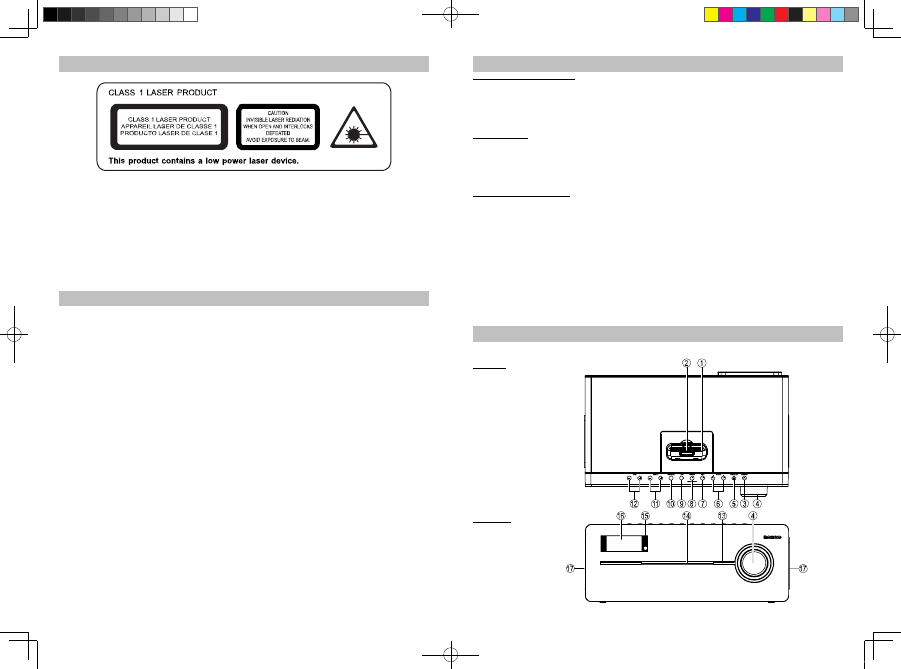
ON PROTECTION AGAINST LASER ENERG
EXPOSURE
ϥ
As the laser beam used in this compact disc player is harmful to the eyes, do not attempt to
disassemble the casing.
ϥ Stop operation immediately if any liquid or solid object should fall into the cabinet.
ϥ Do not touch the lens or poke at it. If you do, you may damage the lens and the player may not
operate properly.
ϥ
Do not put anything in the safety slot. If you do, the laser diode will be ON when the CD door is still open.
ϥ
This unit employs a laser. The use of controls or adjustment or performance of procedures other
than those specified here may result in exposure to hazardous radiation.
Features
Thank you fo
purchasing the CD RADIO with iPod
iPhone DOCKING music system.
This model incorporates following features:
z
Support for different iPod / iPhone models Player / Re-charger
z
CD player with playback of Audio CDs and MP3 songs
z
ID3 technology displaying song title
z
FM receiver with digital read out on LCD
z
RDS function
z
LCD Clock
z
Sleep timer function
z
LCD display with back-light
z
Audio line-in (AUX) for connecting other digital audio player
z
Video output for watching iPod/iPhone movie using an external video display (e.g. TV set)
z
Built-in 2 High Fidelity Speakers
z
Build-in Subwoofer for heavy bass effect
z
With Bass and Treble settings
“Made for iPod” and “Made for iPhone” means that an electronic accessory has been designed to connect
specifically to iPod or iPhone respectively and has been certified by the developer to meet Apple
performance standards. Apple is not responsible for the operation of this device or its compliance with
safety and regulatory st andards. Please note that the use of this accessory with iPhone or iPod may affect
wireless performance.
iPhone, iPod, iPod mini, iPod nano, iPod touch, iPod classic and iPod shuffle are trademarks of Apple Inc.,
registered in the U.S. and other countries.
iPhone, iPod are not included.
5
Installation
Clock setting battery back-up
A backup battery compartment located at rear of t he unit.
(1) Open the clock battery compartment lid.
(2) Follow the polarity diagram shown inside the compartment and install 2 x AAA (UM-4) batteries (not
included).
(3) Close the clock battery compartment lid.
Remote Control
A battery compartment located at rear of the remote control.
(1) Open the battery compartment lid.
(2) Follow the polarity diagram shown inside the compartment and install 2 x AAA (UM-4) batteries (not
included).
(3) Close the battery compartment lid.
AC-DC Adaptor Connection
The unit can be powered by an external AC-DC Adaptor, required the output DC 16V 3000mA (included).
(1) Firmly and securely plug the adaptor's AC plug into AC main outlet.
(2) Connect the adaptor's DC output plug to the DC-in jack of the unit.
Warnings:
- Batteries shall not be exposed to excessive heat such as sunshine, fire or the like.
- Be sure that the batteries are installed correctly. W rong polarity may damage the unit.
- Do not mix old and new batteries.
- Do not mix alkaline, standard (carbon-zinc) or rechargeable (nickel- cadmium) batteries.
- Only batteries of the same or equivalent type as recommend are to be used.
- If the unit is not to be used for an extended period of time, remove the battery.
- Do not dispose of batteries in fire, battery may explode or leak.
- Danger of explosion if battery is incorrectly replaced.
Description of Parts
Main Unit
Top View
Front View
iPD-9000 5L IB.indd 4-5 2011-10-17 10:06:54



Únase a la conversación sobre este producto
Aquí puedes compartir lo que piensas sobre Lenco IPD-9000 Docking station. Si tiene alguna pregunta, primero lea atentamente el manual. Puede solicitar un manual utilizando nuestro formulario de contacto.