Manual de uso Pioneer DEH-1600UBB Radio para coche

¿Necesita un manual para su Pioneer DEH-1600UBB Radio para coche? A continuación puedes ver y descargar el manual en PDF gratis en español. Este producto actualmente tiene 4 preguntas frecuentes, 0 comentarios y tiene 0 votos. Si este no es el manual que desea, , contáctenos.

¿Su producto tiene algún defecto y el manual no ofrece ninguna solución? Vaya a Repair Café para solicitar un servicio de reparación gratuito.

Manual de uso

Loading…
Black plate (4,1)
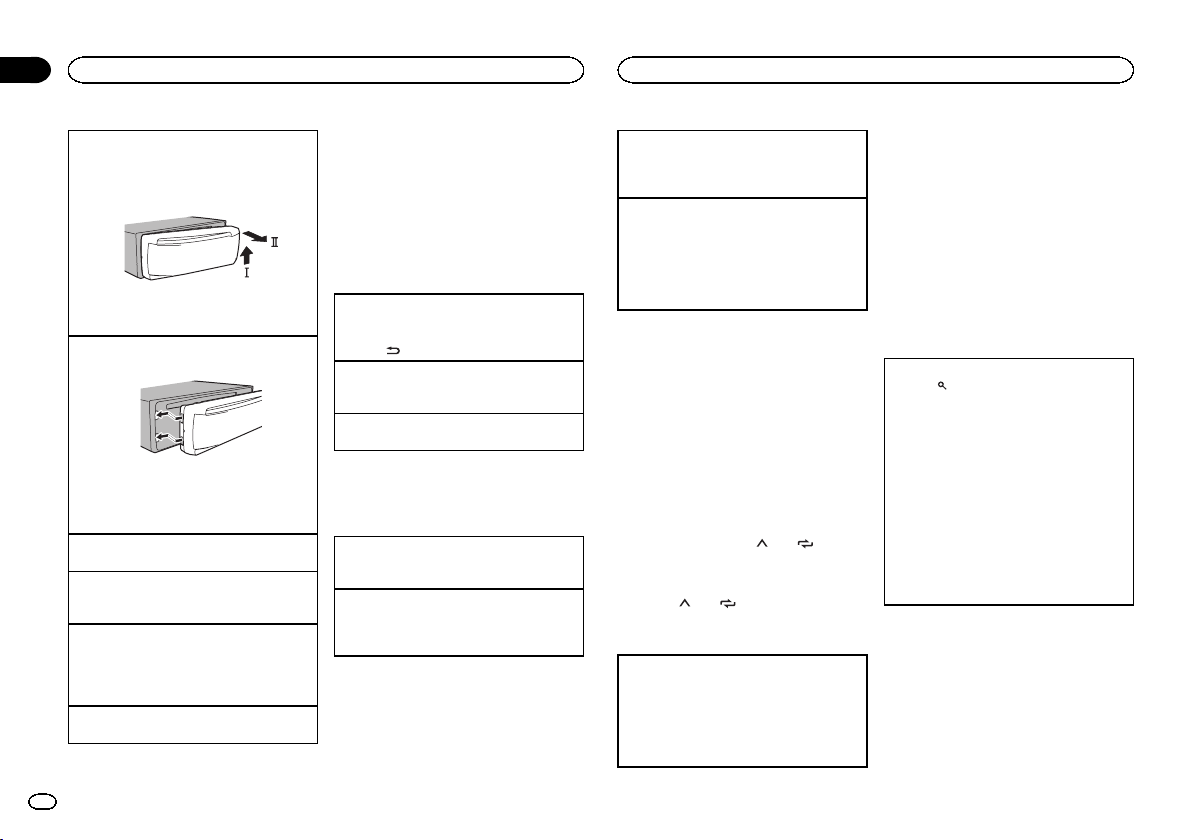
Removing the front panel
1 Press the detach button to release the front
panel.
2 Push the front panel upward (M) and then pull
it toward (N) you.
3 Always store the detached front panel in a pro-
tective case or bag.
Re-attaching the front panel
1 Slide the front panel to the left.
2 Press the right side of the front panel until it is
firmly seated.
Forcing the front panel into place may result in
damage to the front panel or head unit.
Turning the unit on
1 Press SRC/OFF to turn the unit on.
Turning the unit off
1 Press and hold SRC/OFF until the unit turns
off.
Selecting a source
1 Press SRC/OFF to cycle between:
RADIOCDUSBAUX
! USB MTP displays while the MTP connection
is in use.
Adjusting the volume
1 Turn M.C. to adjust the volume.
Note
When this units blue/white lead is connected to
the vehicles auto-antenna relay control termi-
nal, the vehicles antenna extends when this
units source is turned on. To retract the anten-
na, turn the source off.
Frequently used menu
operations
Returning to the previous display
Returning to the previous list (the folder one level
higher)
1 Press
/DIMMER.
Returning to the ordinary display
Canceling the main menu
1 Press BAND.
Returning to the ordinary display from the list
1 Press BAND.
Radio
Basic operations
Selecting a band
1 Press BAND until the desired band (FM1,
FM2, FM3 for FM or MW/LW) is displayed.
Switching preset stations
1 Press c or d.
! Select PCH (preset channel) under SEEK to
use this function.
Manual tuning (step by step)
1 Press c or d.
! Select MAN (manual tuning) under SEEK to
use this function.
Seeking
1 Press and hold c or d, and then release.
You can cancel seek tuning by briefly pressing
c or d.
While pressing and holding c or d, you can
skip stations. Seek tuning starts as soon as
you release c or d.
Notes
! For details about SEEK, refer to SEEK (left/
right key setting) on page 5.
! This units AF (alternative frequencies
search) function can be turned on and off.
AF should be off for normal tuning operation
(refer to AF (alternative frequencies search)
on page 5).
Storing and recalling stations
for each band
Using preset tuning buttons
1 To store: Press and hold down one of the
preset tuning buttons (1/
to 6/ ) until
the number stops flashing.
2 To recall: Press one of the preset tuning
buttons (1/
to 6/ ).
Switching the display
Selecting the desired text information
1 Press DISP to cycle between the following:
! FREQUENCY (program service name or
frequency)
! BRDCST INFO (program service name/PTY
information)
! CLOCK (source name and clock)
Notes
! If the program service name cannot be ac-
quired in FREQUENCY, the broadcast fre-
quency is displayed instead. If the program
service name is detected, the program serv-
ice name will be displayed.
! Depending on the band, text information can
be changed.
! Text information items that can be changed
depend on the area.
Using PTY functions
You can tune in to a station using PTY (program
type) information.
Searching for an RDS station by PTY information
1 Press
(list).
2 Turn M.C. to select a program type.
NEWS/INFOPOPULARCLASSICS
OTHERS
3 Press M.C. to begin the search.
The unit searches for a station broadcasting
that type of program. When a station is found,
its program service name is displayed.
! To cancel the search, press M.C. again.
! The program of some stations may differ
from that indicated by the transmitted PTY.
! If no station is broadcasting the type of
program you searched for, NOT FOUND is
displayed for about two seconds and then
the tuner returns to the original station.
PTY list
For more details about PTY list, visit the follow-
ing site:
http://www.pioneer.eu/eur/products/25/121/tech/
CarAudio/PTY.html
Function settings
1 Press M.C. to display the main menu.
Using this unit
4
Section
Using this unit
En
02
<QRD3204-A>4
Descargue el manual en Español (PDF, 3.37 MB)
(Piense en el medioambiente y solo imprima este manual si es de verdad necesario)

Loading…

Puntuación

Dé su opinión de la Pioneer DEH-1600UBB Radio para coche calificando el producto. ¿Quiere compartir su experiencia con este producto o hacer una pregunta? Deje un comentario en la parte inferior de la página.
¿Estás satisfecho con elPioneer DEH-1600UBB Radio para coche?
No
Sea el primero en calificar este producto
0 votos

Únase a la conversación sobre este producto

Aquí puedes compartir lo que piensas sobre Pioneer DEH-1600UBB Radio para coche. Si tiene alguna pregunta, primero lea atentamente el manual. Puede solicitar un manual utilizando nuestro formulario de contacto.

Más sobre este manual

Entendemos que es bueno tener un manual en papel para tus Pioneer DEH-1600UBB Radio para coche. Siempre puedes descargar el manual desde nuestro sitio web e imprimirlo tú mismo. Si deseas tener un manual original te recomendamos contactar con Pioneer. Es posible que puedan proporcionar un manual original. ¿Estás buscando el manual de tu Pioneer DEH-1600UBB Radio para coche en otro idioma? Elija su idioma preferido en nuestra página de inicio y busque el número de modelo para ver si lo tenemos disponible.

Especificaciones

Marca Pioneer
Modelo DEH-1600UBB
Categoría Radio para coche
Tipo de archivo PDF
Tamaño del archivo 3.37 MB

Todos los manuales para Pioneer Radio para coche
Más manuales de Radio para coche

Preguntas frecuentes sobre Pioneer DEH-1600UBB Radio para coche

Nuestro equipo de atención al cliente busca información útil sobre los productos y responde a las preguntas frecuentes. Si encuentra inexactitudes en las preguntas frecuentes, indíquenoslo usando nuestro formulario de contacto.

¿Qué es DAB+? Verificado

DAB+ es el sucesor de la señal de FM y significa radiodifusión de audio digital por sus siglas en inglés. Es una señal digital que permite un mayor número de canales dentro del mismo ancho de banda y permite cambiar más fácilmente de un canal a otro.

Ha sido de gran ayuda (640) Leer más

¿Cuál es la diferencia entre FM y AM? Verificado

Tanto FM como AM son formas de modulación utilizadas para transmitir una señal. FM significa modulación de frecuencia y AM significa modulación de amplitud. AM es la forma de modulación más antigua. La mayor diferencia es que la señal de FM es mucho más fuerte que la de AM.

Ha sido de gran ayuda (411) Leer más

Hay un CD atascado en la radio de mi coche. ¿Qué debo hacer? Verificado

Algunas radios de coche tienen una función para expulsar los CD atascados. Apague el motor del coche y presione durante 10 segundos el botón de encendido a la vez que mantenga pulsado el botón de expulsar. Si esto no funciona, arranque el coche e inténtelo de nuevo.

Ha sido de gran ayuda (392) Leer más

¿Cual es la medida de radio para mi coche? Verificado

Existen dos medidas estándar para radios de coche: 1-DIN y 2-DIN. 1-DIN es la versión delgada estándar, mientras que 2-DIN es la versión doblemente alta. Las radios de coche 2-DIN suelen tener espacio para una pantalla que muestra información de navegación o reproduce películas.

Ha sido de gran ayuda (330) Leer más
Manual de uso Pioneer DEH-1600UBB Radio para coche

Productos relacionados

Categorias relacionadas

×
Download