Manual de uso Sherwood CDC-5506 Reproductor de CD

¿Necesita un manual para su Sherwood CDC-5506 Reproductor de CD? A continuación puedes ver y descargar el manual en PDF gratis en español. Este producto actualmente tiene 1 pregunta frecuente, 0 comentarios y tiene 2 votos con una calificación promedio de producto de 100/100. Si este no es el manual que desea, , contáctenos.

¿Su producto tiene algún defecto y el manual no ofrece ninguna solución? Vaya a Repair Café para solicitar un servicio de reparación gratuito.

Manual de uso

Loading…
Preliminary Knowledge About Discs & Files
PLAYABLE DISCS
This unit supports the following discs.
• This unit supports CD-R and CD-RW discs recorded in
Audio CD(CD-DA) format, MP3 or WMA format.
• Only CD-R and CD-RW discs recorded with ISO9660
format can be played back.
• This unit supports multi-session discs. Some multi-session
discs may take a long time to load and some may not be
loaded at all.
Unplayable discs
• Since this unit cannot support disc types, formats and file
types not listed above, do not play such discs.
• Some CD-R and CD-RW discs cannot be played due to
incomplete disc finalization, recording quality or physical
condition of the disc, characteristics of recording device or
authoring software, etc.
See the operating instructions supplied with your recording
device for more information.
• Some Audio CDs use copy protection that doesn’t
conform to the official CD standard. Since these are
nonstandard discs, this unit cannot play them properly.
• When an Audio CD recorded in DTS-ES or Dolby Digital
EX is played, noise may be heard.
Disc Logo Format or file type
PCM
Audio CD, MP3, WMA
Audio CD, MP3, WMA
W
MA(Windows Media Audio)
• Sampling frequency : 32, 44.1, 48 kHz
• Bit rate : 32 ~ 320 kbps
Extension : .wma, .WMA
WMA Tag is not available
• Windows Media and the Windows logo are trademarks or
registered trademarks of Microsoft Corporation in the United States
a
nd/or other countries.
N
otes :
• Folders can be up to ten levels deep.
• For some files, it may not be possible to use certain functions
during playback.
Files protected by DRM(Digital Rights Management) cannot be
played.
• When the data of file and folder names is larger than the unit’s
memory capacity, some files, etc. cannot be recognized and
p
layed.
USB MEMORY DEVICES
• An USB memory device can be connected to the USB
connector on the front panel to play MP3 or WMA files
stored on it.
• Only USB memory devices conforming to mass storage
class and MTP(Media Transfer Protocol) standards can be
played on this unit.
• Thin unit supports FAT16 or FAT32 file format system for
USB memory divece.
PLAYABLE AUDIO FILE FORMATS
MP3(MPEG-1 Audio Layer-3)
• Sampling frequency : 32, 44.1, 48 kHz
• Bit rate : 32 ~ 320 kbps
• Extension : .mp3, .MP3
• Fixed bit-rate files are recommended. Variable bit-rate
(VBR) fiels are playable, but playing time may be
displayed incorrectly.
• ID3 Tag is not avaliable.
• MPEG Layer-3 audio coding technology licensed from
Fraunhofer IIS and Thomson.
10
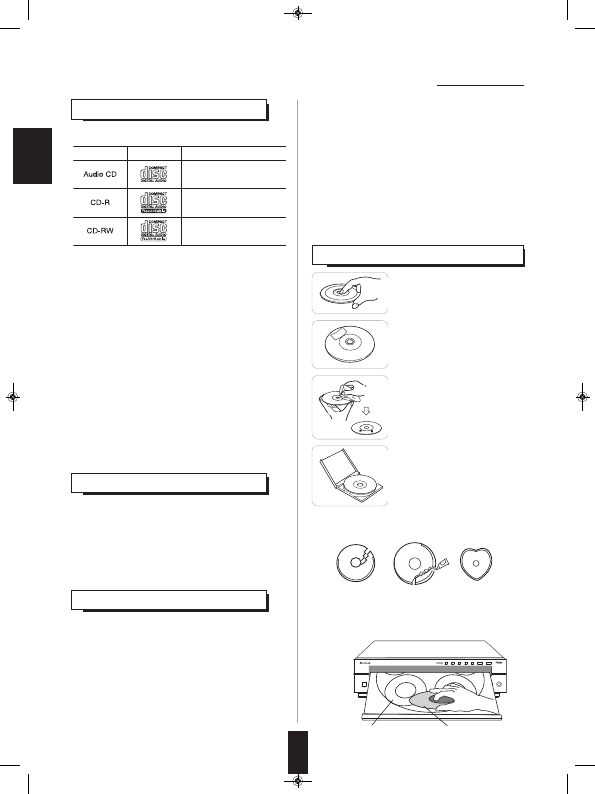
CARE AND HANDLING OF DISCS
5
DISC CD CHANGER
CDC
-
5506
POWER
DISC SELECTOR
12345D
ISC SKIP OPEN /CLOSE
PHONES
USB
5
V 500mA
ON OFF
5 DISC AUTOMATI C LOADING SYST EM
ON/STANDBY
I
NTRO
DIMMERCD/USB
TIME
PROGRAM
R
ANDOM
REPEAT
Printed sideTray
• In handling a disc, hold it carefully
with edges.
• Do not stick paper or write
anything on the printed surface.
• Finger marks and dust on the
recorded surface should be
carefully wiped off with a soft cloth.
Wipe straight from the inside to the
outside of the disc.
• Always keep the discs in their
cases after use to protect them
from dust and scratches.
• Do not use a cracked, deformed, or repaired disc.
These discs are easily broken and may cause serious
personal injury and apparatus malfunction.
Notes:
• Do not expose discs to direct sunlight, high humidity or
high temperature for a long time.
• When loading or unloading a disc in the disc tray, always
place it with the printed side up.
ENGLISH
CDC-5506 (G)_ENG_110817:CDC-5506(E)_ENG 2011-08-17 오 5:36 페이지 10
Descargue el manual en Español (PDF, 8.35 MB)
(Piense en el medioambiente y solo imprima este manual si es de verdad necesario)

Loading…

Puntuación

Dé su opinión de la Sherwood CDC-5506 Reproductor de CD calificando el producto. ¿Quiere compartir su experiencia con este producto o hacer una pregunta? Deje un comentario en la parte inferior de la página.
¿Estás satisfecho con elSherwood CDC-5506 Reproductor de CD?
No
100%
0%
2 votos

Únase a la conversación sobre este producto

Aquí puedes compartir lo que piensas sobre Sherwood CDC-5506 Reproductor de CD. Si tiene alguna pregunta, primero lea atentamente el manual. Puede solicitar un manual utilizando nuestro formulario de contacto.

Más sobre este manual

Entendemos que es bueno tener un manual en papel para tus Sherwood CDC-5506 Reproductor de CD. Siempre puedes descargar el manual desde nuestro sitio web e imprimirlo tú mismo. Si deseas tener un manual original te recomendamos contactar con Sherwood. Es posible que puedan proporcionar un manual original. ¿Estás buscando el manual de tu Sherwood CDC-5506 Reproductor de CD en otro idioma? Elija su idioma preferido en nuestra página de inicio y busque el número de modelo para ver si lo tenemos disponible.

Especificaciones

Marca Sherwood
Modelo CDC-5506
Categoría Reproductores de CD
Tipo de archivo PDF
Tamaño del archivo 8.35 MB

Todos los manuales para Sherwood Reproductores de CD
Más manuales de Reproductores de CD

Preguntas frecuentes sobre Sherwood CDC-5506 Reproductor de CD

Nuestro equipo de atención al cliente busca información útil sobre los productos y responde a las preguntas frecuentes. Si encuentra inexactitudes en las preguntas frecuentes, indíquenoslo usando nuestro formulario de contacto.

¿Puedo reparar yo mismo los arañazos en un CD? Verificado

Los rayones impiden que el láser lea el disco correctamente. Cuando los rayones son solo superficiales, es posible repararlos usted mismo puliendo el disco con un compuesto ligeramente abrasivo. Lo ideal es utilizar un compuesto abrasivo profesional, pero también es posible utilizar pasta de dientes normal. Después de pulir el disco, es necesario lavarlo y dejarlo secar. Hay empresas especializadas que pueden hacer esto.

Ha sido de gran ayuda (42) Leer más
Manual de uso Sherwood CDC-5506 Reproductor de CD

Productos relacionados

Categorias relacionadas

×
Download