Manual de uso Sylvania 6427TF Televisor

¿Necesita un manual para su Sylvania 6427TF Televisor? A continuación puedes ver y descargar el manual en PDF gratis en español. Este producto actualmente tiene 5 preguntas frecuentes, 0 comentarios y tiene 0 votos. Si este no es el manual que desea, , contáctenos.

¿Su producto tiene algún defecto y el manual no ofrece ninguna solución? Vaya a Repair Café para solicitar un servicio de reparación gratuito.

Manual de uso

Loading…
OPERATIONS (Continued)
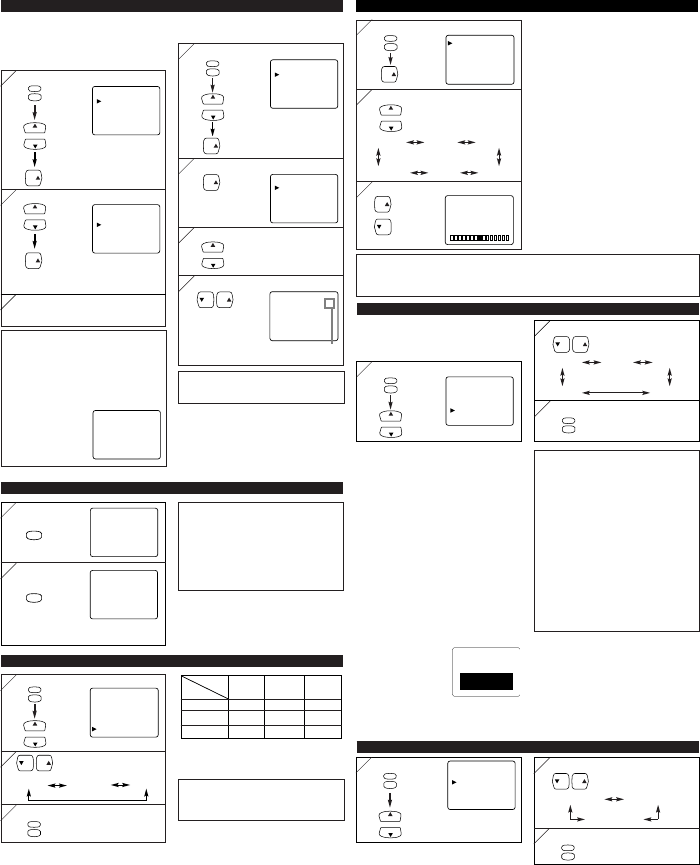
OPTIONAL SETTINGS
2
2
CH
CH
Adjust the setting
3
3
GAME MODE
Set to the most suitable position for video
games.
[-] : OFF [+] : ON
BRIGHT
Adjust until the darkest parts of the picture are
as bright as you prefer.
[-] : decrease brightness
[+] : increase brightness
CONTRAST
Adjust to increase or decrease contrast.
[-] : decrease contrast
[+] : increase contrast
COLOR
Adjust to be brilliant or pale color.
[-] : be pale color [+] : be brilliant color
TINT
Adjust to obtain natural skin tones.
[-] : add red [+] : add green
SHARPNESS
Adjust to detail in the picture.
[-] : make soft [+] : make clear
Notes:
The display will disappear automatically after 10 seconds unless you press any buttons.
Magnetism from nearby appliances and speakers might affect the color of the TV picture. If
this happens, hit
[POWER] to turn off the TV and turn it on again after about 30 minutes.
CHANNEL SETTING
1
1
MENU
CH
CH
PICTURE
CHANNEL SET
[ENG] / ESP / FRA
V-CHIP SET UP
CAPTION [OFF]
TV SOUND [MAIN]
[AUTO PRESET CHANNELS]
As the initial setting, this TV has memorized
all channels, including the ones not available
in your area. This feature automatically puts
only available channels into the memory.
1
1
MENU
CH
CH
The tuner scans and memorizes all
available channels in your area.
PICTURE
CHANNEL SET
[ENG] / ESP / FRA
V-CHIP SET UP
CAPTION [OFF]
TV SOUND [MAIN]
VOL
2
2
VOL VOL
Select the desired language
3
3
MENU
To exit the menu
CH
CH
VOL
ADD/DELETE
AUTO PRESET CH
Notes:
The TV distinguishes between standard TV
channels and cable (CATV) channels.
The TV may recognize TV channels as
CATV channels if reception condition is
poor. If this happens, check the antenna
connections and try steps 2 to 3 again when
reception conditions are better.
If there is no TV sig-
nal input, “NO TV
SIGNALS” will
appear on the display
after the completion of
channel scanning.
NO TV SIGNALS
[ADDING/DELETING CHANNELS]
You can add or delete channels manually.
LANGUAGE SELECTION
3
3
When the scanning is completed, the
lowest memorized channel appears on
the TV screen.
1
1
2
2
MENU
CH
CH
PICTURE
CHANNEL SET
[ENG] / ESP / FRA
V-CHIP SET UP
CAPTION [OFF]
TV SOUND [MAIN]
VOL
CH
CH
VOL
ADD/DELETE
AUTO PRESET CH
Select the channel you wish
4
4
VOL VOL
Note:
The menu will disappear automatically after
about 10 seconds.
Notes:
If closed captioning is not broadcast, you
cannot receive it and nothing is displayed.
When your TV receives a special effects
playback signal (i.e., Search, Slow and Still)
from a VCR’s video output channel (CH3 or
CH4), the TV may not display the correct
caption or text.
Captions and texts may not match the TV
voice exactly.
Interference may cause the closed caption
system not to function properly.
The caption or text characters will not be
displayed while the menu display or func-
tions display is shown.
If a black box appears on the screen, this
means that the TV is set to TEXT mode. To
clear screen, select CAPTION [C1], [C2] or
[OFF].
Add: light blue
Delete: light red
2
2
3
3
[
GAME MODE
][
BRIGHT
][
CONTRAST
]
[
SHARPNESS
][TINT] [COLOR]
Select an item to adjust
Select [ENG]
[ENG(lish)] [ESP(añol)]
[FRA(nçais)]
Select “CHANNEL SET”
Select “ADD/DELETE”
Select “AUTO PRESET CH”
15
ADD/DELETE
Add or delete the channel
You may view specially labeled (cc) TV pro-
grams, movies, news and prerecorded tapes,
etc. with either a dialogue caption or text dis-
play added to the program.
1
1
MENU
CH
CH
PICTURE
CHANNEL SET
[ENG] / ESP / FRA
V-CHIP SET UP
CAPTION [OFF]
TV SOUND [MAIN]
2
2
VOL VOL
Select the desired caption mode
MENU
To exit the menu
3
3
[OFF] [C1] [C2]
[T2] [T
1]
Select “CAPTION”
[CAPTION MODE (C1, C2)]
CAPTION1 (C1)
displays standard closed captions (what a
character is saying).
CAPTION2 (C2)
displays foreign language closed captions
(foreign language words showing what a
character is saying).
There are three ways of displaying accord-
ing to programs:
Paint-on mode: Displays input characters
on the screen immediately.
Pop-on mode : Once characters are stored
in memory, they are dis-
played all at once.
Roll-up mode : Displays the characters con-
tinuously by scrolling
(max. 4 lines).
[TEXT MODE (T1, T2)]
TEXT1 (T1) and
TEXT2 (T2) display
half-screen text by
scrolling (such as a
channel guide, schedule
or announcement).
CLOSED CAPTION
*Second Audio Program (SAP) :
Your program can also be received in a sec-
ond language or sometimes a radio station.
MULTI-CHANNEL TELEVISION SOUND (MTS)
Typ e of
broadcast
Regular
-None-
Stereo
broadcast
STEREO
SAP
Menu
Selection
MAIN
MONO
SAP*
-None- -None-
MONO
STEREO
SAP
MAIN
MAIN
Note:
If you select [SAP] when second audio is
not available, the TV will receive normal
audio.
1
1
2
2
MENU
CH
CH
VOL VOL
• Select the desired sound
mode.
[MAIN] [MONO] [SAP]
3
3
MENU
PICTURE
CHANNEL SET
[ENG] / ESP / FRA
V-CHIP SET UP
CAPTION [OFF]
TV SOUND [MAIN]
Select “TV SOUND”
To exit the menu
VOL
VOL
[-]
BRIGHT
[+]
...
+
...
Notes:
When you disconnect the unit from the AC
outlet or when you have a power failure, the
sleep time will be lost.
To cancel the sleep timer, hit [SLEEP]
repeatedly until “SLEEP 0” is displayed.
The Sleep Timer Setting display will disap-
pear automatically after 10 seconds of the
operation.
SLEEP TIMER SETTING
1
1
2
2
SLEEP
SLEEP
SLEEP 0
SLEEP 10
The time increases by 10 minutes
up to 90.
repeatedly
PICTURE ADJUSTMENT
1
1
MENU
VOL
PICTURE
CHANNEL SET
[ENG] / ESP / FRA
V-CHIP SET UP
CAPTION [OFF]
TV SOUND [MAIN]
Select “PICTURE”
Descargue el manual en Español (PDF, 0.47 MB)
(Piense en el medioambiente y solo imprima este manual si es de verdad necesario)

Loading…

Puntuación

Dé su opinión de la Sylvania 6427TF Televisor calificando el producto. ¿Quiere compartir su experiencia con este producto o hacer una pregunta? Deje un comentario en la parte inferior de la página.
¿Estás satisfecho con elSylvania 6427TF Televisor?
No
Sea el primero en calificar este producto
0 votos

Únase a la conversación sobre este producto

Aquí puedes compartir lo que piensas sobre Sylvania 6427TF Televisor. Si tiene alguna pregunta, primero lea atentamente el manual. Puede solicitar un manual utilizando nuestro formulario de contacto.

Más sobre este manual

Entendemos que es bueno tener un manual en papel para tus Sylvania 6427TF Televisor. Siempre puedes descargar el manual desde nuestro sitio web e imprimirlo tú mismo. Si deseas tener un manual original te recomendamos contactar con Sylvania. Es posible que puedan proporcionar un manual original. ¿Estás buscando el manual de tu Sylvania 6427TF Televisor en otro idioma? Elija su idioma preferido en nuestra página de inicio y busque el número de modelo para ver si lo tenemos disponible.

Especificaciones

Marca Sylvania
Modelo 6427TF
Categoría Televisores
Tipo de archivo PDF
Tamaño del archivo 0.47 MB

Todos los manuales para Sylvania Televisores
Más manuales de Televisores

Preguntas frecuentes sobre Sylvania 6427TF Televisor

Nuestro equipo de atención al cliente busca información útil sobre los productos y responde a las preguntas frecuentes. Si encuentra inexactitudes en las preguntas frecuentes, indíquenoslo usando nuestro formulario de contacto.

¿Cómo mido las pulgadas de mi televisor? Verificado

Para medir las pulgadas de su televisor debe medir la diagonal, por ejemplo, entre la esquina superior izquierda y la esquina inferior derecha de la pantalla (no del marco). Una pulgada equivale a 2,54 centímetros, de manera que, cuando mide 99 centímetros, quiere decir que su televisor es de 39 pulgadas.

Ha sido de gran ayuda (74) Leer más

¿Por qué hay letras junto a los números en el control remoto? Verificado

Algunas configuraciones de televisión pueden requerir que ingrese letras. Por lo general, hay tres letras u otros caracteres en un botón. Cuando se requiera ingresar una letra, puede presionar ese botón una vez para la primera letra, presionar dos veces para la segunda letra y presionar 3 veces para la tercera letra. De esta forma, el texto se puede escribir con un número mínimo de botones.

Ha sido de gran ayuda (46) Leer más

¿Cuál es la distancia óptima para ver la tele? Verificado

Depende en parte de las preferencias personales, pero como regla general la distancia óptima de visión es de unas 3 veces el tamaño diagonal de la pantalla del televisor. Para un televisor de 60 pulgadas (152 cm) la distancia óptima de visión sería de 180 pulgadas o unos 4,5 metros.

Ha sido de gran ayuda (39) Leer más

¿Qué es la relación de contraste? Verificado

La relación de contraste indica la diferencia entre el blanco más blanco y el negro más negro. De este modo, una relación de contraste de 400:1 significa que el negro más negro de la pantalla es 400 veces más oscuro que el blanco más blanco. Una alta relación de contraste contribuye a la nitidez de la imagen.

Ha sido de gran ayuda (30) Leer más

¿Cómo puedo limpiar correctamente mi televisor? Verificado

Apague el televisor y quite el polvo y la suciedad de la pantalla usando un paño de microfibra. No use papel, ya que puede causar rayaduras. No aplique demasiada presión o podría dañar los píxeles. Use un detergente especial o mézclelo usted mismo con una parte de vinagre y otra de agua. Humedezca el paño con el detergente y limpie la pantalla. Asegúrese de que el paño no esté demasiado húmedo. Elimine las manchas haciendo movimientos giratorios. Seque la pantalla con otro paño de microfibra para evitar las rayas.

Ha sido de gran ayuda (29) Leer más
Manual de uso Sylvania 6427TF Televisor

Productos relacionados

Categorias relacionadas

×
Download