
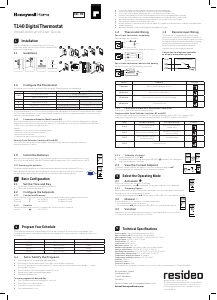
T140 Digital Thermostat
Installation and User Guide
Installation
Must be installed by a competent person. To ensure
your safety, make sure the mains power is switched OFF
before accessing wiring.
1.1 Guidelines
1
1.2-1.5m
Bk-electronic GmbH
Hardhofweg 40
74821 Mosbach
Germany
For assistance with this product please visit
livewell.honeywellhome.com
1.2 Thermostat Wiring
For a 2-wire connection: no polarity.
Direct wiring to the circulator
Connection to the thermostat terminals of a furnace
For a 3-wire connection: observe the polarity
Wiring to a power-operated mixing control valve
1 Loosen the captive screw holding the faceplate to the mounting plate.
2 Pull the lower part of the faceplate to remove it from the mounting plate.
3 Loosen the screw (captive) holding the wire cover and remove the wire cover.
4 Pull wires through the hole in the mounting plate and secure the mounting plate to the wall
(or onto an electrical box for line voltage wiring) using the enclosed wall anchors and screws.
5 Wire the thermostat to the heating system and, if necessary, connect the remote input.
6 Once wiring is complete, re-install the wire cover.
7 Use the switches located at the back of the faceplate to configure your thermostat according to your application.
8 Install the batteries.
9 Mount the faceplate on the mounting plate and tighten the screw.
1.3 Remote Input Wiring
The thermostat is equipped with a remote input
which allows connection of a telephone controller or
a home automation system. When a signal is received
through this input, the thermostat will automatically
switch from normal operating mode to Vacation
mode. For details on operating the telephone
controller, refer to the instruction manual.
1.4 Configure the Thermostat
The switches are located on the back of the faceplate. Default settings are highlighted.
1. If you change from °C to °F (or vice versa), you will need to reprogram your Comfort, Economy and Vacation settings.
2. For hot water installations, it is recommended to enable this option to activate the pump for one minute every
24 hours to prevent pump seizure.
1.4.1 Proportional Adaptive Mode (switch #5)
This mode analyzes previous cycles to define the the next duty cycle. This control mode guarantees optimal
temperature control based on the system’s capacity. To extend the life of the system, a minimum On/Off time
of 10% of the cycle has been implemented.
Ideal for:
• Radiant or convection electrical heating system
• Circulator control in a hot water system
• Electrical hot-air furnace
• Conventional gas or fuel hot-air furnace
Heating Cycle Selection (switches #1 and #2)
Select the cycle using switches #1 and #2. Short cycles help eliminate temperature variations,
thus increasing user comfort.
1
6 7 8 9
2
3
4 5
Furnace
Relay
240 V
240 V
Home automation system
or telephone controller
T140
Switch Description UP DOWN
1 & 2
Cycles (proportional) 15 min (see 1.4.1)
Span (conventional) 0.5°C (0.9°F) (see 1.4.2)
3 Clock display 12H 24H
4 Temperature display
1
°F °C
5 Temperature control mode Proportional (see 1.4.1) Conventional (see 1.4.2)
6 Pump protection
2
Deactivate Activate
Cycles EUROPE Position
5 minutes Not recommended for furnaces
10 minutes Gas or electric wall furnace
15 minutes Fuel or gas floor furnace, forced air heating
20 minutes Commercial unit
Technical Specifications
Power supply: 2 AA or LR6 alkaline batteries 1.5 V
Max. resistive load: 5 A @ 240 VAC / 5 A @ 30 VDC
Max. inductive load: 2 A @ 240 VAC / 2 A @ 30 VDC (P.F. = 0.4)
Remote input: 12 VDC, ± 10%, 2.5 mA
Certifications: CE, c UL us
Control device: Electronic
Automatic action: Type 1 B
Number of programs: 4 programs / day, total of 28 programs
Storage temperature: 20°C to 50°C (4°F to 122°F)
Operating temperature: 0°C to 50°C (32°F to 122°F), 95% R.H.
Temperature setting range: 5°C to 30°C (40°F to 85°F)
Temperature display resolution: 0.1 degree
Temperature reading accuracy: ± 0.5°C (± 0.9°F)
Software: Class A
Protection class: II
Protection degree: IP 40
The terminals are designed to handle a cross-section of wire measuring up to 2.5 mm2 (14 AWG).
Basic Configuration
2.1 Set the Time and Day
Set the time, using the Hour and Minute buttons.
2 Set the day, using the Day button.
2.2 Configure the Setpoints
2.2.1 Comfort and Economy
These setpoints are associated to the schedule’s programs and are pre-programmed as follows:
Comfort R 20°C (68°F) Programs 1 and 3
Economy 18°C (64°F) Programs 2 and 4
2.2.2 Vacation
This pre-programmed setpoint is used when the Vacation mode is activated.
Vacation 10°C (50°F)
Select the Operating Mode
3.1 Automatic
This mode executes the schedule. To activate:
• Press Manual/Auto until is displayed. The program setpoint icon is displayed.
3.1.1 Temporary Bypass
When in Automatic mode, you can temporarily bypass the current program setpoint until
the beginning of the next program. To bypass:
• Set the desired temperature pq OR quickly press R or to use a pre-defined setpoint.
3.2 Manual
J
This mode allows you to maintain a constant temperature.
• Press Manual/Auto until is displayed.
• Set temperature pq OR quickly press R or to use a pre-defined setpoint.
3.3 Vacation
Maintains a specific temperature when away for a prolonged absence (e.g. vacation).
• From the thermostat, quickly press to activate.
Program Your Schedule
The thermostat allows four setting changes for each day of the week. There are no pre-set programs. Your
heating system switches betwwen the Comfort setpoint and the Economy setpoint according to the times you
would have set.
1.4.2 Conventional mode with anticipation (switch #5)
This mode is compatible with all heating systems.
Programmable Span Selection (switches #1 and #2)
Select the span using switches #1 and #2. The default temperature span is 0.5°C. For example, if the
temperature setpoint is 20°C, the heating system will turn on at 19.5°C and turn off at 20.5°C.
Span Hot Water Heating Forced Air Heating Position
0,3°C
Not recommended
for furnaces
Not recommended for
central units
0,4°C Gas or electric wall furnace
Radiant or convection
electric heating
0,5°C
Fuel or gas floor furnace,
forced air heating
Central heating
0,6°C Commercial unit
1.5 Install the Batteries
When you first install the batteries, the unit runs a sequence of tests and a complete reset to zero.
The screen should display 0:00 MO
J
and the ambient temperature. The current setpoint is 20°C.
1.5.1 Replacing the batteries
The thermostat will display an icon indicating that the batteries must be replaced. This icon
will be displayed for 60 days; after this delay, the thermostat will shut down the heating unit.
The time and programming are saved for 15 seconds when replacing the batteries.
4.1 Set or Modify the Programs
1 Press Program. The screen displays MO and PROG 1.
2 Press Day to select the day (hold for 3 seconds to select all days of the week).
3 Press Hour and Minute to set the start time. To clear an entry, press Clear, the time zone displays --:-- when
the program is inactive.
Press Program to select the program number (2, 3 or 4).
5 Repeat steps 3 and 4 for remaining programs.
6 Press Manual/Auto to exit.
To erase program for desired day:
1 Press Program until desired program is selected.
2 Press Day to select desired day.
3 Press Clear to erase the time (--:--).
4 Press Manual/Auto to exit.
2
3
4
5
2.2.3 To Modify a Setpoint
Set the temperature using pq.
2 Press and hold one of the setpoint buttons (R or or ) until the icon is displayed
on the screen (approx. 3 seconds).
2.3 View the Current Setpoint
To view the current setpoint, quickly press once one of the arrow buttons pq.
The screen displays the setpoint; the arrow indicates a setpoint.
Programs Associated Setpoint Time
PROG 1
R (Comfort)
Wake-up
PROG 2
(Economy)
Leave
PROG 3
R (Comfort)
Return
PROG 4
(Economy)
Sleep
Connection to telephone controller
or a home automation system
© 2019 Resideo Technologies, Inc.
This product manufactured by Resideo and its affiliates.
The Honeywell Home trademark is used under license
from Honeywell International Inc. All rights reserved.
EN + DE
3300057ED02


Únase a la conversación sobre este producto
Aquí puedes compartir lo que piensas sobre Honeywell T140 Termostato. Si tiene alguna pregunta, primero lea atentamente el manual. Puede solicitar un manual utilizando nuestro formulario de contacto.
responder | Ha sido de gran ayuda (22)
responder | Ha sido de gran ayuda (6) (Traducido por Google)
responder | Ha sido de gran ayuda (4) Leer más
Ha sido de gran ayuda (2)
responder | Ha sido de gran ayuda (2)
responder | Ha sido de gran ayuda (1) (Traducido por Google)
responder | Ha sido de gran ayuda (0) (Traducido por Google)
responder | Ha sido de gran ayuda (0) (Traducido por Google)